
Plug & Play Retro Game Console Review: 4K HDMI TV Stick with 20,000+ Classic Games
This review looks at the Plug & Play Retro Game Console, a compact HDMI TV gaming stick that comes preloaded with over 20,000 classic games on 128GB of storage and includes two wireless controllers. We examine its overall design, standout and supporting features, usability, performance, and the key pros and cons to help you decide if this plug-and-play retro system is a good fit for casual gaming, family use, and nostalgic players.
Overview
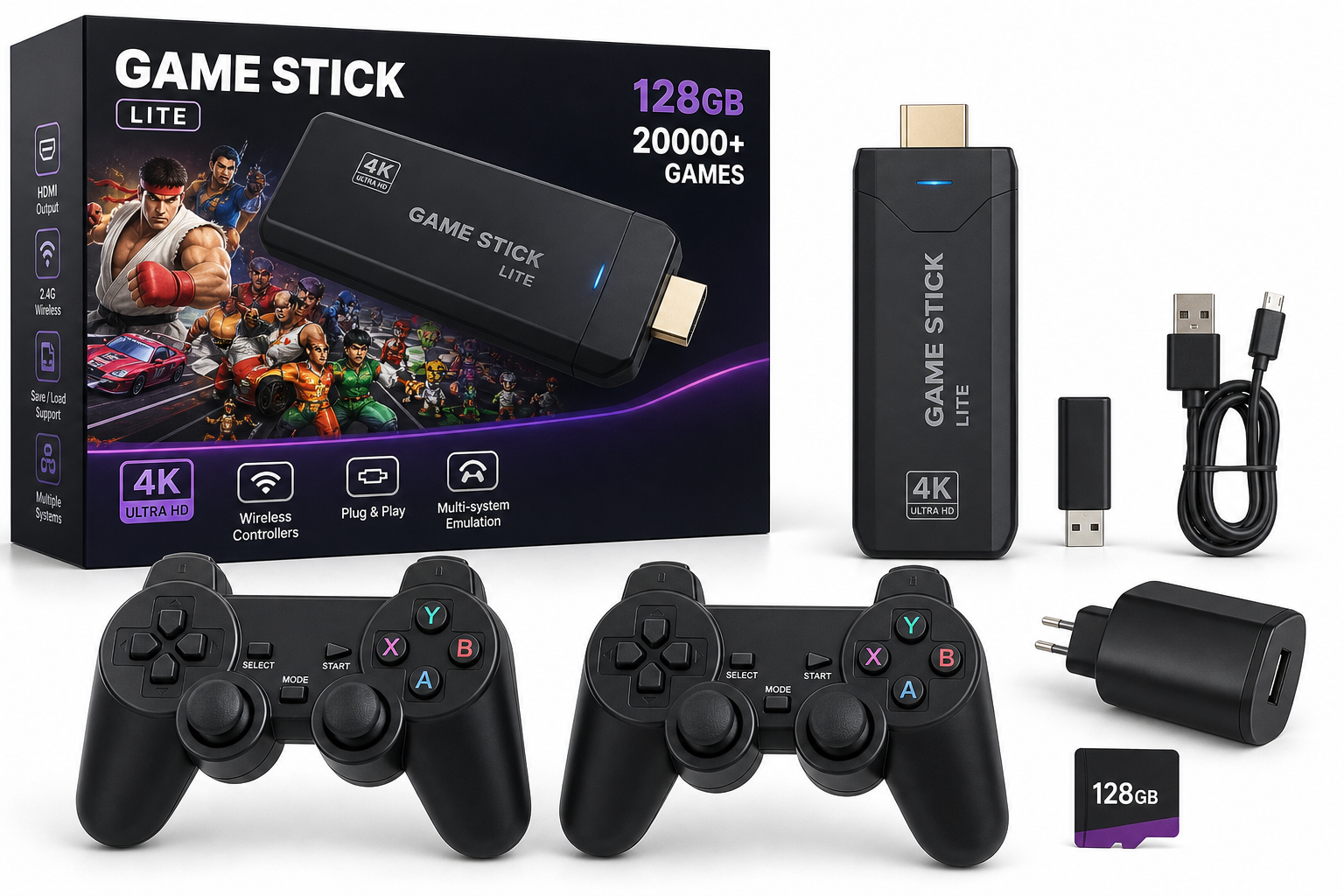
The Plug & Play Retro Game Console (128GB, 20,000+ Games, 4K HDMI TV Gaming Stick) is designed as an all‑in‑one way to revisit classic titles without dealing with original hardware, cartridges, or complex emulator setups. You plug the compact stick into an HDMI port on your TV, connect power, turn on the bundled wireless controllers, and you are taken straight into a menu with thousands of retro games spanning multiple systems and genres.
This type of HDMI "retro stick" focuses on convenience and breadth of content rather than authenticity or premium build quality. It’s aimed at:
- Families wanting a simple party or weekend gaming option
- Casual players who just want to revisit a handful of childhood favorites
- People who do not want to configure or maintain a full emulation PC or dedicated retro handheld
In terms of value, the console is typically positioned in the budget to mid‑range category, with a street price around $38.99 depending on promotions and availability, which is attractive given the included controllers and huge library.
Standout Features
1. 128GB Storage with 20,000+ Preloaded Games
The headline feature is the library of 20,000+ classic games stored on a 128GB card or internal memory. These typically cover 8‑bit and 16‑bit systems and early 3D consoles, including a mix of platformers, fighters, racing games, beat ’em ups, puzzle titles, and arcade shooters.
What this means in practice:
- You have an enormous catalog to browse without any downloads.
- Many obscure titles are included alongside more recognizable classics.
- Expect some duplication (regional variants, hacks, or multiple entries of similar ROMs) and occasional titles that may not run perfectly.
2. 4K HDMI TV Gaming Stick Form Factor
The console itself is a small HDMI stick that plugs directly into your TV, projector, or monitor. It receives power via USB (often from a TV USB port or bundled power adapter) and outputs video over HDMI.
Key advantages of this design:
- Minimal cable clutter compared with traditional consoles
- Easy to move between rooms or take to a friend’s house
- No separate base unit—everything lives in the stick and memory card
While it is advertised as supporting up to 4K output, the underlying classic games usually render at much lower resolutions. The 4K support primarily refers to compatibility with modern 4K TVs rather than native 4K graphics.
3. Dual 2.4G Wireless Controllers Included
The package includes two wireless controllers, allowing instant local multiplayer for fighting games, sports titles, racing games, and co‑op platformers.
Typical benefits:
- No long controller cables running across the room
- Layout modeled after familiar modern gamepads
- Quick pairing with the included USB receiver
For family game nights or parties, having both controllers in the box is a major plus—you don’t need to buy extra peripherals to play two‑player games.
Supporting Features
Beyond the headline specs, this Plug & Play Retro Game Console generally offers several secondary conveniences that improve day‑to‑day use.
Multi‑System Emulation
The game collection is organized across multiple classic platforms (often including home consoles, portable systems, and arcade boards). A front‑end menu typically lets you:
- Browse by system
- Scroll through long alphabetical lists
- Filter or search (basic text search on some versions)
This structure makes it easier to jump between, for example, 8‑bit platformers and 16‑bit fighting games without needing to touch any emulator settings.
Save/Load Support (On Many Titles)
A number of these retro sticks support save states, allowing you to:
- Pause progress in difficult games
- Retry tough boss fights without replaying entire levels
- Make longer RPGs or adventure games more manageable
Implementation can vary, but in most cases you access save options with a hotkey combination (often Start + Select or similar) to bring up the emulator menu.
Flexible TV Compatibility
With HDMI video output and USB power, the stick is broadly compatible with:
- Modern flat‑panel TVs
- Many computer monitors with HDMI
- Projectors with HDMI inputs
As long as there is an available HDMI port and a way to provide USB power, the console can be used in living rooms, bedrooms, dorms, and even makeshift movie‑night setups.
Usability
Setup Experience
The key appeal is simplicity:
- Plug the stick into an HDMI port on your TV.
- Connect the USB power cable (to a TV USB port or included adapter).
- Insert or confirm the 128GB game card is in place.
- Plug the wireless receiver into the stick if it’s separate.
- Turn on the TV, switch to the correct HDMI input.
- Power on the controllers and they pair automatically or with a short button sequence.
Within a minute or two, you’re typically greeted by the main game menu.
Menu Navigation
Menu design varies by firmware, but most follow a fairly standard pattern:
- Horizontal or vertical lists of systems and games
- Box‑art or text‑only views
- Simple settings pages for language, display format, and controller mapping
Navigation is usually straightforward, though the sheer number of games can make it time‑consuming to find exactly what you want. Some versions offer favorites lists or recent‑play lists to speed up access after your first sessions.
Learning Curve for Non‑Gamers
For children, parents, or people who rarely play games, there is a small adjustment period:
- Learning which buttons correspond to confirm/cancel
- Understanding that many older games lack tutorials or in‑game hints
- Adjusting to the more demanding reflex and timing of classic arcade‑style design
However, once the basics are understood, the plug‑and‑play design is well suited to drop‑in sessions.
Performance
Game Compatibility
Given the broad game count, performance is generally acceptable for 8‑bit and 16‑bit consoles and many early 3D titles. Most simple platformers, shooters, and puzzle games run smoothly.
Typical behaviors you may encounter:
- A small percentage of titles that fail to load or crash
- Occasional sound glitches or frame‑rate dips on more demanding late‑era games
- Some duplicate or mislabeled ROMs in the library
These issues are common across mass‑market retro sticks and tend not to break the experience for casual play, but they’re worth keeping in mind if you are very particular about accuracy.
Wireless Controller Responsiveness
The 2.4GHz wireless link usually provides low enough latency for casual gaming and most retro titles:
- Button presses feel responsive in platformers and fighters in typical home setups
- Range is adequate for living‑room distances
Performance can degrade slightly if the controllers are blocked by furniture or if you sit very far from the receiver; it’s best to keep a clear line of sight where possible.
Video and Audio Quality
Because the original games are low‑resolution, they are scaled up to fit modern displays:
- Graphics appear clean but can be pixelated or soft depending on your TV’s scaling
- Colors are generally vibrant, though some filters or shaders may be basic
- Audio quality is usually faithful but may vary between systems and emulators
There are rarely in‑depth options for advanced scaling shaders or CRT‑style filters; this product prioritizes plug‑and‑play ease over enthusiast‑level tuning.
Pros and Cons
Pros
- Huge built‑in library of 20,000+ retro games covering multiple systems and genres
- Plug‑and‑play setup via a compact HDMI stick—no complex configuration
- 128GB storage offers room for a large preloaded catalog
- Two wireless controllers included for instant couch multiplayer
- HDMI output compatible with modern TVs, monitors, and projectors
- Save‑state and quick‑load support on many titles (depending on firmware)
- Portable form factor makes it easy to move between rooms or take to friends and family gatherings
- Attractive cost‑per‑game value at around $38.99 when on sale or bundled
Cons
- Game library quality is mixed: duplicates, obscure titles, and occasional non‑functional games
- Not an official/licensed platform for individual classic game catalogs
- Limited documentation on exactly which games and systems are included
- Emulation accuracy varies; some demanding titles may have audio or performance quirks
- User interface can feel basic, especially when navigating very long lists
- Build quality of controllers is serviceable but usually not on par with first‑party console pads
Summary
The Plug & Play Retro Game Console (128GB, 20,000+ Games, 4K HDMI TV Gaming Stick, Dual Wireless Controllers) is a convenient and budget‑friendly way to explore a massive slice of gaming history without investing in multiple original systems or advanced emulation setups.
Its strengths lie in the sheer breadth of its library, the simplicity of HDMI plug‑and‑play, and included wireless controllers that get you straight into multiplayer sessions. At roughly $38.99, it delivers strong value as a casual, party‑friendly retro machine.
On the other hand, enthusiasts expecting perfect emulation, a curated catalog of only top‑tier classics, or premium‑grade hardware may find its limitations more noticeable. It’s best suited for families, casual players, and nostalgia seekers who prioritize convenience and variety over precision and authenticity.
If you want an easy way to add an instant retro arcade to your living room with minimal setup, this Plug & Play Retro Game Console is a practical, low‑friction option worth considering.