
GameSir G7 Pro Review: A Feature‑Rich Xbox and PC Controller with Pro-Grade Controls
This review takes a detailed look at the [GameSir G7 Pro Wired Controller for Xbox Series X|S, Xbox One, and PC & Android](https://www.amazon.com/dp/B0FD41XC3P). Key points include its Xbox-style ergonomics, TMR magnetic-resistance sticks designed to reduce drift, Hall Effect analog triggers, 1000Hz polling rate on PC, and 3.5mm audio jack support. We examine setup on Xbox, Windows, and Android, assess daily comfort and responsiveness in a range of game genres, and highlight strengths such as customisation, input precision, and build quality, as well as areas that could be improved, including cable dependence on Xbox and the learning curve around software tuning.
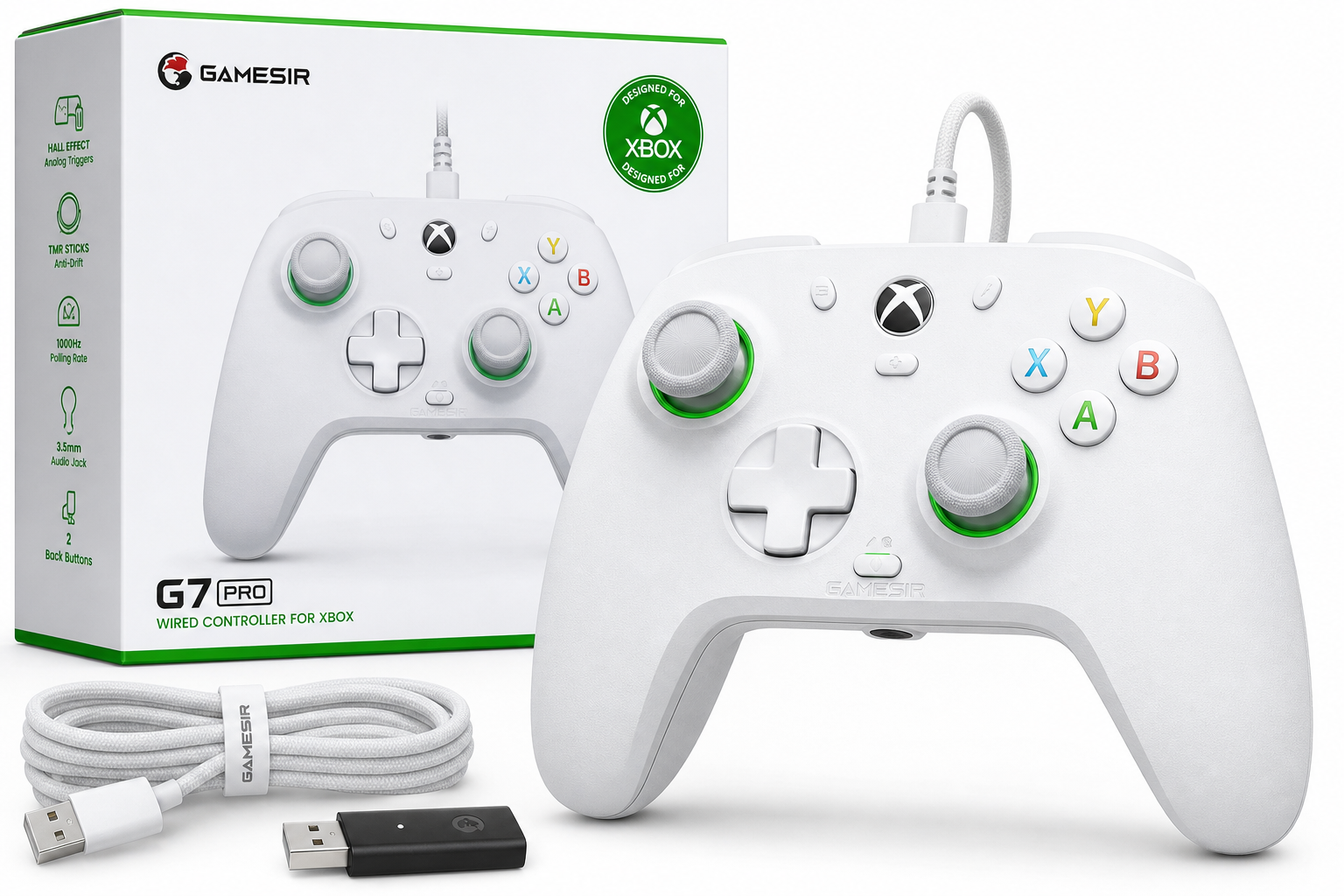
GameSir G7 Pro Wired Controller for Xbox & PC Review
Introduction
The GameSir G7 Pro Wired Controller for Xbox Series X|S, Xbox One, Wireless Gamepad for PC & Android with TMR Sticks, Hall Effect Analog Triggers, 1000Hz Polling Rate, 3.5mm Audio Jack – White targets players who want an Xbox-style layout with more advanced internals than the stock pad. It combines magnetic‑resistance TMR sticks, Hall Effect analog triggers, and high polling‑rate support on PC, aiming to deliver precise inputs and strong durability for competitive and casual gaming alike.
This review focuses on how the controller performs across Xbox consoles, Windows PCs, and Android devices, and whether its design and features justify a spot as your primary gamepad.
Setup / Getting Started
In the box and first impressions
Out of the box, the GameSir G7 Pro includes the controller itself, a detachable USB‑C cable, and basic documentation. The white finish and Xbox-style face layout feel immediately familiar, with asymmetrical thumbsticks, standard ABXY cluster, and central Xbox guide button.
Build quality is solid: there is minimal flex when twisting the chassis, and the surface finish strikes a balance between smooth and grippy. The triggers and bumpers feel tighter and more defined than many budget third‑party pads, hinting at the Hall Effect trigger hardware underneath.
Connecting to Xbox Series X|S and Xbox One
For Xbox consoles, the G7 Pro is designed primarily as a wired controller. Setup is straightforward:
- Plug the USB‑C cable into the controller.
- Connect the other end to an available USB port on Xbox Series X|S or Xbox One.
- The console recognises the controller automatically, with no additional drivers or configuration required.
Once connected, the Xbox button and menu controls behave exactly as you would expect from a native Xbox controller, including system navigation, screenshots, and power controls where supported.
Connecting to PC (Windows)
On PC, the G7 Pro supports both wired and 2.4 GHz wireless (via compatible variants) with up to a 1000Hz polling rate. When used as a wired controller:
- Connect the USB‑C cable to a Windows 10/11 machine.
- Windows generally installs the necessary drivers automatically.
- The controller appears as an Xbox‑style XInput device, making it compatible with most modern games and platforms like Steam.
For users with a model that supports wireless modes, pairing with the 2.4 GHz dongle is typically as simple as pressing the pairing buttons on the controller and dongle, then waiting for the LED to confirm connection.
Connecting to Android
The G7 Pro is also usable with Android devices that support gamepads. Depending on the specific hardware variant, connection options include:
- Bluetooth: Put the controller into Bluetooth pairing mode, locate it in the Android Bluetooth menu, and pair.
- Wired (USB‑C or OTG): Connect the controller via a USB‑C cable and, if required, a USB‑OTG adapter for phones or tablets.
Once connected, many Android games and cloud streaming apps (such as Xbox Cloud Gaming or Steam Link) detect the G7 Pro as an Xbox-style controller.
Optional software
On PC, the controller can be customised through GameSir’s software (GameSir Nexus or equivalent for the G7 Pro series). The software typically allows you to:
- Re-map buttons
- Adjust stick sensitivity curves and deadzones
- Tune trigger ranges and hair‑trigger behaviour
- Configure vibration intensity
- Save multiple profiles for different games
The software layer adds depth but is optional; plug‑and‑play works fine if you prefer a simple setup.
Daily Usage
Ergonomics and comfort
The G7 Pro follows the familiar, slightly contoured Xbox silhouette. For medium to large hands, the grip size feels natural with easy reach to all inputs. Long sessions of shooters or racing games are feasible without noticeable hand fatigue.
The surface texture avoids becoming slippery, and the weight is well balanced, especially considering the internal hardware for extra buttons and rumble motors. Face buttons, D‑pad, and sticks are all easily accessible, with the back paddles and extra bumpers placed to be reachable without accidental presses once you adjust to them.
Buttons, D‑pad, and extra controls
- Face buttons (ABXY): Actuation is crisp and relatively short‑travel. Inputs register reliably for both rapid tapping and deliberate presses.
- D‑pad: The D‑pad uses mechanical switches, giving a defined click that works well for platformers and menu navigation. It is precise enough for fighting game quarter‑circles, though preferences here are highly personal.
- Bumpers and triggers: The bumpers have a firm but responsive feel. The triggers benefit from Hall Effect sensors, maintaining consistency even under heavy use.
- Extra buttons: The controller includes additional back buttons and mini bumpers, allowing you to shift common actions like jump, crouch, or reload off the face buttons. This can be especially useful in competitive shooters.
Audio and chat
A built‑in 3.5mm audio jack allows you to plug in a headset directly to the controller. On both Xbox and PC, this provides in‑game audio and chat without routing cables to the console or PC tower. Volume and chat mixing depend on system‑level controls and game support but, in general, audio quality is clear with no noticeable interference from controller inputs.
Everyday genres
- First‑person shooters and battle royale games: The high polling rate on PC, precise sticks, and back buttons make aiming and movement feel responsive. Custom sensitivity curves in software can help dial in aim exactly how you like it.
- Racing games and simulators: Hall Effect triggers give a smooth, analog feel that suits throttle and brake control well. Trigger stops can shorten travel for fast shooters, but racing players may prefer full analog range for finer control.
- Action‑adventure and platformers: The D‑pad and face buttons feel reliable, and vibration feedback adds to immersion.
- Sports and fighting games: Button responsiveness and clear actuation on the D‑pad make the controller a capable option, though hardcore fighting game players may still prefer an arcade stick.
Performance & Reliability
Input precision
The GameSir G7 Pro is built around TMR (magnetic‑resistance) sticks and Hall Effect triggers. These technologies rely less on physical contact than traditional potentiometer designs, aiming to reduce wear and stick drift over time.
In practice, the sticks feel smooth through their entire range of motion, and fine adjustments—such as micro‑aiming in shooters or subtle steering corrections in racing games—translate accurately in‑game. Deadzones can typically be tuned through software, giving additional control over how fast the sticks respond from center.
The triggers register subtle pressure changes immediately, which is noticeable when feathering acceleration or slowly pulling a trigger for analog actions.
Polling rate and latency
On PC, the controller supports a polling rate of up to 1000Hz, meaning it can send input updates as frequently as many competitive‑grade keyboards and mice. While the difference from standard 125Hz or 250Hz pads may be subtle to some players, fast‑paced shooters and rhythm game enthusiasts may appreciate the snappier feeling.
Wired connections on Xbox naturally keep latency low and consistent, which is advantageous for competitive play where input delay can affect performance.
Vibration and haptics
The G7 Pro includes multiple rumble motors, typically in both grips and triggers. This setup enables more nuanced haptic feedback, such as differentiating between gun recoil, engine vibration, and environmental effects. Intensity can often be adjusted or disabled in software and in individual games.
Reliability over time
While long‑term reliability always depends on usage patterns, the choice of Hall Effect triggers and magnetic‑resistance sticks is aimed at addressing common controller failure points, particularly stick drift. Physically, the chassis and buttons feel robust, with no obvious weak spots or creaks during normal use.
Firmware and software updates from GameSir can further refine behaviour, fix minor bugs, and improve compatibility with newer platforms, so periodically checking for updates is advisable.
What Works Well
- TMR sticks and Hall Effect triggers: These components offer smooth, precise control and are designed to resist drift and degradation longer than conventional potentiometer designs.
- High polling rate on PC: Up to 1000Hz polling rate helps reduce input latency and provides a responsive feel in fast‑paced titles.
- Xbox‑native layout and compatibility: The controller behaves like a native pad on Xbox Series X|S and Xbox One, making it easy to integrate into an existing setup.
- Cross‑platform flexibility: Support for PC and Android, in addition to Xbox, makes the G7 Pro a versatile choice if you play across multiple devices.
- Extra buttons and customisation: Back buttons and additional bumpers expand your input options, and software allows button remapping, sensitivity adjustment, and profile creation.
- Comfortable ergonomics: The familiar Xbox-style form factor, balanced weight, and good surface texture work well for long gaming sessions.
- 3.5mm audio jack: On‑controller audio is convenient for both console and PC players using wired headsets.
What Could Be Improved
- Dependence on wired connection for Xbox: While wired play ensures low latency, some users would prefer fully integrated wireless support on Xbox without separate variants or additional hardware.
- Software learning curve: The richness of configuration options can be overwhelming at first. Clearer in‑app tutorials or presets tuned for common genres could help new users get the most from the hardware.
- Back button tuning: Although extra buttons are welcome, their placement and default sensitivity may take time to get used to. Additional shape or texture options for these buttons could further reduce accidental presses.
- Cable management: The included cable is long, which is useful, but a more flexible or braided option—and an included tie or clip—would improve cable handling and durability, particularly for living room setups.
Overall Impression
The GameSir G7 Pro Wired Controller for Xbox Series X|S, Xbox One, Wireless Gamepad for PC & Android with TMR Sticks, Hall Effect Analog Triggers, 1000Hz Polling Rate, 3.5mm Audio Jack – White delivers a well‑balanced mix of advanced internals and practical ergonomics. Its TMR sticks and Hall Effect triggers aim to reduce common wear issues, while the high polling rate on PC and robust cross‑platform support make it attractive for players who move between Xbox, Windows, and Android.
If you prioritise low‑latency wired play on Xbox or PC, value long‑term input precision, and appreciate deep customisation, the G7 Pro stands out as a strong alternative to the standard Xbox controller. Players seeking completely wireless console use or simpler, plug‑and‑forget behaviour may prefer a more basic pad, but for those who want a more feature‑rich, enthusiast‑leaning option, the GameSir G7 Pro is a compelling choice.