
Plug & Play Retro Game Console (128GB, 20,000+ Games) Review: Simple Big‑Screen Nostalgia for the Living Room
This review looks at the Plug & Play Retro Game Console (128GB, 20,000+ classic games, 4K HDMI output, dual wireless controllers), a compact TV gaming stick designed to bring retro titles to the living room with minimal setup. We examine its overall design and included hardware, the breadth and organization of the preloaded game library, ease of use, controller comfort, performance via HDMI on modern TVs, and where it fits in the broader landscape of retro and family gaming options. Pros include straightforward plug‑and‑play setup, a huge selection of classic‑style games, and two wireless controllers for couch multiplayer, while trade‑offs include variable game quality, basic menus, and limited documentation when compared with more premium retro systems.
Overview
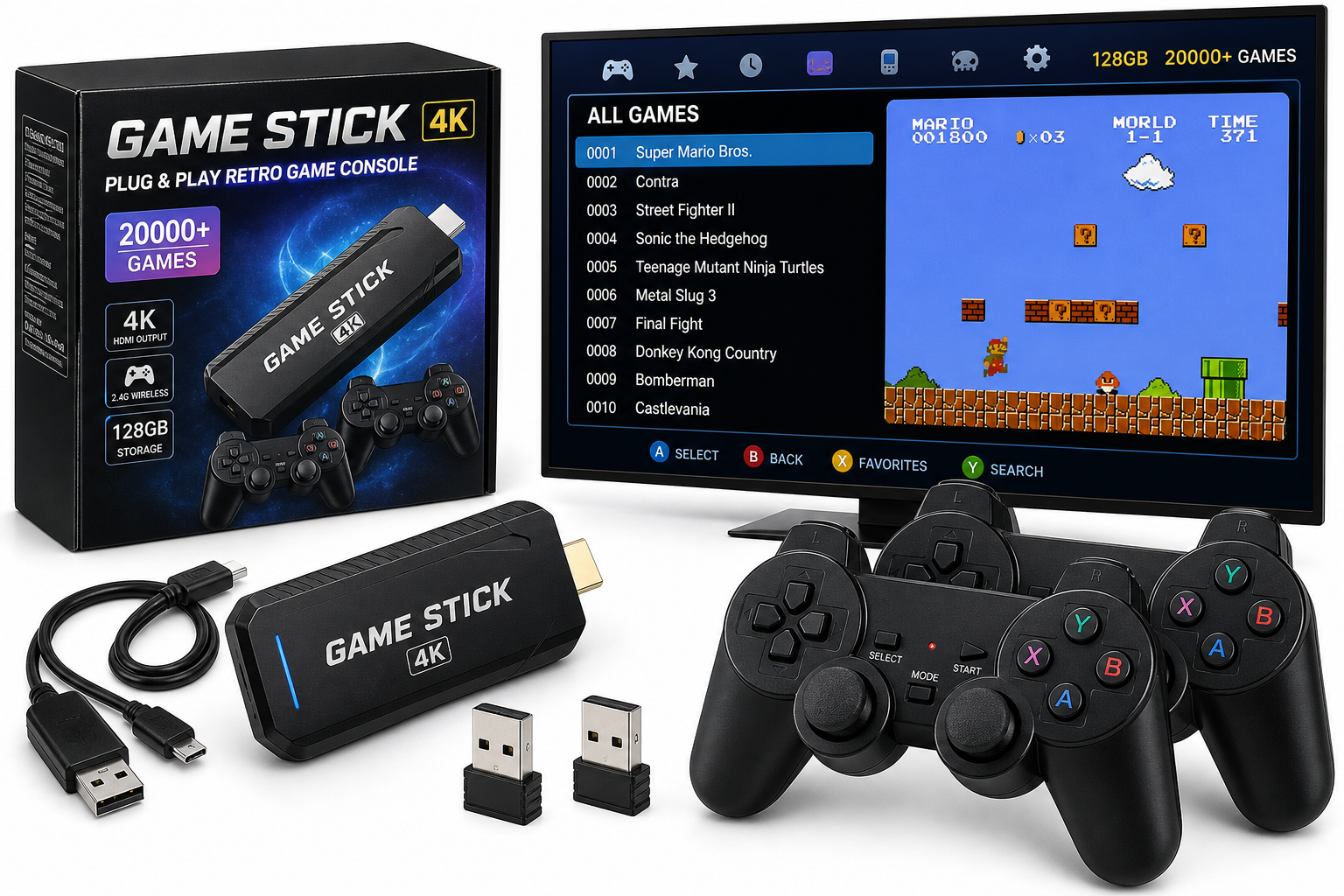
The Plug & Play Retro Game Console | 128GB 20000+ Classic Games | 4K HDMI TV Gaming Stick | Dual Wireless Controllers is designed as a simple way to turn almost any modern TV into a retro gaming hub. The system combines a compact HDMI stick, a 128GB game library, and two 2.4 GHz wireless controllers into a single, ready‑to‑use package aimed at families, casual players, and anyone looking to revisit older console and arcade‑style titles without a complicated setup.
Rather than acting as a traditional disc‑ or cartridge‑based console, this unit functions as an all‑in‑one emulation stick: you connect it to a TV or monitor via HDMI, power it via USB, and navigate a menu of thousands of built‑in games drawn from multiple classic platforms. It’s a value‑oriented, convenience‑first product, competing more on volume of content and ease of use than on premium build or brand‑name polish. At around $38.99, it undercuts most officially licensed mini consoles and many dedicated handheld emulation devices while delivering a far larger library.
Standout Features
1. 128GB Storage with 20,000+ Preloaded Games
The headline feature is the large preconfigured library. The included 128GB storage is populated with more than 20,000 titles across multiple retro systems, so you can start playing immediately after setup with no downloads or manual file management.
In practice, the benefits are:
- Huge variety: Platformers, fighters, beat ’em ups, puzzle games, shooters, racing titles, and more.
- Multi‑system coverage: Typical sticks in this category include 8‑ and 16‑bit consoles, some 32‑bit/arcade content, and handheld libraries.
- Instant access: No internet connection is required for game access, and there’s no subscription component.
The trade‑off is that these libraries are curated for quantity rather than curation. Expect some duplicates, regional variants, and obscure or low‑quality games mixed in with well‑known classics.
2. 4K HDMI TV Gaming Stick Form Factor
Instead of a bulky console, the main unit is a small HDMI stick that plugs directly into an HDMI port on your TV or monitor. Power is supplied via the included USB cable. This design makes the system:
- Highly space‑efficient: No large box to store; most of the time it hides behind the TV.
- Portable: Easy to bring to a friend’s house or move between rooms—just unplug the stick, USB power, and the wireless receivers.
- Simple to install: No AV switchers or legacy connectors—just HDMI and USB.
While the product advertises 4K support, it’s important to note that retro games themselves typically render at much lower resolutions (from 240p to 480p originally). The 4K claim generally refers to the output signal format, not native 4K game assets. You can expect upscaled retro visuals with sharp pixels and some potential scaling artifacts depending on your display.
3. Dual 2.4 GHz Wireless Controllers
Two included wireless controllers are central to the console’s value proposition, especially for families and couch co‑op.
Key points:
- 2.4 GHz wireless: Provides better range and reliability than older IR‑based solutions, with lower latency than Bluetooth in many budget implementations.
- Familiar layout: The pad design typically mimics classic console controllers with a D‑pad, face buttons, shoulder buttons, and Start/Select/Menu keys.
- Battery‑powered: Controllers generally use AA/AAA batteries or internal rechargeable cells (check the listing/manual for exact type); you’ll need to ensure they are charged or have fresh batteries for longer sessions.
Build quality is usually serviceable for casual use, though not at the level of first‑party controllers from major console manufacturers. Button feel and D‑pad precision are adequate for casual retro gaming, with some variance game‑to‑game in terms of how responsive the emulation feels.
Supporting Features
Multi‑Emulator Platform
Under the hood, the stick uses multiple emulators to run games from different systems. While the specific emulator list isn’t always fully documented, devices in this category generally cover:
- Classic 8‑bit and 16‑bit home consoles
- Portable systems from the same era
- A selection of arcade titles
The advantage is broad compatibility with many generations of retro content. However, because this is a value‑priced, mass‑market product, you won’t find the same level of configurable options or system‑specific fine‑tuning that enthusiast emulation platforms (like RetroArch builds on PC or custom handhelds) provide.
Simple On‑Screen Menu System
The console boots directly into a graphical game browser. From there you can:
- Scroll through lists of games, grouped by system or category
- Launch titles with a button press
- Return to the main menu (usually by pressing a designated button combo)
Menu design is functional, though somewhat basic compared to premium retro products. Font choices, thumbnail art, and navigation speed tend to be adequate, but advanced features like per‑system filters, favorites lists, and detailed metadata may be limited or absent.
Save/Load Support (Model‑Dependent)
Many modern retro sticks offer save and load states that let you suspend progress at almost any time. While implementation details vary, you can typically:
- Save your progress from within a game using a button combination
- Load that state later even if the game doesn’t support saving natively
If this function is essential for you (especially with longer RPGs or difficult action games), it’s worth confirming in the listing or manual how saves are managed and whether multiple slots or profiles are supported.
Usability
Setup and Installation
Usability is one of this product’s biggest strengths.
To get started, you usually:
- Plug the HDMI stick into an available HDMI port on your TV/monitor.
- Connect the included USB power cable to a USB port on the TV or to a USB power adapter.
- Insert any necessary USB dongles for the wireless controllers.
- Power on the TV, select the correct HDMI input, and wait for the main menu to appear.
There’s typically no need for account creation, Wi‑Fi setup, or firmware updates before first use. For households that prefer a no‑maintenance device—especially for kids or guests—this simplicity is a major plus.
Everyday Use
In day‑to‑day usage, the console is straightforward:
- Controller pairing: Controllers usually auto‑pair via the included dongle; a button press or power toggle may be required if they sleep.
- Navigation: Menus are controlled entirely by the gamepad—no need for a separate remote.
- Swapping games: Exiting back to the main menu is commonly done through a Start/Menu combo.
Potential usability quirks:
- Game overload: With 20,000+ titles, finding specific favorites can be time‑consuming if the menu doesn’t offer robust search, alphabetical shortcuts, or filters.
- Language and translation: On some models, menu text or game titles may show a mix of languages or imperfect translations.
- Documentation: Printed manuals for devices in this category are usually brief, with only essential setup steps explained.
Performance
Video and Audio Output
Connected via HDMI, the console outputs a digital signal compatible with modern TVs and monitors, often up to a 4K output mode with internal scaling.
In practice:
- Visual clarity: Pixel art appears sharp and vibrant on most panels, though some TVs may add extra smoothing or motion processing that you might want to disable for the most authentic look.
- Aspect ratio: Retro games were designed for 4:3 displays; depending on settings, the stick may stretch them to 16:9 or preserve the original ratio with side borders.
- Audio: Sound output is generally clean enough for retro music and effects, though occasional pops or slight desync can occur in a small subset of titles.
Input Latency and Responsiveness
Overall responsiveness is acceptable for casual retro gaming:
- Wireless latency: 2.4 GHz controllers introduce minimal delay for most players during platformers, action games, and fighters.
- Emulation overhead: Certain more demanding systems or specific titles may exhibit frame drops, audio crackle, or slight input delay. This is common across many low‑power, plug‑and‑play emulation sticks.
Competitive players or those very sensitive to latency may prefer wired controllers or more powerful, configurable hardware. For family use and nostalgic playthroughs, the performance is typically sufficient.
Stability and Game Compatibility
With such a large library, performance and compatibility naturally vary:
- Many 8‑bit/16‑bit games run smoothly and as expected.
- Some more advanced or obscure titles may show glitches, incorrect speeds, or mapping oddities.
- A small fraction of games may not run correctly or at all.
Because this is a closed system, you don’t get advanced troubleshooting options beyond restarting games or avoiding problematic titles.
Pros and Cons
Pros
- Very easy setup: Connect via HDMI and USB, then start playing—no downloads or configuration required.
- Massive game library: Over 20,000 preloaded titles across multiple classic systems.
- Compact design: HDMI stick form factor keeps clutter to a minimum and is highly portable.
- Dual wireless controllers included: Ready for two‑player gaming straight out of the box.
- Family‑friendly: Simple interface and broad selection make it suitable for casual play sessions and parties.
- Strong value proposition: At approximately $38.99, the cost per included game is extremely low compared with buying individual classics on modern digital storefronts.
Cons
- Mixed curation quality: Expect duplicates, hacks, and obscure or low‑quality titles among the 20,000+ games.
- Basic menus and options: Limited search/filter features and fewer advanced settings than enthusiast‑grade emulation devices.
- Variable emulation accuracy: Not all systems and titles perform perfectly; some audio or visual glitches can occur.
- Controller build quality is mid‑range: Adequate for casual play but not comparable with premium first‑party pads in feel or durability.
- Licensing and provenance of ROMs are unclear: As with many bulk retro devices, the exact rights status of all included games is not typically transparent.
- Minimal documentation/support: Printed materials and firmware update paths are often sparse.
Summary
The Plug & Play Retro Game Console (128GB, 20,000+ classic games, 4K HDMI TV gaming stick with dual wireless controllers) is a convenience‑first retro gaming solution. It’s best suited to households that want an easy way to enjoy a wide mix of classic‑style games on a big screen, without dealing with complex configuration, subscriptions, or extra hardware.
Its strengths lie in simplicity, breadth of content, and low cost of entry. Plug it into a TV, hand out the wireless controllers, and you have an instant library capable of entertaining kids, nostalgic adults, and casual guests alike. In return, you accept some compromises: a somewhat cluttered and inconsistently curated game catalog, variable emulation fidelity, basic menus, and mid‑tier controller quality.
If you’re an enthusiast who cares deeply about perfect emulation accuracy, curated libraries, and granular configuration, you may be better served by a more advanced—often more expensive—retro platform. But if your priority is a plug‑and‑play, living‑room‑friendly retro experience at around $38.99, this console delivers a compelling mix of features and content for the price.