
Nintendo Switch 2 vs. Steam Deck OLED: Which Handheld Game Console Should You Buy?
The Nintendo Switch 2 and Steam Deck OLED offer two very different approaches to handheld gaming. Switch 2 focuses on Nintendo's exclusive games, console-style simplicity, and a more portable design, while Steam Deck OLED provides access to a large PC game library and greater customization. This review compares their performance, display, game libraries, battery life, portability, controls, and overall value to help you choose the right handheld.
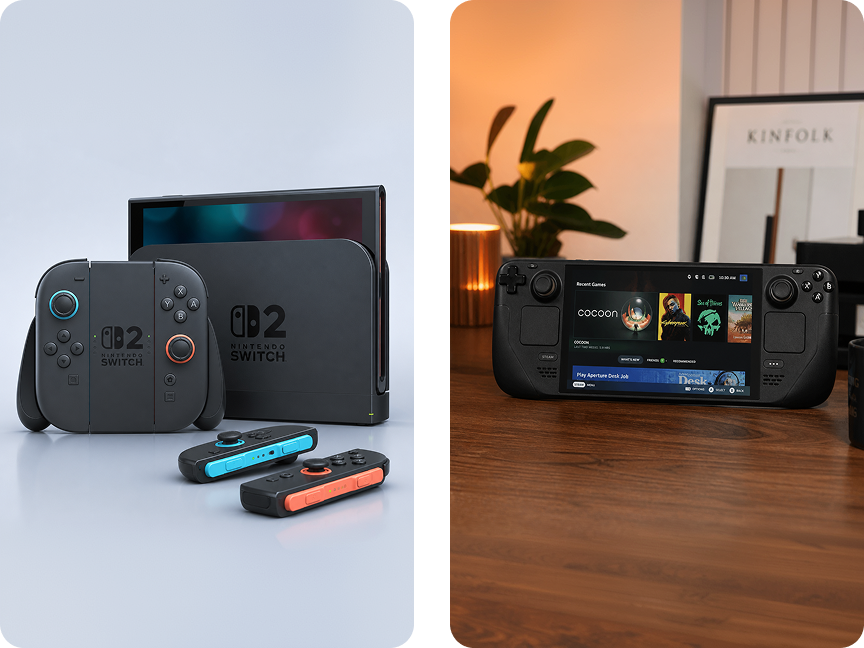
🎮 Nintendo Switch 2 vs. Steam Deck OLED: Which Handheld Game Console Should You Buy?
Handheld gaming has become more competitive than ever. Two of the most interesting options are the Nintendo Switch 2 and the Steam Deck OLED.
Both let you play games on the go, but they are designed for very different types of gamers. The Switch 2 focuses on Nintendo's exclusive games and flexible console-style gaming, while the Steam Deck OLED brings much of the PC gaming experience to a handheld device.
So which one should you buy?
The answer depends less on specifications and more on the games you want to play, how you prefer to use your handheld, and how much you value portability, flexibility, and ecosystem.
⚡ Nintendo Switch 2 vs. Steam Deck OLED at a Glance
The Nintendo Switch 2 is Nintendo's latest hybrid game console, while the Steam Deck OLED is a handheld gaming PC from Valve.
The two devices take very different approaches to portable gaming.
The Switch 2 is designed to be simple and console-like. You can play it in handheld mode, use it on a tabletop, or connect it to a TV.
The Steam Deck OLED is more like a compact gaming PC. It gives you access to your Steam library and provides much more freedom to customize games and system settings.
If you want Nintendo exclusives and a straightforward console experience, Switch 2 is the natural choice.
If you want PC gaming and maximum flexibility, Steam Deck OLED is more appealing.
🎮 Nintendo Switch 2
Best for: Nintendo fans, families, and gamers who want a traditional console experience
Nintendo Switch 2 is built around flexibility.
You can use it as a handheld, place it on a tabletop, or connect it to a TV through the dock. This makes it a versatile option for both solo gaming and multiplayer entertainment.
The console features a 7.9-inch 1080p display, giving you a larger screen and higher resolution than the original Nintendo Switch.
But hardware isn't the biggest reason to buy Switch 2.
The real advantage is the Nintendo game library.
If you want to play major Nintendo franchises such as Mario, Zelda, Pokémon, and other Nintendo-exclusive games, Switch 2 is the obvious platform.
👍 What We Like
🎮 Excellent hybrid console design
🏠 Easy transition between handheld and TV gaming
🌟 Strong Nintendo-exclusive game library
👨👩👧👦 Great for family and local multiplayer gaming
🖥️ Large 7.9-inch 1080p display
🔌 Simple, console-style user experience
👎 What Could Be Better
🔒 More closed ecosystem than a PC handheld
💰 Nintendo games can be relatively expensive
⚙️ Less customization than a Steam Deck
💻 Not designed to replace a gaming PC
🖥️ Steam Deck OLED
Best for: PC gamers, Steam users, and players who want more flexibility
The Steam Deck OLED takes a completely different approach.
Instead of creating a traditional console ecosystem, Valve built a handheld PC around SteamOS and the Steam gaming library.
The 512GB OLED model features a 7.4-inch OLED display with a 90Hz refresh rate, 16GB of RAM, and 512GB of storage.
The OLED screen is one of its biggest attractions. Games look colorful and vibrant, while the 90Hz refresh rate can make supported games feel smoother.
The biggest advantage, however, is the Steam ecosystem.
If you already own a large Steam library, the Steam Deck OLED can give you access to many of your existing games without purchasing them again for another platform.
It also provides significantly more flexibility than a traditional console. You can adjust graphics settings, install software, connect peripherals, and use the device more like a small PC.
👍 What We Like
🌈 Excellent OLED display
🎮 Huge Steam game library
⚙️ Highly customizable gaming experience
💻 PC-style functionality
🖱️ Useful trackpads for PC games
🔄 90Hz refresh rate
🔋 Improved efficiency compared with the original Steam Deck
👎 What Could Be Better
📦 Larger and heavier than many traditional handheld consoles
⚙️ Some games require additional configuration
❓ PC game compatibility can vary
💰 Higher price than Switch 2 at current official pricing
🆚 Design and Portability
Both devices are portable, but they feel very different in everyday use.
The Switch 2 has a more traditional console-like design. Its detachable controllers and hybrid functionality make it particularly convenient if you want to switch between handheld and TV gaming.
The Steam Deck OLED is larger and feels more like a compact gaming PC. Its built-in controls and trackpads are especially useful for PC games that weren't originally designed for a traditional gamepad.
🏆 Which Is Better?
If you want something that feels like a console you can take anywhere, the Switch 2 has the advantage.
If you want a PC that happens to be a handheld, the Steam Deck OLED offers more flexibility.
🌈 Display: Switch 2 vs. Steam Deck OLED
This is one of the most interesting differences between the two.
The Switch 2 features a 7.9-inch 1080p LCD display.
The Steam Deck OLED has a 7.4-inch OLED display with 1280 × 800 resolution and a 90Hz refresh rate.
The Switch 2 gives you:
📏 Larger screen
🔍 Higher native resolution
The Steam Deck OLED gives you:
🌈 OLED contrast
🎨 Richer colors
⚡ 90Hz refresh rate
✨ Excellent visual quality
For colorful games and media, the Steam Deck OLED's screen can look particularly impressive.
For players who prioritize screen size and resolution, Switch 2 has an advantage.
🏆 Winner: Tie
The better display depends on what you value more: Switch 2's larger 1080p screen or Steam Deck OLED's OLED panel and 90Hz refresh rate.
⚡ Performance
The two devices are difficult to compare purely by specifications because they run different operating systems and game libraries.
Switch 2 uses newer-generation hardware and is designed specifically around Nintendo's software ecosystem.
Steam Deck OLED uses a custom AMD-based platform and is designed primarily for PC games. Performance can vary depending on the game and graphics settings.
For optimized Nintendo games, Switch 2 provides a polished and consistent experience.
For PC gaming, the Steam Deck OLED offers much more freedom to adjust graphics settings and performance.
🏆 Which Is Better?
If you want a device that simply runs games with minimal configuration, Switch 2 is the easier choice.
If you enjoy tweaking settings and optimizing games, Steam Deck OLED is more appealing.
🎮 Game Library
This is probably the most important category.
⭐ Choose Switch 2 for Nintendo Games
Nintendo's first-party library is the biggest reason to buy a Switch 2.
If your priority is Nintendo's major franchises, the decision is relatively simple.
Switch 2 is the platform to choose if you want Nintendo's exclusive games and ecosystem.
💻 Choose Steam Deck OLED for PC Games
Steam Deck OLED is better suited to players who already have a Steam library or want access to the enormous PC gaming ecosystem.
You can play games across many genres while having more freedom to customize how they run.
However, not every PC game is equally well suited to the Steam Deck. Compatibility, anti-cheat systems, controls, and performance can vary.
🏆 Winner: Depends on Your Library
Nintendo fans → Switch 2
PC gamers → Steam Deck OLED
🔋 Battery Life
Battery life depends heavily on the game, screen brightness, frame rate, wireless settings, and performance requirements.
The Steam Deck OLED benefits from improved power efficiency compared with the original Steam Deck, making it a better choice for longer handheld gaming sessions.
Switch 2 also offers a rechargeable battery designed for portable gaming, but demanding games can reduce runtime considerably.
Neither device should be judged solely by its advertised maximum battery figure.
For long trips, carrying a compatible USB-C charger or power bank can still be a good idea.
💡 Buying Tip
If you regularly travel or play outdoors, battery life should be one of your top considerations, not an afterthought.
📺 TV and Docked Gaming
This is where Switch 2 has a major advantage in simplicity.
Nintendo designed the Switch 2 from the beginning as a hybrid console. You can move between handheld and TV play with minimal effort.
The Steam Deck OLED can also connect to a TV or monitor through a compatible dock, but the experience is more PC-like.
That means more flexibility, but potentially more setup.
🏆 Winner: Nintendo Switch 2
If you frequently switch between handheld gaming and big-screen gaming, Switch 2 provides the more seamless experience.
👨👩👧👦 Which One Is Better for Families?
For families, the Switch 2 is generally the easier recommendation.
Nintendo's controller design, local multiplayer options, family-friendly game library, and TV connectivity make it particularly well suited to shared gaming.
The Steam Deck OLED is better suited to an individual gamer who wants access to a broad PC library.
🏆 Winner: Nintendo Switch 2
If you're buying one device for family entertainment and multiplayer gaming, Switch 2 has the edge.
💻 Which One Is Better for PC Gamers?
This one is much easier.
🏆 Winner: Steam Deck OLED
SteamOS, Steam integration, desktop functionality, customizable graphics settings, and access to PC games make the Steam Deck OLED much more appealing to someone who already spends most of their gaming time on PC.
The Switch 2 provides an excellent console experience, but it isn't intended to replace a gaming PC.
💰 Which One Offers Better Value?
Value depends heavily on what you already own.
The Switch 2 generally makes more sense for someone who specifically wants Nintendo games and a simple console experience.
The Steam Deck OLED can be particularly valuable if you already have a large Steam library.
Instead of buying games again for another platform, you may be able to use many of the games you already own.
However, the Steam Deck OLED's higher purchase price means the value proposition depends heavily on how much you use your existing Steam library.
💡 Think About Your Existing Games
Before buying, ask yourself:
"Where are most of my games already?"
If the answer is Nintendo, choose Switch 2.
If the answer is Steam, the Steam Deck OLED makes much more sense.
🛒 Which One Should You Buy?
Choose Nintendo Switch 2 $449 if:
🎮 You love Nintendo games
🏠 You want a simple console experience
📺 You frequently play on a TV
👨👩👧👦 You play multiplayer games with family or friends
🎒 You want a straightforward handheld
⚙️ You don't want to deal with PC settings and compatibility
Choose Steam Deck OLED $899 if:
💻 You already have a large Steam library
🎮 You primarily play PC games
⚙️ You want more control over graphics and performance
🖥️ You want a handheld that can also function as a small PC
🛠️ You enjoy customizing your gaming experience
🌈 You prefer an OLED display and 90Hz refresh rate
🏆 Final Verdict
The Nintendo Switch 2 is the better choice for most traditional console gamers, especially if Nintendo's exclusive games are important to you.
Its hybrid design makes it easy to use at home or on the go, and the overall experience is straightforward and family-friendly.
The Steam Deck OLED is the better choice for PC gamers who want their Steam library in a portable format.
Its OLED display, flexible software, customizable controls, and PC-oriented features make it a unique handheld gaming machine.
The biggest factor isn't really which device has better specifications.
It's which gaming ecosystem you want to live in.
🎮 If your ideal gaming experience involves Mario, Zelda, local multiplayer, and playing on the TV, choose Nintendo Switch 2.
💻 If you want to take your Steam library with you and don't mind a more PC-like experience, choose Steam Deck OLED.
Bottom line: Nintendo Switch 2 for console simplicity and Nintendo exclusives; Steam Deck OLED for PC gaming flexibility and the Steam library.