
LG 32GS95UE UltraGear 32-inch OLED Gaming Monitor Review: Dual-Mode Speed Meets 4K Clarity
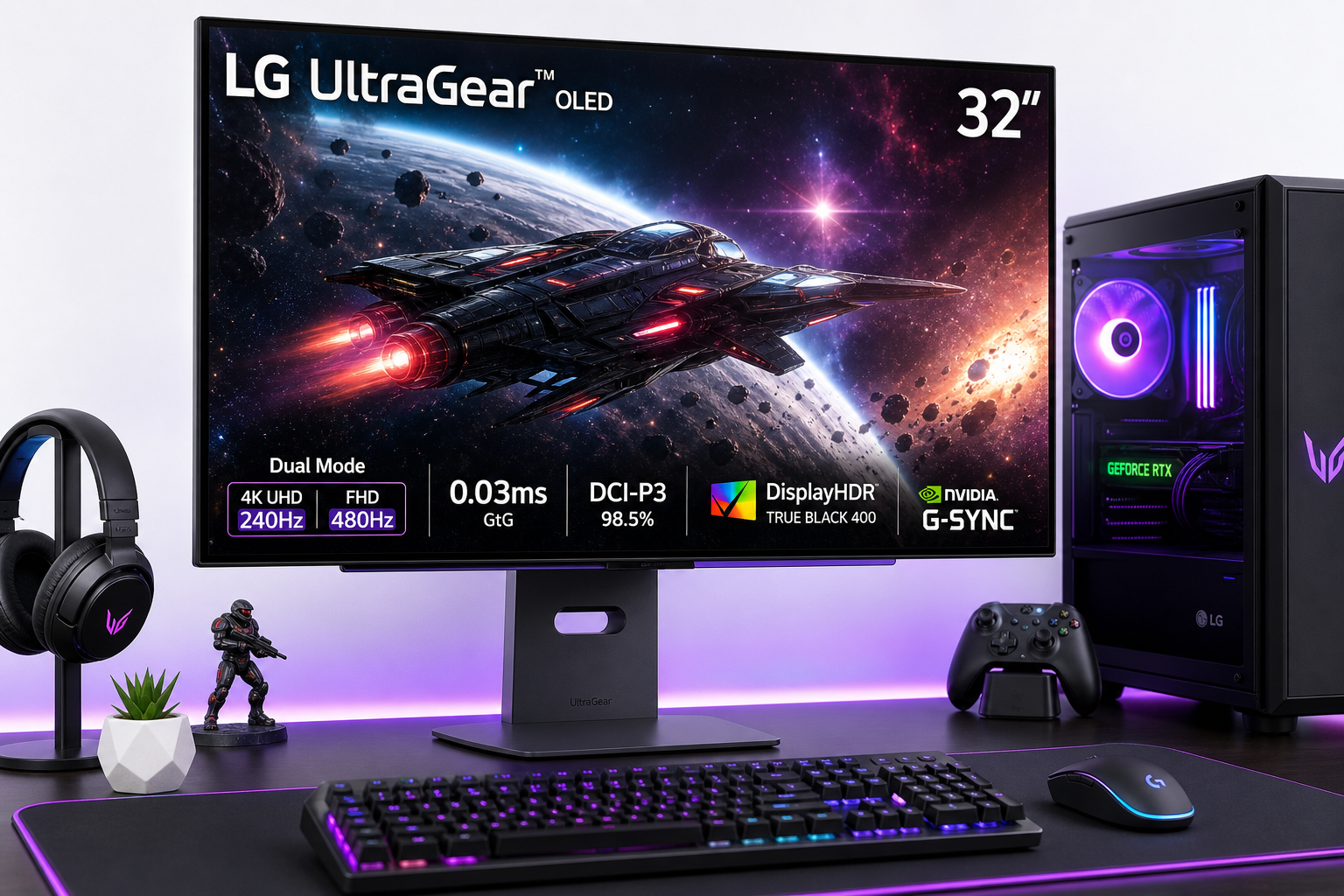
The LG 32GS95UE is a 32-inch UltraGear OLED gaming monitor that combines 4K resolution with a 240Hz refresh rate and an optional 1080p 480Hz “Dual-Mode” for esports-focused play. With an extremely fast 0.03ms GtG response time, HDMI 2.1 connectivity, AMD FreeSync Premium Pro, and NVIDIA G-Sync compatibility, it aims to serve both competitive and cinematic gamers in a single package. This review looks at setup, everyday usability, gaming performance, strengths, and trade-offs like text clarity, fan noise, and OLED-specific considerations such as brightness and burn-in management.
Introduction
The LG 32GS95UE UltraGear is positioned as a flagship 32-inch OLED gaming monitor for players who want both razor-sharp 4K detail and extreme refresh rates. Its standout feature is "Dual-Mode": you can run it at native 4K (3840×2160) up to 240Hz, or switch to 1080p at up to 480Hz for esports and latency-sensitive games. Backed by a 0.03ms (GtG) response time, DisplayHDR True Black 400, and wide DCI-P3 coverage, it targets enthusiasts who are willing to invest around $1439.00 in a single high-end display instead of juggling separate monitors.
This review focuses on how the 32GS95UE behaves in real-world use: initial setup, day-to-day ergonomics, gaming performance, and where it shines or falls short compared to other 32-inch 4K 240Hz OLED options.
Setup / Getting Started
Unboxing and physical setup
The LG 32GS95UE arrives in a substantial box typical of 32-inch premium monitors. Inside, you’ll find:
- The 32-inch flat OLED panel
- Height/tilt/swivel stand (with tool-less or minimal-tool assembly)
- External power supply
- DisplayPort cable
- HDMI cable
- USB upstream cable
- Documentation and quick-start guide
Assembly is straightforward: attach the stand to the panel (usually via a quick-release or a few screws) and slot the base into place. The monitor also supports VESA mounting if you prefer an arm. The stand offers tilt, height adjustment, and swivel, giving enough range to align the screen comfortably for both work and gaming.
Connectivity and first-time configuration
On the rear, the 32GS95UE includes:
- 2× HDMI 2.1 ports (suitable for PC, PS5, and Xbox Series X|S at high refresh rates)
- 1× DisplayPort (capable of 4K 240Hz from a modern GPU)
- USB ports (for peripherals via the monitor’s hub)
- Headphone/line-out jack
For PC users, DisplayPort is generally the best choice to unlock 4K 240Hz. HDMI 2.1 will also work for high refresh rates, especially with modern graphics cards and consoles.
Once connected, you’ll need to:
- Install GPU drivers and enable high refresh rate in the OS (e.g., set 240Hz at 4K in display settings).
- Enter the on-screen display (OSD) using the rear joystick or buttons and:
- Select the correct picture mode (e.g., Gamer or an sRGB-like mode for desktop use).
- Enable VRR (variable refresh rate) or AdaptiveSync if needed.
- Check OLED care settings such as pixel shift and logo dimming.
- Optionally, use LG’s software (if available) to control settings from Windows rather than via the joystick.
The OSD is fairly comprehensive, with options for black stabilizer, crosshairs, frame rate counters, and different gamer profiles. You can save different presets for 4K 240Hz single-player titles and 1080p 480Hz competitive play.
Daily Usage
Desk presence and ergonomics
At 32 inches, the UltraGear 32GS95UE fills a standard desk without dominating it like a 42-inch TV would. The thin bezels and minimalist stand help it blend into a PC setup, while RGB or accent lighting on the back is relatively subtle compared to some gaming monitors.
Ergonomically, the panel’s height adjustment and tilt range are adequate for most users. Swivel is helpful if you frequently reposition the screen. There is no rotation to portrait mode, which is typical for larger gaming-focused OLEDs.
Text, productivity, and mixed use
For general desktop use, 4K at 32 inches provides sharp text and plenty of workspace. That said, some users notice fringing or subpixel text artifacts on WOLED panels in Windows compared to high-quality IPS or certain QD‑OLED layouts. This is not unique to the 32GS95UE but is worth noting if you spend long hours reading and writing.
Color accuracy and contrast are excellent out of the box, making the monitor comfortable for photo viewing, media consumption, and light content creation. Dark mode interfaces look especially good thanks to OLED’s true blacks.
The built-in Pixel Sound speakers (audio projected through the panel) are better than the average thin monitor speakers, but still not a replacement for dedicated desktop speakers or quality headphones. They’re convenient for casual listening and quick videos.
Comfort and OLED care
LG includes several OLED-care measures:
- Pixel shift / screen move, subtly shifting the image to reduce static wear.
- Logo or static element dimming, gradually reducing brightness for HUDs or taskbars.
- Panel refresh routines, which may run automatically after extended use.
These are generally unobtrusive in daily use, but you may notice brightness changes with very static UI elements. For heavy productivity users who leave static windows open all day, it’s wise to:
- Use auto-hide taskbars.
- Avoid long periods with full-screen static content.
- Enable screen savers or sleep mode when idle.
Daily Usage: Gaming Experience
4K 240Hz mode
In native 4K at up to 240Hz, the 32GS95UE delivers:
- Exceptionally sharp visuals in modern titles.
- Deep blacks and high perceived contrast that make HDR scenes stand out.
- Slick motion clarity thanks to the very fast response time and high refresh rate.
You’ll need a powerful GPU to sustain high frame rates at 4K 240Hz, but even at more modest frame rates, VRR support smooths out motion and helps avoid tearing.
1080p 480Hz Dual-Mode
Dual-Mode is the signature feature: the panel can switch to 1920×1080 at up to 480Hz. This mode targets competitive gamers who value extremely low latency and maximum temporal clarity over resolution.
Key observations:
- Motion clarity at 480Hz is outstanding, with noticeably smoother tracking of fast-moving objects in FPS and esports titles.
- The 1080p image stretched across 32 inches is less sharp than 4K mode; you can see larger pixels and more aliasing if you sit close.
- For many players in fast-paced shooters, the clarity of motion and responsiveness may outweigh the loss of resolution.
Switching between 4K 240Hz and FHD 480Hz is done via the OSD. It’s not instantaneous but quick enough if you regularly change genres (e.g., from a story-driven game to an arena shooter).
Console gaming
With HDMI 2.1 ports, the 32GS95UE works well for PS5 and Xbox Series X|S gaming:
- 4K 120Hz is supported.
- VRR helps smooth uneven frame delivery.
- HDR gaming benefits from OLED’s black levels, though peak brightness is still lower than the best mini‑LED LCDs.
For couch distance gaming, 32 inches is on the small side, but for a close desk setup with a console nearby, it’s a strong match.
Performance & Reliability
Image quality and HDR
The OLED panel with MLA+ (micro-lens array–type tech) delivers:
- True black levels with per-pixel illumination.
- Very high contrast, especially noticeable in dark scenes.
- Wide color gamut close to full DCI‑P3, giving saturated, vivid colors.
- DisplayHDR True Black 400 certification, reflecting deep blacks and respectable—but not blinding—peak brightness.
For HDR content, highlights stand out far better than on typical IPS displays, though if you’re used to very bright mini‑LED monitors or TVs, the absolute peak brightness is more modest.
Response time, input lag, and motion
The quoted 0.03ms GtG response time translates to near-instant pixel transitions, which minimize ghosting and smearing. Combined with 240Hz or 480Hz refresh rates, motion is exceptionally clear, especially in fast shooters, racing games, and action titles.
Input lag is very low in gaming modes. Most users will find the monitor highly responsive, especially when paired with VRR to eliminate tearing.
There is no traditional backlight strobing (as with some LCDs), but the high refresh rate and fast OLED transitions largely remove the need for it.
VRR and compatibility
The 32GS95UE supports:
- AMD FreeSync Premium Pro
- NVIDIA G-Sync compatibility
On both AMD and NVIDIA GPUs, VRR helps keep gameplay smooth across a wide refresh window. This is particularly valuable in 4K 240Hz mode, where frame rates may fluctuate depending on game complexity and GPU power.
Fan noise and thermals
Like several high-end OLED gaming monitors, the 32GS95UE uses active cooling. Under typical desktop use, the fan is often quiet or only faintly audible. Under extended heavy HDR or high-refresh gaming, some users report the fan becoming noticeable in a silent room.
Whether this is bothersome depends on your sensitivity and the rest of your system’s noise profile. In many gaming setups, GPU and case fans will mask it.
Burn-in considerations
OLED burn-in remains a consideration, though modern panels and LG’s mitigation features significantly reduce the risk under mixed usage. Still, if you:
- Run static HUDs for many hours daily
- Keep bright static logos or UI elements on screen for long sessions
you should take reasonable precautions: rotate content, lower static UI brightness where possible, and allow the panel to run its maintenance cycles.
What Works Well
-
Dual-Mode versatility (4K 240Hz & 1080p 480Hz)
One of the most flexible gaming monitors available today, letting you prioritize either visual fidelity or raw speed without buying two displays. -
Outstanding OLED picture quality
Deep blacks, high contrast, and rich colors make both SDR and HDR content look excellent, especially in dark scenes where IPS and VA panels struggle. -
Extremely fast response times
The 0.03ms GtG transitions and high refresh rates produce clean motion with minimal ghosting, ideal for twitch shooters and high-tempo games. -
Strong gaming feature set
VRR support across AMD and NVIDIA GPUs, HDMI 2.1 for consoles, gaming-centric OSD features, and good ergonomics make it an all-rounder for PC and console setups. -
Better-than-average built-in audio
Pixel Sound with virtual surround enhancements is more usable than typical thin monitor speakers, reducing the need for external audio in casual scenarios. -
Premium design and ergonomics
Thin bezels, a relatively clean aesthetic, and functional stand adjustments help it fit into both gaming and productivity environments.
What Could Be Improved
-
Text clarity and subpixel rendering
As with many WOLED gaming monitors, Windows text rendering isn’t as pristine as on some IPS or QD‑OLED panels. If your primary use is reading and office work, this is a notable compromise. -
Fan noise under load
The cooling fan can be audible in quiet rooms during extended high-brightness, high-refresh gaming sessions. Users highly sensitive to noise may notice it. -
Brightness versus the best HDR LCDs
While OLED’s contrast is superb, peak brightness isn’t on the same level as top-tier mini‑LED gaming monitors. HDR highlights are impressive but not as intensely bright. -
Resolution trade-off at 1080p 480Hz
On a 32-inch screen, 1080p looks soft compared to 4K. Competitive players may accept the trade-off, but it’s not an ideal everyday resolution on this size panel. -
OLED burn-in anxiety
Even with protections, some users remain wary of keeping a costly OLED monitor on a static desktop for many hours daily, especially in work-from-home scenarios. -
Premium pricing
The 32GS95UE is a high-end product with pricing to match. While its dual-mode feature and OLED quality justify the cost for enthusiasts, price-sensitive buyers have cheaper alternatives, including lower-refresh 4K OLEDs and fast IPS monitors.
Overall Impression
The LG 32GS95UE UltraGear is one of the most capable and versatile gaming monitors currently available. It brings together:
- 4K 240Hz for visually rich single-player and cinematic experiences.
- 1080p 480Hz for latency-obsessed competitive play.
- OLED’s signature contrast and black levels.
- Robust VRR support and HDMI 2.1 connectivity.
It is best suited to:
- Enthusiast PC gamers who want a single do‑everything monitor rather than juggling a 4K display and a separate high-refresh esports panel.
- Players who value both image quality and responsiveness and are comfortable managing OLED care basics.
- Users with a powerful GPU capable of driving high refresh rates, particularly at 4K.
However, it may not be ideal if:
- You are extremely sensitive to text clarity and spend most of your time on productivity or coding.
- You require absolutely silent operation in all scenarios.
- You prefer a budget-friendly or midrange monitor.
If you’re prepared to invest around $1439.00 and want one of the most advanced 32-inch gaming displays on the market, the LG 32GS95UE makes a compelling case. It effectively bridges the gap between pristine 4K visuals and ultra-high refresh-rate esports performance, offering a single-screen solution for almost any gaming style.
For more details or to check current availability, you can refer to the official product page on Amazon: https://www.amazon.com/dp/B0CV1Y7NLT.