
Classic Retro Game Console (621 Games) Review: Simple Nostalgia in a Plug‑and‑Play Box
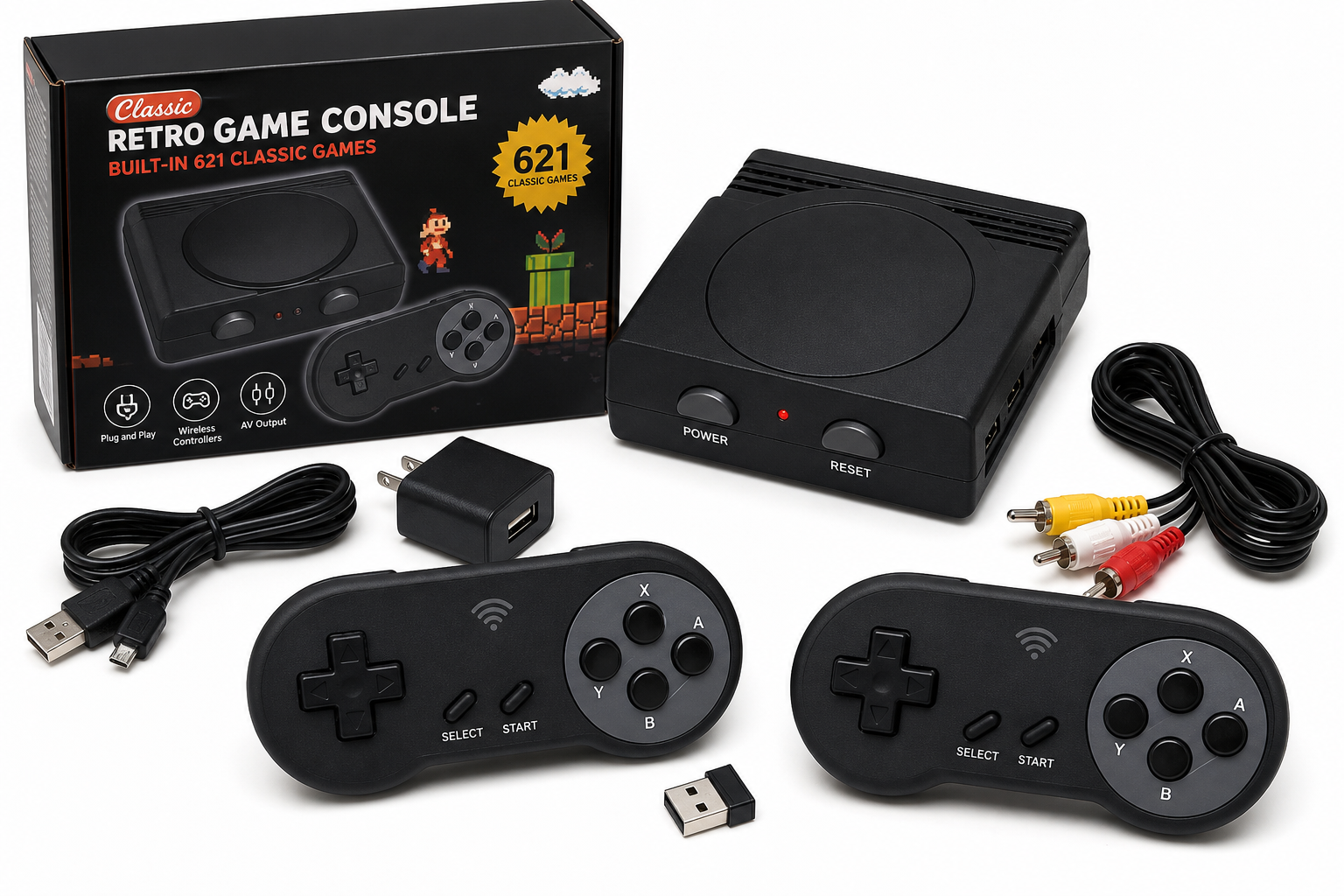
The Classic Retro Game Console with 621 built-in games and dual wireless controllers is a compact, plug-and-play 8-bit system aimed at casual nostalgia rather than accuracy or modern performance. It connects via AV output, offers a broad mix of simple arcade-style titles in one box, and is best suited for families or users who want quick, low-cost retro fun on a compatible TV. However, its AV-only output, variable build quality, repeated games in the library, and lack of official licensing or save features mean it is not a replacement for more premium or authentic retro gaming solutions.
Product Context
The Classic Retro Game Console Built 621 Classic Video Games, AV Output Handheld Game System with Dual Wireless Controllers, Plug and Play is one of many compact retro-style systems designed to deliver instant nostalgia with minimal setup. It targets:
- Casual players and families who want a ready-to-go library of old-school, 8-bit style games.
- Gift buyers looking for a simple, self-contained entertainment box for kids or mixed-age gatherings.
- Nostalgic adults who remember early console eras and want to revisit simple arcade and platform titles without configuring emulators or buying cartridges.
This model follows a common pattern in the low-cost retro space: a small, plastic console, hundreds of built-in games, AV connection to the TV, and two controllers included (here advertised as wireless). The focus is on breadth and convenience, not on perfect emulation, HD graphics, or official brand licensing.
You’ll typically find this console around $59.99, which positions it firmly as an impulse or budget-friendly purchase rather than a premium retro solution.
Feature Breakdown
Built-in Game Library (621 Titles)
- 621 preloaded games span genres like platformers, shooters, puzzles, sports and racing.
- As with many similar units, the game list often includes:
- Classic-style platform and action games.
- Simple shooters and beat ’em ups.
- Basic puzzle and card/board-style titles.
- Expect repetition and clones: many low-cost retro consoles reuse or slightly modify games, so the true number of unique experiences is usually lower than the advertised count.
There is no indication of official licensing from major brands. That means:
- You should not expect all the exact, name-brand titles you may remember from original hardware.
- Some games may be off-brand versions, ROM hacks, or generic clones with familiar mechanics but different names.
AV Output to TV
The console uses AV (composite) output, typically via the classic yellow-red-white RCA connectors:
- Works best with older TVs or modern TVs that still have AV inputs.
- Not designed for 4K-only or HDMI-only displays without an additional AV-to-HDMI converter.
- Outputs 8-bit level video: colors and sharpness are limited compared to HDMI-based mini consoles, which is in line with the retro aesthetic but also means soft and sometimes noisy image quality.
Dual Wireless Controllers
The product description highlights dual wireless controllers, which are styled similarly to classic gamepads:
- Support two-player co-op or versus modes in compatible games.
- Remove the need for long cables across the room, which is convenient in living rooms.
- Typically use 2.4 GHz or infrared-style wireless connections and may require batteries.
However, with this class of console, wireless controllers can be a mixed bag:
- Latency: Slight input lag may be noticeable in fast-paced action or platformers.
- Build quality: Buttons and D-pads are often serviceable but may feel less precise than original controllers or modern name-brand gamepads.
Plug-and-Play Simplicity
The setup flow is straightforward:
- Connect the AV cable from the console to the TV’s AV inputs.
- Connect the power cable (usually USB or included power adapter).
- Select the correct AV input on the TV.
- Power on the console and navigate the menu using a controller.
There is usually no internet, no downloads, no accounts—everything lives on the internal memory, making the system easy for kids or non-technical users to operate.
Performance Insights
Visual and Audio Quality
Because this is effectively an 8-bit style AV system, the performance profile is predictable:
- Resolution & clarity: On modern large-screen TVs, the composite signal results in a soft, slightly blurry image. For many users, this feels nostalgic; for others, it can look dated or noisy.
- Color reproduction: Colors are relatively washed out compared to HDMI outputs, but acceptable for simple sprite-based games.
- Audio: Simple chiptune-style sound is generally in line with retro expectations, but minor buzzing or hum from AV lines is possible depending on your TV and cable quality.
Game Responsiveness
Game responsiveness depends mainly on the controller performance and the TV’s input mode:
- When the TV’s “Game Mode” or low-latency option is enabled, on-screen response is generally adequate for casual play.
- Wireless controllers may introduce slight delay, noticeable mostly to experienced players in timing-sensitive platform sections.
- Button rollover (pressing multiple buttons quickly) can be limited, especially on lower-quality pads, so advanced inputs in action games may occasionally mis-register.
Overall, the system is playable and enjoyable for casual use, but it is not tuned for competitive or speedrun-level precision.
Stability and Reliability
These compact retro consoles are typically lightweight and built to a cost:
- Heat and noise: The hardware draws very little power and runs silently, with no fans.
- Crashes: Occasional freezes or glitches can happen, especially when switching games frequently; the remedy is generally to reset the console.
- Save support: Most similar devices do not offer persistent save states or profile management. Progress is usually lost once you exit a game unless the game itself has a built-in password or save system.
Usability
Interface and Navigation
The menu system is typically a simple list-based UI:
- Games are listed in a long numbered list, often without cover art or descriptions.
- Some devices group titles by category, but many simply scroll through all 600+ entries.
- Finding a specific game can be tedious; there is usually no search function.
This design is functional but basic—fine for browsing and casual discovery, less ideal if you are looking for specific titles.
Setup Experience
For a user with a compatible TV, setup should take only a few minutes:
- Connect AV cables correctly (matching color to color) is critical.
- On newer TVs, you may need to enable the AV input or use an adapter if the TV only has HDMI ports.
- The console is lightweight enough that it can hang from cables; it’s best placed on a stable surface to avoid strain on connectors.
Who Will Find It Easy to Use?
- Children: Once turned on and set to the game menu, kids can experiment and pick games without complex reading or configuration.
- Older adults: Those accustomed to simpler TV inputs and basic remotes may appreciate the straightforward AV connection more than app-based or streaming-centric solutions.
- Non-gamers: No logins, downloads, or system updates to manage.
That said, the reliance on AV inputs can be a hurdle for households with only HDMI ports available, requiring an inexpensive third-party adapter.
Trade-offs
Strengths
-
Large Built-in Library
With 621 titles available immediately, there is plenty of variety for short sessions and casual discovery. -
Two Included Controllers
Being able to play cooperatively or competitively out of the box is a key advantage for families and parties. -
Plug-and-Play Design
No operating system updates, no accounts, and no downloads make this attractive for users who want a simple, appliance-like device. -
Budget-Friendly
The price point (around $59.99 depending on seller and promotions) is generally far below that of brand-name mini consoles or full modern systems.
Limitations
-
AV-Only Output
- Not ideal for modern home theaters.
- May require an AV-to-HDMI adapter for many contemporary TVs.
- Image quality is limited compared with HDMI-based retro or modern consoles.
-
Uncurated Game Quality and Repetition
- Many built-in titles may feel like filler or near-duplicates.
- The library is not curated with modern quality-of-life standards, so you may spend time testing which games are actually enjoyable.
-
No Official Ecosystem or Updates
- There are no firmware updates, online services, or ways to legitimately add new games.
- If a game runs poorly or the system has quirks, there is usually no patch or vendor support.
-
Basic Build Quality
- Plastic casings and controllers are typically light and can feel cheap.
- Buttons and D-pads may not stand up to intensive long-term use.
-
Limited Features for Enthusiasts
- No save states, achievements, or advanced display options.
- Not suitable as a serious emulation or archival platform.
Conclusion
The Classic Retro Game Console with 621 built-in games and dual wireless controllers is best understood as a casual, budget-friendly nostalgia device rather than a serious retro gaming platform.
It shines when:
- You want an inexpensive, self-contained game box for occasional family use.
- You’re gifting a simple retro-style toy to kids or non-technical users.
- You value immediate access to many simple games over high visual fidelity or precise emulation.
It will feel limited if:
- Your TV lacks AV inputs and you’re not interested in adapters.
- You want authentic, licensed classics with strong build quality and HDMI output.
- You expect modern features such as save states, curated libraries, or online capabilities.
If your priority is low-cost, plug-and-play fun and you’re comfortable with AV output and some rough edges, this console delivers a straightforward way to recapture a slice of old-school gaming without a large investment. For enthusiasts or those seeking a centerpiece retro system, however, it may be worth considering more robust, HDMI-based alternatives—even if they come at a higher price than the budget-friendly $59.99 range of this unit.