
Pulsar Lab X2F Mini Wireless Gaming Mouse (Black) Review: A Purpose-Built Fingertip Weapon at 38g
The Pulsar Lab X2F Mini Wireless Gaming Mouse in black is an ultra-light 38 g, fingertip-focused design aimed squarely at competitive FPS players who favor speed and precision over palm support. With its symmetrical, flat-sided shell, center hump, flagship XS-1 sensor (up to 32,000 DPI), 8K polling capability, and crisp HUANO switches, it provides a highly responsive and flexible platform for serious aim training and fast-paced shooters. This review examines build quality, sensor performance, shape and comfort, wireless behavior, and overall value to help you decide if this aggressively specialized mouse fits your grip style and setup.
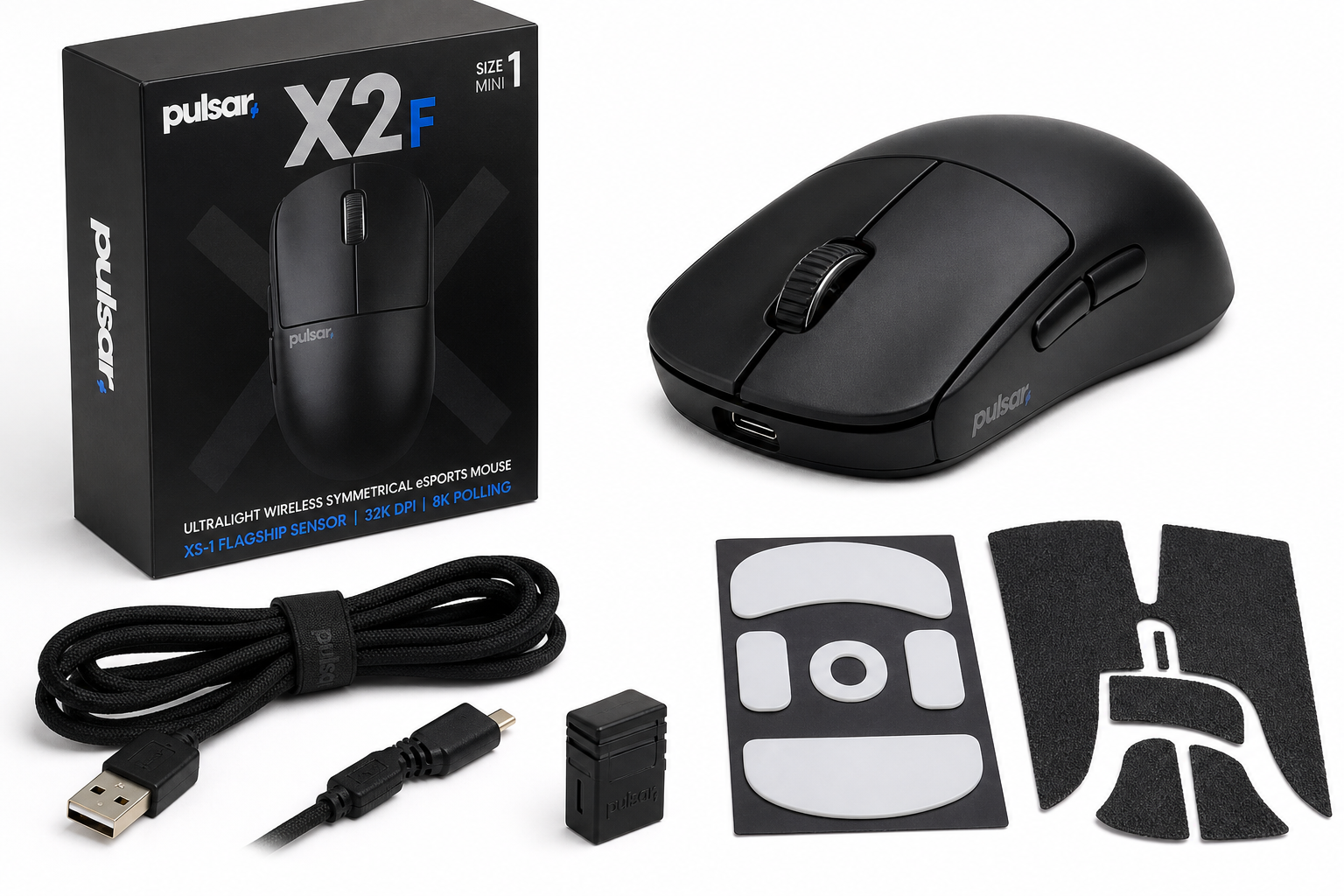
Quick Summary
The Pulsar Gaming Gears Pulsar Lab X2F Wireless Gaming Mouse, Mini, Black is a highly specialized, ultra-light (about 38 g / 1.34 oz) wireless mouse designed primarily for fingertip grip users and competitive FPS play. Pulsar achieves this by aggressively trimming the rear of the shell, keeping the profile low, and pairing the design with:
- A symmetrical, flat-sided mini shell with a pronounced center hump
- Pulsar’s XS-1 flagship sensor (up to 32,000 DPI)
- Support for up to 8,000 Hz polling with the appropriate dongle
- HUANO Blue Pink dot mechanical switches for crisp main clicks
- Light but stable wireless performance with a paracord USB‑C cable for wired use
On the downside, the X2F’s radical shape can be polarizing. It demands proper fingertip technique, offers almost no rear palm support, and its ultra-low weight can reveal personal preference issues—some users love the speed, others find it too insubstantial or twitchy. Still, for the right hands and grip style, it’s one of the most focused fingertip tools on the market.
If you find it at around $149.95, it sits in the same general bracket as other premium wireless esports mice but distinguishes itself through weight, shape, and sensor tuning rather than broad mainstream appeal.
Detailed Analysis
Design and Build Quality
The Pulsar Lab X2F Mini keeps the visual language minimal: a clean black finish, a compact footprint, and no cut-out honeycomb pattern. The flat side walls and low rear immediately signal its fingertip-first intent. Unlike many small mice that still preserve a fuller back, the X2F effectively removes that section, so your palm is encouraged to hover or barely touch.
Key design points:
- Dimensions (approximate): 87.5 mm length, 61.1 mm width, 31.6 mm height
- Weight: about 38 g (1.34 oz), without resorting to structural holes
- Symmetrical shape suitable for left- and right-handed use (though buttons are on the left side only)
- Material: ABS/nylon composite, giving it a solid, non-flexy feel for the weight class
In hand, the shell feels impressively rigid for such a light device. There is minimal to no flex on the sides or top when squeezed reasonably hard, and creaks are rare. The finish leans toward a semi-matte texture that balances grip and cleanliness; it is not as grippy as heavy rubberized coatings, but good enough for dry hands.
The scroll wheel uses Pulsar’s refined implementation with distinct steps and a light-to-medium resistance level. It avoids the overly loose feel of some ultralights, which is important when micro-adjusting in FPS titles.
Switches and Buttons
Pulsar equips the X2F with HUANO Blue Pink dot switches for the main buttons. These are known for a crisp, sharp actuation and relatively firm response, which many competitive players prefer for controlled bursts and avoiding accidental spam.
- Primary clicks (L/R): Light-to-moderate actuation force, short pre- and post-travel, and a clean tactile peak
- Side buttons: Small but accessible, placed high enough to avoid accidental presses yet still usable with fingertip grip
- Scroll click: Slightly heavier than the main clicks but consistent, suitable for binds like ping or melee
Overall, click feel is a strong point of the X2F. There is little to no noticeable wobble, and the tensioning works well across the length of each main button, which is important for varied finger positions in fingertip grip.
Sensor and Performance
At the heart of the X2F is Pulsar’s XS-1 flagship sensor, designed to compete at the top end of the market:
- Up to 32,000 DPI
- High tracking speeds and acceleration tolerance appropriate for low-sense flicks
- Support for 8K polling (8,000 Hz) when used with a compatible dongle and system
- 32‑bit MCU and modern wireless implementation for low latency
Real-world performance:
- Tracking is clean and predictable, with no perceptible smoothing or acceleration when configured correctly in software.
- Motion-sync style tuning (via Pulsar software) aims to synchronize sensor readout timing with the PC’s polling behavior, improving micro-aim consistency at high refresh rates.
- Lift-off distance can be tuned in software and is low enough for most low-sense players to recenter without unintentional cursor movement.
For fast-paced shooters like VALORANT, CS2, or Apex Legends, the X2F behaves as expected for a top-tier sensor: it simply gets out of the way. Any aim issues you notice will almost certainly be related to grip, shape, or sensitivity choices rather than sensor limitations.
Wireless and Battery
The X2F operates primarily over 2.4 GHz wireless using its included dongle, with wired USB‑C as a backup and charging method. Pulsar also supports higher polling rates (up to 8K) with an optional 8K dongle and suitable PC hardware.
Wireless characteristics:
- Latency is effectively imperceptible at standard 1K polling and remains competitive in fast shooters.
- 8K polling can reduce micro-stutter or input granularity for very high frame rate setups, but it does increase CPU load and power usage.
- The included paracord-like USB‑C cable is serviceable for wired use, though the mouse is clearly designed to be used primarily wirelessly.
Battery life depends heavily on polling rate and lighting/feature choices. At standard 1,000 Hz polling with no RGB to drive, you can expect multiple days of average use between charges. Higher polling and constant high-DPI use will reduce that figure but maintain esports-grade responsiveness.
Software and Customization
Pulsar’s companion software (Pulsar Fusion or X2F-specific software, depending on version) offers a reasonably streamlined experience:
- DPI adjustment in fine increments, allowing you to match in-game and training sensitivities closely
- Polling rate control, including access to higher modes with compatible hardware
- Button remapping and macro assignment for side buttons and scroll functions
- Profiles saved either on-board or in the software, making it easier to carry your settings between PCs
The software is relatively lightweight, but as with most gaming utilities, it’s best treated as a configuration tool rather than something you keep running constantly if you value a clean system.
User Experience
Grip and Comfort
The X2F’s defining trait is its fingertip-only philosophy. The short length and cut-off rear mean:
- Your palm rarely rests fully on the mouse, if at all.
- Most of the control comes from finger articulation and small wrist movements.
- The center hump gives just enough support for the base of the fingers, but not the palm itself.
Who it suits best:
- Players who already use or are comfortable transitioning to pure fingertip grip
- Smaller to medium hand sizes in particular, though larger hands that like to hold the mouse more forward can also make it work
- Low-to-mid sensitivity users in FPS who rely on micro-corrections and rapid direction changes
Who may struggle:
- Dedicated palm grippers, or anyone who strongly prefers feeling their palm anchored on the mouse
- Users who want a hybrid claw/palm feel with more back support
The ultra-light 38 g weight makes rapid flicks and quick corrections feel effortless. However, some users may find such a light mouse harder to control at first, especially if they are used to heavier devices that dampen small involuntary movements.
Glide and Skates
Pulsar equips the X2F with UHMW-PE skates, which provide a very low-friction glide on cloth and hard pads alike. The small footprint of the mouse combined with low friction means it feels extremely nimble. On slower or more control-focused mousepads, the combination is well-balanced; on very fast pads, it can feel almost frictionless.
If you prefer a slightly more controlled feel, swapping to thicker or more control-oriented skates—or a slower pad—can help tame the speed without sacrificing the benefits of low mass.
Everyday Use
While clearly engineered around competitive play, the X2F is still functional for everyday tasks:
- Web browsing and productivity are fine, though some may find the lack of palm support fatiguing over long, non-gaming sessions.
- The side buttons and scroll click are adequate for standard shortcuts.
- Its light weight makes it comfortable to use for extended periods if your grip style aligns with its design.
If you want a single mouse for both heavy competitive gaming and long ergonomic office use, the X2F might be a bit specialized. It shines brightest when your priority is performance in shooters and aim-intensive titles.
Pros
- Extremely light (around 38 g) without structural cut-outs
- Aggressively fingertip-focused shape ideal for pure fingertip grip enthusiasts
- Symmetrical, flat-sided design for consistent finger placement and control
- XS-1 flagship sensor with up to 32K DPI and excellent tracking fidelity
- 8K polling support (with compatible dongle and system) for ultra-low latency
- Crisp HUANO Blue Pink dot switches with satisfying tactility and minimal pre-travel
- Strong shell rigidity despite the low weight
- Clean, driver-assisted software with DPI, polling, macros, and profile control
- Suitable for both wireless and wired use via USB‑C
Cons
- Shape is highly specialized; palm and many claw grippers may find it uncomfortable or unstable
- Ultra-light weight can be too twitchy for users who rely on the inertia of heavier mice
- Requires good fingertip fundamentals; may not be the best first ultralight for beginners
- High polling modes (e.g., 8K) demand stronger CPU and USB bandwidth, and reduce battery life
- No left-side buttons for left-handed users, despite symmetrical shape
Value Assessment
Positioned as a premium competitive mouse, the Pulsar Lab X2F Mini Wireless typically lands around $149.95 on marketplaces like Amazon. In this price band, it competes with well-known wireless esports mice from larger brands, many of which offer more conventional shapes and broader ergonomics.
Where the X2F stands out:
- Specialization over generalism: Rather than trying to please everyone, it targets fingertip players who want maximum agility.
- Weight and performance combo: Few mice combine this level of lightness with a flagship sensor and high polling capabilities without resorting to structural cutouts.
- Shape innovation: The trimmed rear and flat sides are a deliberate choice to enhance fingertip control, not just a shrunken version of an existing shell.
From a value perspective, the X2F offers strong performance per dollar if you are the intended user. If you are unsure of your grip style or know you prefer palm/claw comfort, other mice at a similar price might be a safer, more versatile choice.
Final Thoughts
The Pulsar Lab X2F Mini Wireless Gaming Mouse (Black) is not built to be everyone’s daily driver; it is built to be someone’s perfect fingertip tool. At just about 38 g, with a radical rear profile, flat sides, and a top-tier sensor, it clearly signals who it’s for: players willing to optimize their grip, pad, and sensitivity for high-level FPS performance.
If you are a fingertip player—or actively training to become one—and you prioritize speed, precision, and low weight above all else, the X2F is a compelling, highly specialized option that justifies its cost around $149.95. If, however, you want a more forgiving shape or spend as much time on spreadsheets as in shooters, you may be better served by a more conventional ergonomic design.
In short: the Pulsar Lab X2F is an excellent choice for serious fingertip grip enthusiasts, and a risky but rewarding experiment for anyone curious about pushing their mouse control to the next level.