
KTC H32S17F Review: A Budget 32-Inch 240Hz Curved Gaming Monitor Focused on Speed
The KTC H32S17F is a 32-inch 1080p curved gaming monitor built around a 240Hz HVA panel with 1500R curvature, Adaptive Sync support, and HDR10 compatibility. It prioritizes high refresh rates and strong contrast over pixel density, targeting competitive and casual gamers who want a large, immersive screen at an accessible cost. This review breaks down what it is, why it matters, its key strengths and weaknesses, and who should (and shouldn’t) consider it.
What This Product Is
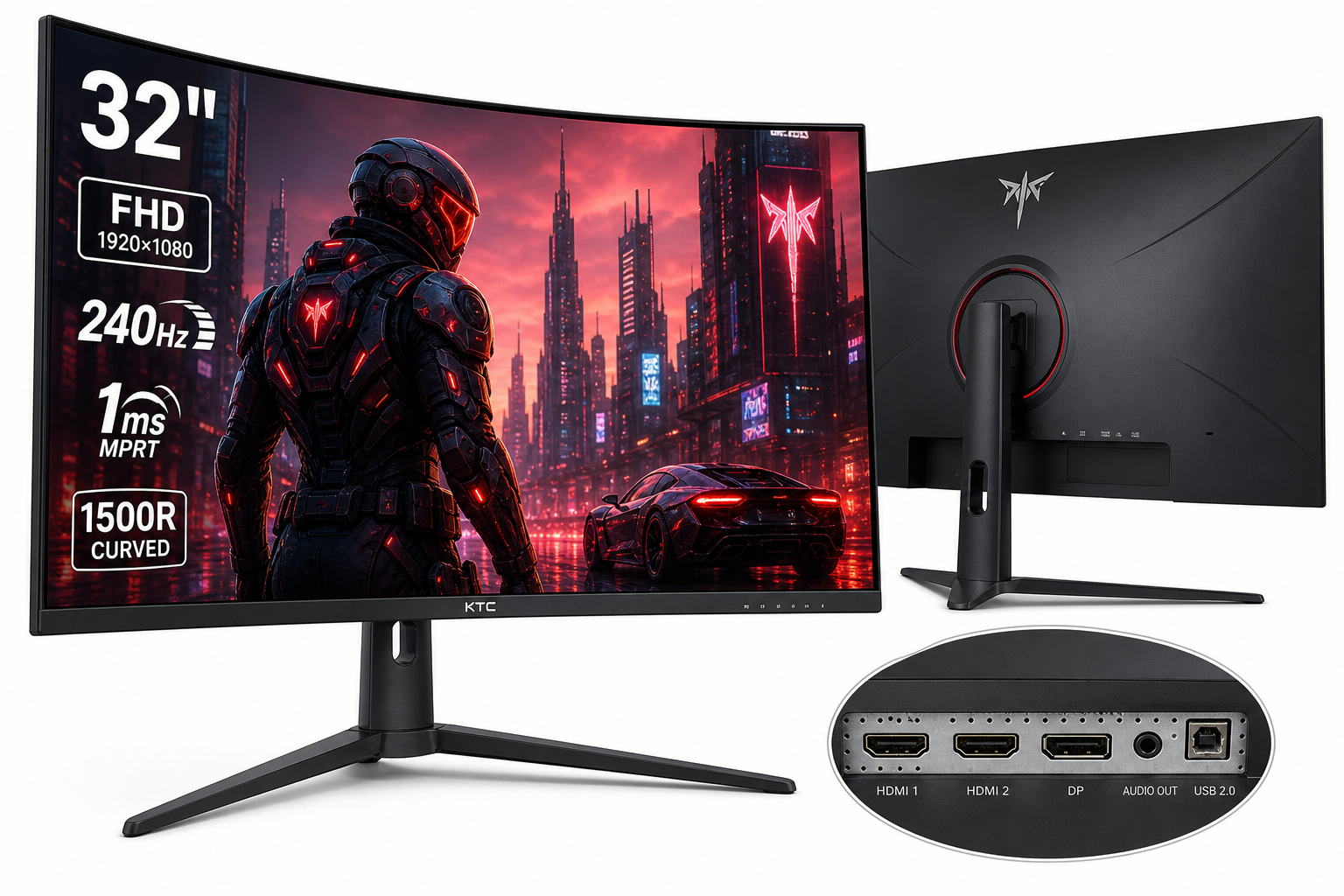
The KTC 32 inch 240Hz Curved Gaming Monitor (H32S17F) is a 31.5-inch Full HD (1920×1080) curved gaming display aimed at players who value high refresh rates and motion clarity over ultra‑high resolution.
Key specs include:
- 32-inch HVA panel with 1500R curvature
- 1920×1080 (FHD) resolution, 16:9 aspect ratio
- Up to 240Hz refresh rate over HDMI 2.0 and DisplayPort 1.4
- 1ms-class response (with overdrive / MPRT)
- HDR10 support, rated ~350 cd/m² brightness and 3500:1 contrast
- Wide color gamut (up to 125% sRGB / ~98% DCI-P3 coverage)
- Adaptive Sync (FreeSync and G-Sync compatible)
- 2 × HDMI 2.0, 1 × DisplayPort 1.4, 1 × audio out, 1 × USB 2.0 (firmware)
- Tilt-adjustable stand and 100×100 mm VESA mount support
On most retailers, it’s positioned as an aggressively priced 240Hz option; if you find it around $199.99, it’s squarely in budget 32-inch gaming territory.
Why It Matters
High-refresh-rate gaming used to require a premium, especially above 144Hz. The H32S17F helps bring 240Hz performance to a wider audience, and does so on a large, curved 32-inch canvas.
That combination matters for a few reasons:
- Competitive edge: 240Hz plus low response times can make fast-paced shooters and battle royale titles feel smoother and more responsive than 60–144Hz screens, assuming your GPU can deliver the frames.
- Immersion through curvature: A 1500R curve wraps the image slightly around your field of view, making large-screen gaming and media more engaging.
- Contrast-heavy visuals: The HVA panel (a VA-type technology) leans into a deep native contrast ratio, which benefits darker scenes in games and movies.
- Value positioning: By sticking to 1080p resolution, KTC can push refresh rate and panel specs while keeping the total cost down compared with 1440p or 4K 240Hz competitors.
If you’re building or upgrading a mid‑range gaming rig and want a big, fast display without overspending, this is the category the H32S17F targets.
Key Advantages
1. Extremely Smooth 240Hz Gaming
The headline feature is the 240Hz refresh rate with support across both HDMI 2.0 and DP 1.4. Paired with a responsive HVA panel and overdrive/MPRT modes, this monitor is tuned for:
- Fast shooters (Apex Legends, Valorant, CS2, Call of Duty)
- Racing and sports titles where motion clarity and input responsiveness are critical
Adaptive Sync (FreeSync and G‑Sync compatibility) helps reduce tearing and stutter between your GPU’s frame output and the panel’s refresh, especially important if your FPS fluctuates.
2. Strong Contrast and Solid Color Coverage
With a 3500:1 typical contrast ratio, the H32S17F offers deeper blacks and better shadow detail than many IPS competitors in this price range. Combined with:
- Up to 125% sRGB and close to 98% DCI-P3 color gamut coverage
- 8-bit color support and ~350 cd/m² peak brightness
…you get vivid images that pop, particularly in games and media with bright highlights against darker backgrounds.
3. Large, Immersive 32-inch 1500R Curve
At 32 inches, a curved 1500R radius offers a sweet spot for desktop gaming:
- The curve makes the outer edges of the screen easier to see without head movement.
- HUD elements and peripheral visuals in games feel more natural at arm’s-length distance.
- Movies and ultrawide-style content are more engaging than on smaller flat panels.
4. Practical Connectivity and Mounting
The port selection and ergonomics are straightforward but functional:
- 2 × HDMI 2.0 (up to 1080p 240Hz with compatible devices)
- 1 × DisplayPort 1.4 (PC users will likely prefer this)
- Audio out for speakers/headsets
- USB 2.0 port reserved for firmware updates
- Tilt‑only stand (‑5° to +15°) but 100×100 mm VESA support for monitor arms and alternative stands
This makes it easy to integrate into dual-monitor setups, wall mounts, or articulated arms.
5. Competitive Pricing for the Features
Relative to many 32-inch gaming displays—especially those with 240Hz and wide color gamut coverage—the H32S17F is typically priced in the budget-to-lower midrange bracket. Seeing a 240Hz curved panel with this spec sheet around $199.99 is what makes it attractive to value-conscious buyers.
Key Limitations
1. Low Pixel Density at 32 inches / 1080p
The most significant trade-off is resolution. At 32 inches, 1080p yields a relatively low pixel density:
- Text and UI elements can look soft or grainy compared with 27-inch 1440p or 24–27-inch 1080p monitors.
- Productivity tasks that rely on crisp fonts and detailed visuals (coding, design, reading long documents) can feel less comfortable over long sessions.
For pure gaming, especially at a typical 2–3 ft viewing distance, this may be acceptable, but it’s not ideal for users who care about sharpness or fine detail.
2. Typical VA/HVA Motion Trade-offs
While the monitor supports fast response times and 1ms-class modes, this is still a VA-type panel:
- Some users may notice dark‑level smearing or ghosting in high-contrast transitions, particularly in darker scenes.
- Overdrive or MPRT settings can reduce blur but may introduce inverse ghosting or reduced brightness depending on the mode.
Competitive players upgrading from high-end IPS or OLED panels may find motion performance less pristine, even if the raw refresh rate is high.
3. Limited Ergonomic Adjustability
The included stand only provides tilt adjustment:
- No height, swivel, or pivot functionality out of the box.
- Taller users especially may need a riser or a monitor arm to reach an ergonomic viewing height.
VESA support helps, but it adds extra cost and setup effort if you need more adjustability.
4. HDR10 Support Is Basic
While the H32S17F supports HDR10, its underlying hardware (edge-lit panel, 350 cd/m² brightness, no full-array local dimming) means:
- You get HDR compatibility, not true high‑end HDR performance.
- Highlights won’t reach OLED or premium HDR monitor levels, and blooming/raised blacks can still occur in challenging scenes.
Think of HDR here as a nice-to-have toggle for slightly punchier visuals rather than a core selling point.
Who It’s For
You should seriously consider the KTC H32S17F if:
- You’re a competitive or fast-paced gamer on a budget who wants a 240Hz experience without stepping up to expensive 1440p or OLED displays.
- You prefer a large, curved screen and sit at a typical desk distance, where the size and curvature feel immersive for shooters, MOBAs, racing games, and action titles.
- You value contrast and color over pixel density, appreciating deep blacks and saturated colors more than razor-sharp text.
- You plan to use Adaptive Sync with a mid‑range GPU (e.g., mid-tier NVIDIA or AMD cards) to get smooth, tear-free gameplay.
- You’re comfortable fine‑tuning settings (overdrive, MPRT, color modes) to balance motion clarity, brightness, and artifacting.
In short, it’s aimed at value-minded gamers whose primary goal is smooth, responsive gameplay on a large curved screen.
Who Should Skip It
You may want to look elsewhere if:
- You care a lot about text clarity and desktop sharpness. For mixed productivity and gaming, a 27-inch 1440p or even a 32-inch 1440p monitor will look noticeably crisper than this 32-inch 1080p panel.
- You’re sensitive to ghosting or motion artifacts. If you’ve used high‑end IPS or OLED gaming monitors, the HVA/VA motion characteristics here may feel like a step down despite the 240Hz refresh rate.
- You need wide ergonomics out of the box. If height adjustment is non‑negotiable and you don’t want to add a VESA arm or riser, the basic stand may disappoint.
- You expect premium HDR. For serious HDR movie watching or HDR‑centric games, a display with higher peak brightness and local dimming (or OLED) will provide a much stronger impact.
- You primarily game on consoles and don’t need 240Hz. Many modern consoles target 60–120Hz at higher resolutions; in that context, a 1440p or 4K 120Hz display may make more sense than a 1080p 240Hz monitor.
Final Recommendation
The KTC H32S17F delivers on its core promise: a large 32-inch, 240Hz curved gaming monitor that focuses on smooth motion, strong contrast, and immersive curvature at a generally accessible price point like $199.99.
It’s not a universal fit. The 1080p resolution at this size, typical VA motion trade-offs, and limited stand adjustability are real compromises. However, for PC gamers who prioritize high refresh rates, big-screen immersion, and good contrast over sheer sharpness and premium HDR, it offers a compelling value proposition.
If you understand those trade-offs and they align with your priorities, the H32S17F is a worthwhile budget-to-midrange option in the 32-inch 240Hz curved gaming segment. If you want sharper text, better HDR, or top-tier motion with minimal ghosting, it’s worth saving up for a higher-resolution IPS or OLED alternative instead.