
KTC H32S17F Review: A Budget 32-Inch 240Hz Curved Gaming Monitor for High-FPS Play
The KTC H32S17F is a 32-inch 1080p curved gaming monitor focused on high-refresh esports-style gaming. With a 240Hz refresh rate, fast response time, FreeSync/G-Sync compatibility, HDR10 support, and a 1500R curve, it targets players who want smooth, responsive gameplay on a large screen without paying premium prices. This review looks at how it performs in competitive shooters, general gaming, and everyday use, and outlines its strengths—like speed and contrast—as well as limitations including relatively low pixel density, VA-type motion handling quirks, basic ergonomics, and mixed user reports about ghosting and quality control.
Introduction
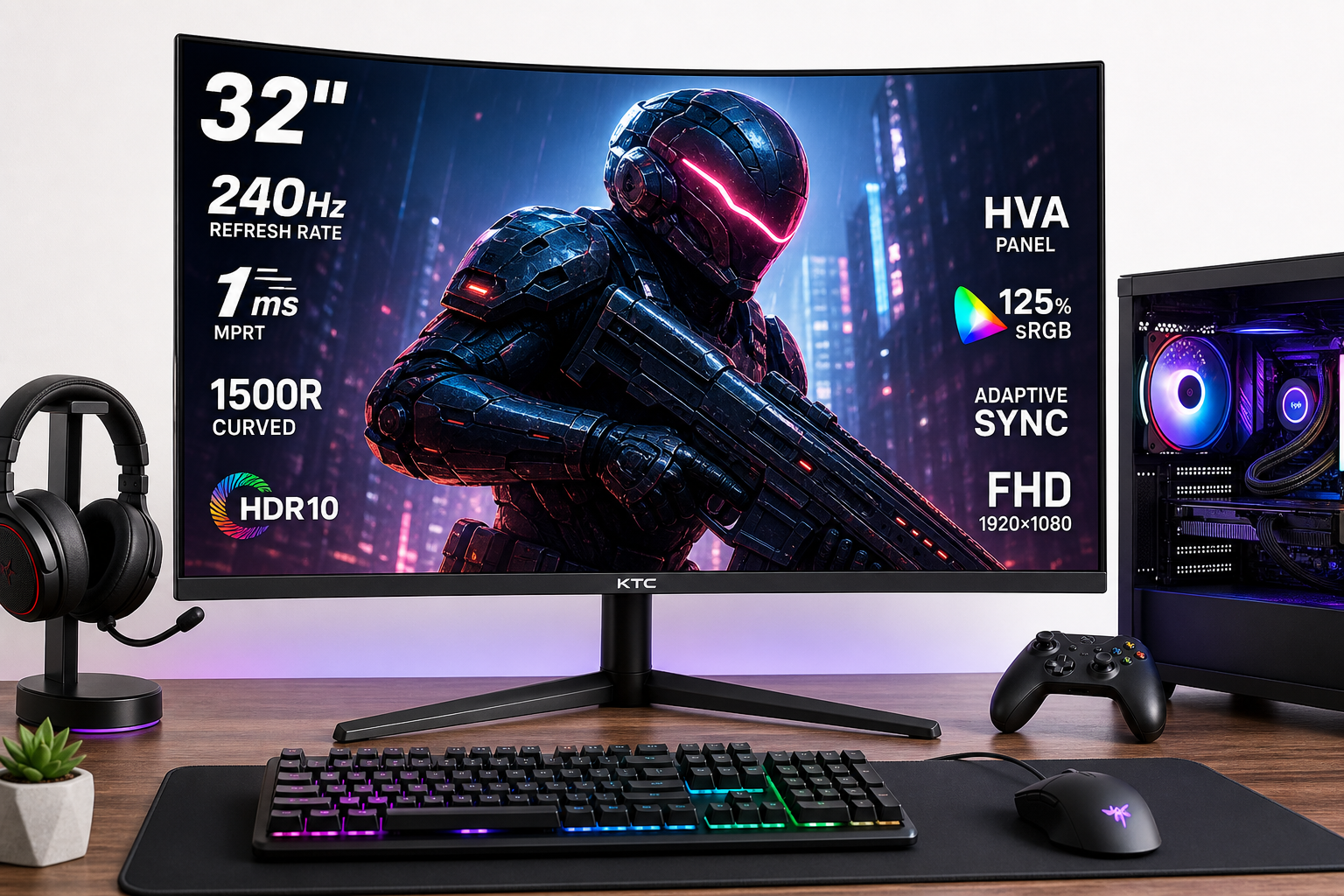
The KTC 32 inch 240Hz Curved Gaming Monitor (H32S17F) is a value-focused 32-inch Full HD gaming display built around an HVA panel with a 1500R curve, 240Hz refresh rate, and 1ms-class response (MPRT/overdrive). It supports Adaptive Sync (FreeSync & G-Sync compatible), HDR10, and a wide color gamut rated up to 125% sRGB, with a high native contrast of around 3500:1.
Connectivity is straightforward: 2× HDMI 2.0 and 1× DisplayPort 1.4, all capable of 1920×1080 at 240Hz, plus audio out and a USB 2.0 port for firmware updates. The stand offers basic tilt adjustment and a 100×100 mm VESA mount for arm mounting.
Positioned as a budget-friendly high-refresh option, the H32S17F frequently sells around $199.99, undercutting many 27–32 inch competitors with similar refresh rates. The question is whether its real-world performance and compromises—particularly 1080p resolution at 32 inches and VA motion characteristics—make sense for your setup.
Typical Use Cases
1. Competitive FPS and Esports Titles
Games such as Valorant, CS2, Apex Legends, Rainbow Six Siege, and similar high-FPS shooters are the core audience for this monitor. The combination of 240Hz refresh, fast response, and Adaptive Sync is aimed squarely at reducing motion blur, tearing, and input latency.
2. Casual and Immersive Gaming
For single-player titles—RPGs, open-world games, racing sims, and action adventures—the 32-inch 1500R curve and high contrast make for a more immersive experience. HDR10 support and the wide color gamut help deliver richer, more saturated visuals, even if the panel’s brightness and HDR implementation are closer to “HDR-compatible” than true HDR.
3. Console Gaming (Xbox, PS5, Switch)
With dual HDMI 2.0 ports, the H32S17F can serve as a shared display for Xbox Series X|S, PlayStation 5, and Nintendo Switch. Console support typically tops out at 1080p 120Hz (where implemented), with the remaining refresh headroom more useful for PC.
4. General Desktop Use and Media
For productivity, browsing, and streaming video, the 32-inch size provides ample real estate. However, the 1080p resolution on a 32-inch panel results in a relatively low pixel density, meaning text and UI elements appear larger and less sharp than on a 27-inch 1080p or 27-inch 1440p display. This is a key trade-off for buyers who intend to use the monitor heavily for work.
Performance in Each Scenario
Competitive FPS and Esports
Motion & Responsiveness:
- The 240Hz refresh rate and 1ms-class MPRT/overdrive give noticeably smoother motion compared to 60–144Hz displays when frame rates are high.
- Overdrive settings help reduce blur, but being an HVA (a VA-variant) panel, some users report visible dark-level smearing/ghosting, especially in high-contrast scenes.
- Input lag is low enough for most competitive players; paired with a capable GPU, it provides a responsive feel.
Clarity & Visibility:
- The large 32-inch size makes enemies easier to spot, but the 1080p resolution spread over this area can look soft, especially at short viewing distances.
- Black equalizer-style adjustments (through OSD gaming modes) can help with visibility in dark areas, leveraging the high contrast.
Overall, the H32S17F performs well for high-refresh PC gaming if you accept the VA-type motion smear and lower pixel density.
Casual and Immersive Gaming
Image Quality:
- The panel offers high contrast (≈3500:1), which delivers deep blacks for a VA-type display.
- Wide gamut coverage (up to 125% sRGB, ~94% DCI-P3 coverage) provides vivid colors that can make games and media look punchy.
- Viewing angles are typical for an HVA panel: decent but not on par with IPS, though the 1500R curve helps maintain a more consistent viewing angle across the screen.
HDR10:
- HDR10 support is present, but with 350 cd/m² typical brightness and no local dimming, HDR is more about improved tone mapping and color than true HDR contrast.
- Some content gains extra pop, but expectations should be modest—this isn’t a high-end HDR monitor.
For single-player and cinematic titles, the immersion from size, curve, and contrast is compelling, especially at this price tier.
Console Gaming
Performance:
- HDMI 2.0 inputs support up to 1080p 240Hz for PC, but current-gen consoles mainly target 1080p 60–120Hz.
- Adaptive Sync behavior varies by console and game; on PC you’ll get the most consistent FreeSync/G-Sync-compatible experience.
Experience:
- The 1500R curve is pleasant for couch-distance or close desk play.
- Again, 1080p at 32 inches is serviceable for console gaming, especially if you sit somewhat further back, but not as sharp as 1440p or 4K.
General Desktop Use and Media
Text & Productivity:
- The low pixel density is the main drawback for office tasks. Text can look jagged compared to a 27-inch 1440p display.
- For users who prefer larger UI elements and sit slightly further away, this may actually be comfortable.
Media Consumption:
- The high contrast and wide gamut work nicely for movies and streaming, especially in darker rooms.
- Curvature and size give a TV-like experience on a desk.
However, if sharpness for document work, coding, or design is a priority, a higher-resolution monitor would be preferable.
Strengths Across Scenarios
-
High Refresh Rate (240Hz)
Very smooth motion and strong responsiveness for fast-paced PC gaming, especially competitive shooters. -
Strong Contrast and Wide Color Gamut
~3500:1 contrast and 125% sRGB gamut deliver deep blacks and vibrant colors that enhance both games and media. -
Immersive 32-Inch 1500R Curve
The size and curvature create a wraparound feel, improving immersion in racing, simulators, and open-world titles. -
Adaptive Sync Support (FreeSync & G-Sync Compatible)
Reduces tearing and stuttering when frame rates fluctuate, especially useful at high refresh rates. -
Simple but Adequate Connectivity
Dual HDMI 2.0 and a DP 1.4 port cover a PC plus multiple consoles or media devices without adapters. -
VESA Mount and Tilt Adjustment
Basic tilt plus a 100×100 VESA mount give flexibility to pair with monitor arms or multi-monitor setups. -
Aggressive Pricing
The H32S17F often sits in a very competitive bracket, making 240Hz and a large curved panel accessible around $199.99.
Limitations Across Scenarios
-
Low Pixel Density at 32-Inch 1080p
Text and fine details appear soft up close. This is the single biggest compromise versus 27-inch 1080p or 32-inch 1440p. -
VA-Type Ghosting and Smearing
Despite its 1ms MPRT claim, real-world motion handling still shows VA dark-level smear in some situations. User reports are mixed—some find it acceptable for the price, while others consider it a deal-breaker for competitive play. -
Basic Ergonomics
The stand only supports tilt; there’s no height, swivel, or pivot adjustment. Many users will want a VESA arm for a more ergonomic setup. -
Entry-Level HDR Implementation
HDR10 without higher peak brightness or local dimming equals limited real HDR impact. It’s a nice bonus, but not a substitute for a true HDR-capable display. -
Quality Control Variability (Anecdotal)
Community feedback describes both very positive experiences (great value, surprisingly good performance) and negative ones (panel uniformity, ghosting complaints, or dissatisfaction with 32-inch 1080p clarity). As with many budget monitors, some unit lottery is to be expected. -
Not Ideal for Color-Critical Work
While color is vivid and coverage is high, out-of-box calibration can vary, and there’s no claim to professional-grade accuracy. It’s fine for gaming and media, but not for serious color grading or prepress work.
Verdict
The KTC H32S17F targets a very specific user: someone who primarily plays on PC at high frame rates, wants a large, curved, very fast 240Hz panel, and is working within a modest budget around $199.99.
It delivers:
- Smooth, responsive gameplay for competitive and casual titles.
- Deep contrast and wide, punchy color that make games and media look engaging.
- A genuinely immersive 32-inch curved experience, especially at close-to-mid viewing distances.
In exchange, you accept:
- Soft overall sharpness due to 1080p resolution at 32 inches.
- VA motion quirks—dark scene ghosting that won’t match the cleanest IPS or OLED options.
- Basic stand ergonomics and an HDR implementation that’s more marketing than transformative.
Recommended if:
- Your priority is high-refresh PC gaming on a large screen and you care more about speed and immersion than pin-sharp text.
- You are coming from a 60–144Hz monitor and want a budget jump to 240Hz without stepping up to 1440p pricing.
Not ideal if:
- You are sensitive to motion artifacts and demand minimal ghosting, or you play at a highly competitive level where VA smear is unacceptable.
- You need a sharp, multi-purpose monitor for significant productivity or creative work, where 27-inch 1440p or 32-inch 4K would serve you better.
For the right buyer—an esports-focused gamer on a budget seeking a big, curved, 240Hz display—the KTC H32S17F represents a compelling, if imperfect, value proposition.