
LG 32GS95UE UltraGear OLED Review: Dual‑Mode 4K/240Hz or 1080p/480Hz in a 32‑Inch Package
The LG 32GS95UE UltraGear is a 32‑inch OLED gaming monitor that targets enthusiast PC and console gamers with 4K resolution at up to 240Hz, or a unique 1080p 480Hz dual‑mode option. It combines an extremely fast 0.03ms response time with DisplayHDR True Black 400 certification, AMD FreeSync Premium Pro, and NVIDIA G‑Sync compatibility. This review looks at setup, daily use, motion performance, HDR capability, and ergonomics to help you decide if LG’s high‑end OLED is the right centerpiece for your gaming setup.
Introduction
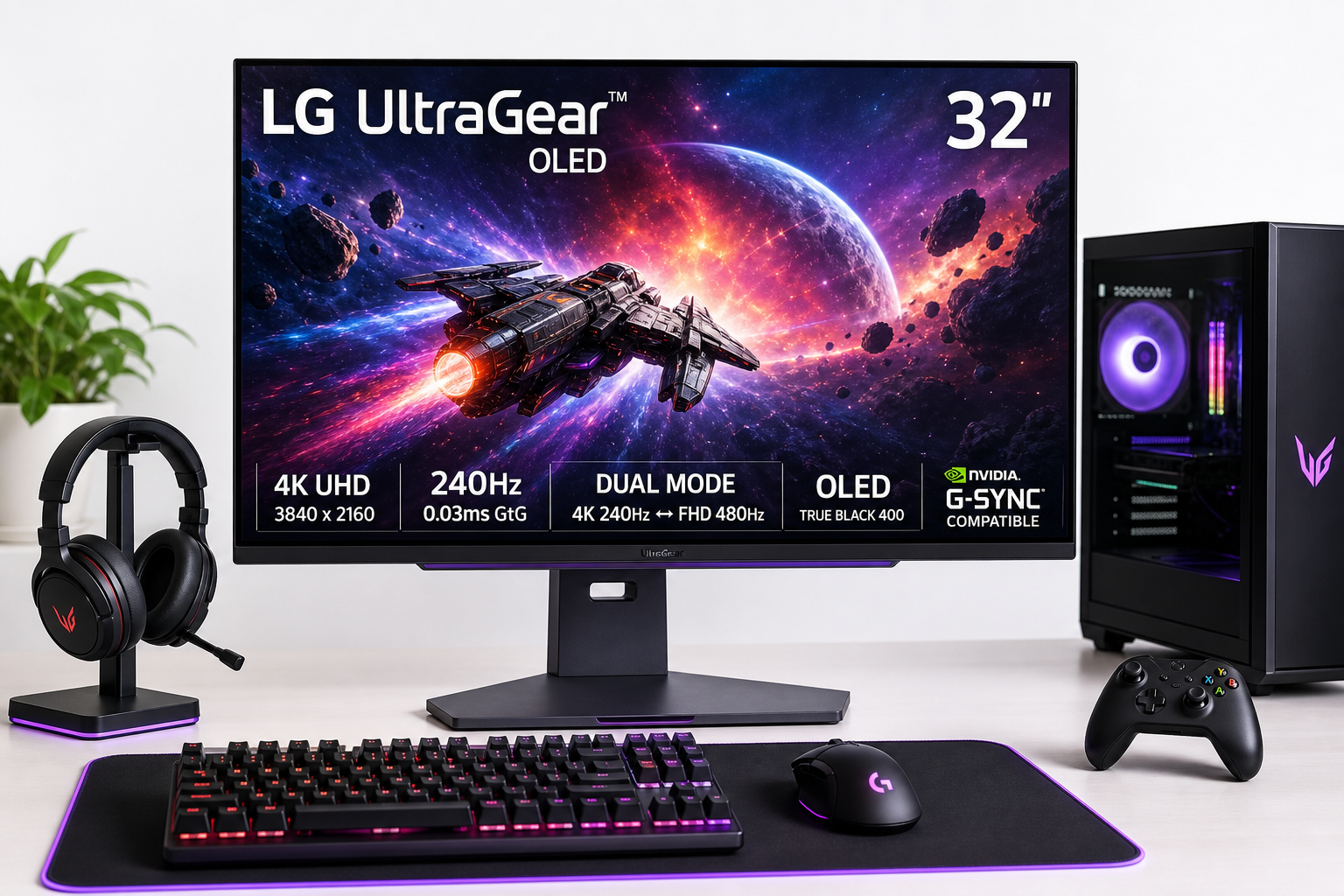
The LG 32GS95UE 32-inch UltraGear OLED Gaming Monitor is positioned as a flagship display for competitive and immersive gaming. It pairs a 32‑inch 4K UHD (3840 × 2160) OLED panel with a 240Hz refresh rate and a quoted 0.03ms gray‑to‑gray response time. LG’s signature UltraGear features are all here: DisplayHDR True Black 400, AMD FreeSync Premium Pro, NVIDIA G‑Sync compatibility, and full‑bandwidth HDMI 2.1 plus DisplayPort.
What sets this model apart is Dual Mode: you can run it at 4K 240Hz for maximum sharpness, or switch to 1080p 480Hz for latency‑sensitive esports titles. In practice, that makes the 32GS95UE unusually flexible—capable of both cinematic single‑player experiences and ultra‑high‑refresh competitive play.
If you’re shopping this monitor on Amazon at around $1439.00, it competes directly with other premium 32‑inch OLEDs and high‑end IPS 4K gaming monitors.
Setup / Getting Started
Physically, the LG 32GS95UE arrives well protected, with the stand, base, and cables separated from the panel. Assembly is straightforward:
- Attach the stand neck to the base using the included screw (no tools typically required).
- Click the stand into the rear VESA mount on the panel.
- Connect power and your preferred video input (DisplayPort or HDMI 2.1 for PCs and latest‑gen consoles).
Ports and Connectivity
On the rear, you’ll find a typical high‑end gaming monitor layout:
- 1× DisplayPort (high‑bandwidth for 4K 240Hz from PC)
- 2× HDMI 2.1 (suitable for PS5, Xbox Series X|S, and PCs)
- USB ports (for peripherals and on‑screen control integration, depending on region/config)
- Audio out for external speakers or a headset
The HDMI 2.1 ports are particularly useful if you’re switching between a PC and a console; you can still benefit from high refresh rates and VRR on both.
OSD and Dual Mode Configuration
The on‑screen display (OSD) is navigated via a small joystick under the bezel. From here you can:
- Toggle between 4K 240Hz and 1080p 480Hz Dual Mode presets
- Enable or tweak variable refresh rate (VRR) options
- Choose color profiles (sRGB, DCI‑P3, game modes)
- Adjust OLED care features (logo dimming, screen shift, pixel refresher)
Setting your GPU to output 4K 240Hz over DisplayPort or HDMI 2.1 is typically plug‑and‑play on modern graphics cards, though you may need to enable 10‑bit color and HDR in your OS.
Daily Usage
Desktop and Productivity
At 32 inches, 4K resolution provides a dense, sharp image suitable for office work and content creation. Text rendering is generally very good for an OLED gaming panel, though some users may notice a slight difference compared to the crispest IPS or mini‑LED productivity displays, especially with specific OS scaling settings.
The near‑infinite contrast of OLED makes dark themes and code editors look outstanding. However, as with any OLED, prolonged use with static elements (taskbars, HUDs, windows that never move) calls for sensible settings:
- Enable screen shift and logo dimming in the OSD.
- Occasionally hide static UI or use auto‑hiding taskbars.
Gaming Experience
In actual gameplay, this monitor is clearly tuned for enthusiasts:
- 4K 240Hz is ideal for visually rich single‑player games, racing sims, and open‑world titles where the extra detail and HDR pop matter.
- 1080p 480Hz Dual Mode caters to competitive shooters and fast arena titles, where motion clarity and input responsiveness take priority over resolution.
The 32‑inch size strikes a strong balance between immersion and desk‑friendly footprint. From a typical sitting distance (around 2–3 feet), you get a wide field of view without needing to turn your head aggressively.
Console Use
HDMI 2.1 support means current‑gen consoles can run:
- Up to 4K 120Hz with VRR
- HDR output with excellent contrast and black levels
For console gamers, the 32GS95UE works nicely as a desk‑mounted alternative to a larger OLED TV, with the ergonomics and pixel density optimized for close‑up use.
Performance & Reliability
Motion and Responsiveness
The quoted 0.03ms GtG response time is among the fastest in any consumer display category. In practice, this translates into:
- Very low motion blur, especially at 240Hz and 480Hz
- Clean tracking of fast‑moving objects
- Minimal overshoot or inverse ghosting compared to aggressive overdrive IPS monitors
When paired with FreeSync Premium Pro or G‑Sync compatibility, the monitor maintains smooth motion with minimal tearing across a wide frame‑rate range.
HDR and Image Quality
Being an OLED panel with DisplayHDR True Black 400, the 32GS95UE delivers:
- True blacks with per‑pixel illumination
- High perceived contrast for films and games
- Wide color gamut suitable for modern HDR content
While the absolute peak brightness may not match the loudest claims of mini‑LED competitors, the combination of perfect black levels and strong highlights still yields a highly impactful HDR image, especially in dim or controlled lighting.
Burn‑In Mitigation and Longevity
LG implements a set of burn‑in protection tools, including:
- Pixel shifting
- Automatic brightness limiting (ABL)
- Periodic pixel refresh cycles
These features are important for long‑term reliability. For most mixed use—including gaming, browsing, and occasional productivity—the risk is manageable if you avoid leaving static elements on‑screen at maximum brightness for extended periods.
What Works Well
-
Dual‑Mode Flexibility
The ability to switch between 4K 240Hz and 1080p 480Hz makes the 32GS95UE unusually adaptable. You can enjoy cinematic visuals one moment and hyper‑responsive esports performance the next, without changing displays. -
Class‑Leading Response Time
The 0.03ms OLED response greatly reduces blur and smearing compared with traditional LCD gaming monitors, especially at high refresh rates. -
Deep Blacks and High Contrast
As a true OLED panel, black levels are essentially perfect, enhancing both dark games and HDR films. Shadow detail and overall perceived contrast are a real step up from most IPS and VA monitors. -
VRR and Platform Support
With AMD FreeSync Premium Pro and NVIDIA G‑Sync compatibility, along with HDMI 2.1 and DisplayPort, the monitor covers a wide range of PCs and consoles without proprietary lock‑in. -
Ergonomic Stand
The included stand supports tilt, height adjustment, and swivel, making it easy to center the display at eye level and angle it to reduce reflections.
What Could Be Improved
-
Brightness Expectations vs. Reality
While HDR performance is strong, users coming from the very brightest mini‑LED or high‑nit QD‑OLED panels may find peak brightness more modest than marketing numbers imply, especially in full‑screen bright scenes. -
OLED Burn‑In Anxiety
Although mitigations exist, some buyers may hesitate to use an OLED for heavy productivity with static UI. That’s not unique to this model, but it’s an inherent trade‑off of OLED technology. -
Text Clarity and Subpixel Layout
As with many OLED monitors, subpixel layout and operating system font rendering can make text appear slightly different from a standard RGB IPS panel, particularly in certain applications or at non‑native scaling. -
Price Positioning
The 32GS95UE sits at a premium price bracket (around $1439.00 at the time of writing), which may feel steep compared to fast IPS or smaller OLED monitors. The Dual‑Mode feature and 32‑inch 4K panel do justify much of that cost, but it still targets enthusiasts rather than budget shoppers.
Overall Impression
The LG 32GS95UE UltraGear OLED is a focused, high‑end gaming monitor built for users who want both top‑tier image quality and cutting‑edge responsiveness in a single 32‑inch package. Its combination of 4K 240Hz, 1080p 480Hz Dual Mode, true OLED blacks, and comprehensive VRR support makes it one of the most versatile displays in its class.
It’s best suited for:
- PC gamers who alternate between competitive shooters and cinematic single‑player titles
- Console gamers wanting a desk‑friendly OLED with full 4K HDR and high refresh support
- Enthusiasts willing to manage OLED care features in exchange for stunning contrast and motion performance
If you are comfortable with the OLED trade‑offs and the premium asking price of roughly $1439.00, the LG 32GS95UE stands out as a compelling choice for a long‑term, all‑round gaming centerpiece.