
KDD RGB Headphone & Controller Stand Review: Compact 3-in-1 Organizer for Gaming Desks
The KDD RGB Headphone & Controller Stand is a compact 3-in-1 desktop accessory designed to store one gaming headset and up to two controllers while adding customizable RGB lighting to a setup. With nine lighting modes, foldable side arms, and integrated cable management, it targets console and PC gamers who want to tidy their desk without committing to a bulky dock. This review looks at its design, feature set, day-to-day performance, usability, and the main trade-offs to consider before buying.
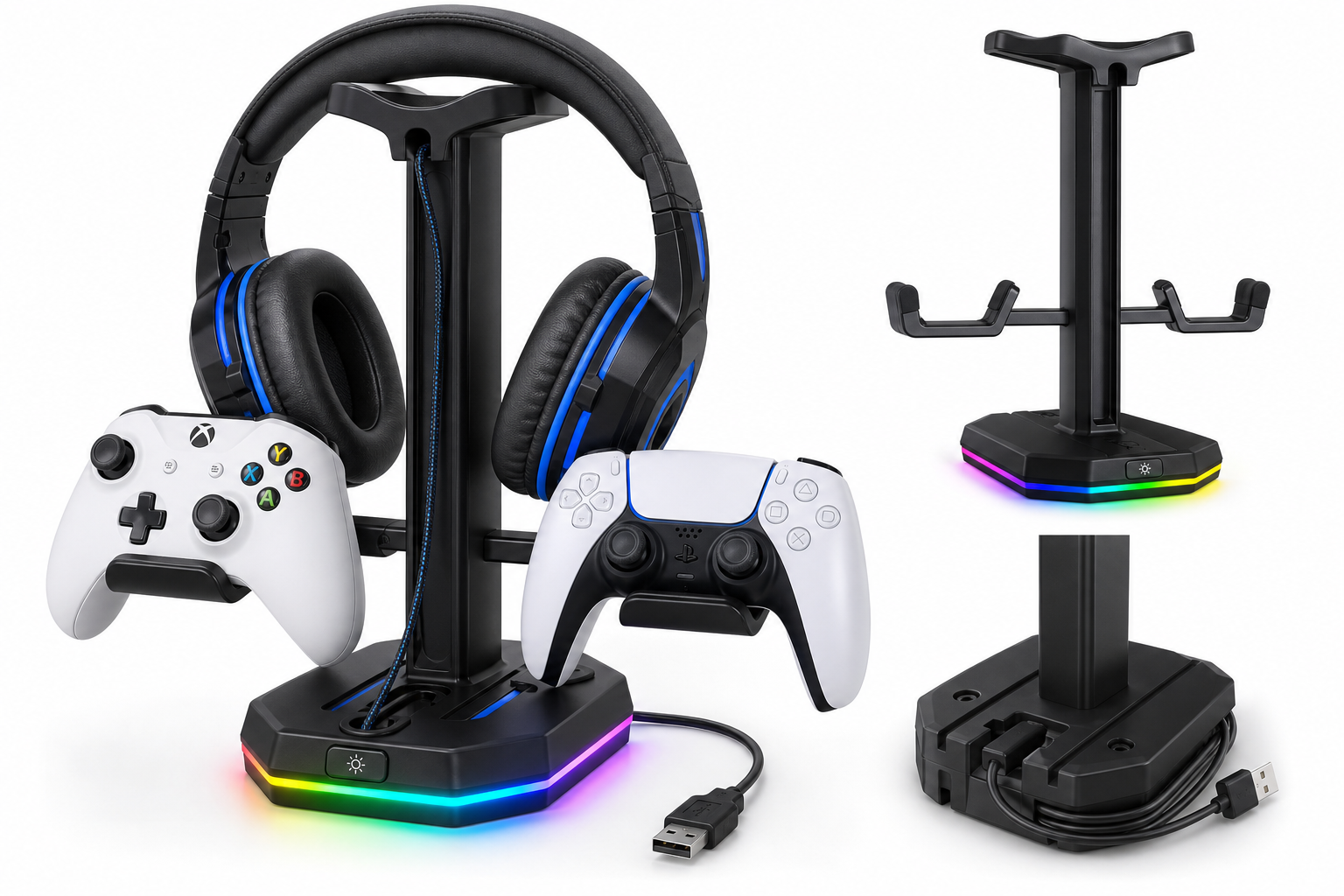
Product Context
The KDD RGB Headphone & Controller Stand with 9 Light Modes is aimed at gamers and desk users who want a small-footprint way to store a headset and controllers while adding ambient lighting to their setup. Instead of a full charging dock or large hub, this product focuses on:
- A central stand for a single over-ear headset
- Two foldable side hooks for game controllers
- RGB lighting in the base
- Basic cable organization for headset and USB cables
It is designed to sit behind or beside a monitor, console, or PC case, and it connects via USB for power. For buyers in this category, its main appeal is combining storage and lighting in one accessory at around $25.95, typically undercutting many branded charging stations or full RGB desk hubs.
Feature Breakdown
3-in-1 Storage Layout
- Headphone stand: A vertical post with a wide top rest supports most over-ear gaming headsets, helping prevent deformation of the headband.
- Dual controller hooks: Two foldable arms on the sides are sized for common console and PC controllers (Xbox, PlayStation, Switch Pro, generic PC gamepads). When not in use, they can be folded up to reduce the footprint.
- Cable organizer: A cable slot near the top routes a headset cable downward, while grooves in the base help wrap or anchor USB and audio leads so they don’t sprawl across the desk.
RGB Lighting System
The stand integrates RGB lighting into the base with 9 lighting modes, typically including:
- Static single-color modes (e.g., red, green, blue, purple, cyan, yellow, white)
- Breathing or cycling multi-color effects
- Fast and slow color transitions
A physical control button on the base cycles through effects and can usually be long-pressed to turn the lighting off. Memory functionality means it generally remembers the last mode used when you power it back on, so you don’t need to reconfigure it every time.
Foldable Controller Hangers
The side hooks are a key differentiator from many basic headphone-only stands:
- Space-saving: Fold them out only when needed, then tuck them away if you’re using just a headset.
- Protection: Soft-touch padding helps avoid scratching controller shells.
- Capacity: Holding up to two controllers plus one headset makes it practical for couch co-op or multi-platform gamers.
Build and Compatibility
- Construction: Lightweight plastic with a weighted base and rubber feet to improve stability.
- Anti-slip base: Rubber pads help keep the stand in place during everyday use.
- Universal fit: Works with most full-size gaming headsets and standard controllers; ultra-heavy audiophile headphones or non-standard controllers may overhang more, but typical gaming gear fits securely.
Performance Insights
Stability and Desk Footprint
On a typical desk, the KDD RGB stand strikes a balance between stability and compactness:
- The weighted base and rubber feet minimize wobble as you grab or replace your headset.
- Stability remains acceptable even with two controllers hung on the sides, though very forceful bumps can still move it because the structure is relatively tall and light compared with metal stands.
- The small footprint is advantageous for narrow desks, console entertainment centers, or multi-monitor setups where space is at a premium.
RGB Lighting in Everyday Use
In daily use, the lighting is more of an ambient accent than a primary light source:
- Brightness is sufficient to create a noticeable glow on and around the base in darker rooms, complementing RGB keyboards, mice, and gaming PCs.
- Mode variety is enough for most users: static single colors to match a theme, plus dynamic modes for those who prefer more visual movement.
- The memory function reduces friction—set a favorite static color once and the stand will generally return to it when powered up again.
Practical Cable Management
While not a full cable-management system, the integrated features help:
- The cable slot on the top can guide a headset cable down along the stand instead of letting it drape over the desk.
- Channels in the base allow you to thread USB or audio cables to the rear of the desk, reducing visible clutter around your keyboard and mouse.
For users with multiple wired devices, it won’t replace dedicated cable raceways or under-desk trays, but it does tidy the immediate area around the stand.
Usability
Setup and Assembly
Assembly is straightforward:
- Slot the vertical support into the base until it clicks or screws into place.
- Attach or unfold the side controller arms.
- Connect the USB cable to a powered USB port (on a PC, console, or wall adapter) to power the lighting.
No drivers or software are needed; it functions as a simple USB-powered accessory.
Everyday Handling
In routine use:
- Headset placement is easy thanks to the wide top support.
- Controllers slide neatly onto the side arms, with the contours accommodating most mainstream designs.
- The light control button is accessible from the front or top of the base, making it simple to cycle modes without moving the stand.
Desk Integration
The stand works particularly well in these scenarios:
- Console setups where both controllers live on the desk or media cabinet instead of in drawers
- PC gaming desks with limited space who still want RGB accents
- Shared spaces where you want visible, consistent storage spots for all controllers to reduce clutter
Trade-offs
While the KDD RGB Headphone & Controller Stand offers good value, there are some trade-offs to consider:
Pros
- 3-in-1 design: Holds one headset and two controllers in a compact footprint.
- Foldable side arms: Allow flexible use and easier storage when you only need a headphone stand.
- Nine RGB modes: Enough customization for most gaming setups, with memory to remember your last choice.
- Integrated cable organizer: Offers basic but useful cable routing to reduce desktop clutter.
- Plug-and-play USB power: No software or drivers required.
Cons
- Plastic construction: While adequate for its purpose, it lacks the premium feel and weight of metal stands, which may concern users with very heavy headphones.
- No built-in charging: Unlike some controller docks, this is purely a storage and lighting solution—your controllers must still be charged separately.
- Limited smart integration: RGB is hardware-controlled only; there’s no syncing with PC RGB ecosystems or voice assistants.
- Single-headset capacity: Users with multiple headsets or VR gear may need additional storage solutions.
Value Considerations
At around $25.95, the KDD RGB stand often competes with:
- Basic single-headset stands without lighting or controller storage
- Bulkier docking stations that add charging but cost more and occupy more desk space
For buyers prioritizing a balance of organization, aesthetics, and compactness over advanced charging or software-based lighting control, its feature set aligns well with its typical street price.
Conclusion
The KDD RGB Headphone & Controller Stand with 9 Light Modes is a practical and visually appealing accessory for gamers looking to tidy up a cluttered desk. Its ability to hold one headset and two controllers, combined with foldable arms and integrated RGB lighting, makes it a strong candidate for users who want more than a basic stand but don’t need a full-fledged charging dock.
It’s best suited for:
- PC and console gamers who want compact, centralized storage for daily-use headset and controllers
- Users who appreciate simple hardware-controlled RGB lighting without relying on extra software
- Setups where desk space is limited, but a bit of ambient glow and organization is desired
If you’re looking for an affordable way to upgrade both the look and orderliness of your gaming area, the KDD RGB Headphone & Controller Stand offers a well-rounded feature set at a reasonable cost of about $25.95, as listed on the product page at: