
KDD Headphone & Controller Stand with Wireless Charging: A Compact All‑in‑One Dock for Gamers
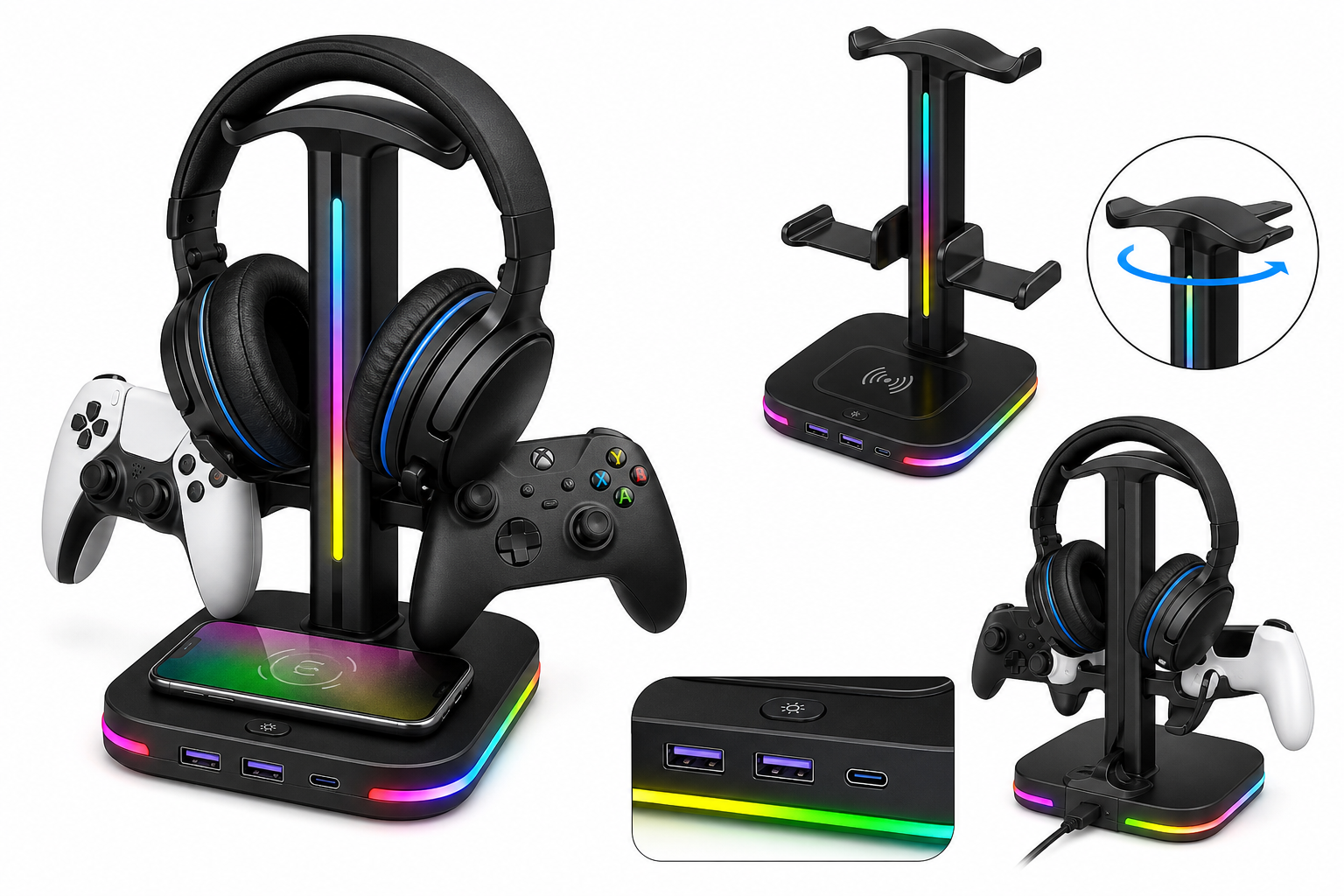
The KDD Headphone & Controller Stand with Wireless Charging is an all‑in‑one desktop accessory designed for gamers who want to organize their headset, gamepads, and mobile devices while freeing up space on their desk. Combining a rotatable headphone hook, dual controller arms, integrated wireless charging for compatible phones, and additional USB-A and USB-C ports, it aims to replace multiple separate stands and chargers. This review looks at its design, lighting, charging performance, overall usability, and where it fits best in a gaming or work setup.
Introduction
The KDD Headphone & Controller Stand with Wireless Charging is designed as a do‑it‑all dock for modern gaming setups. It combines a headphone stand, dual controller holder, RGB lighting, wireless charging pad, and extra USB ports into a single compact base. For players juggling multiple controllers, a wireless‑charging phone, and limited desk space, this kind of combo accessory can simplify cable management and keep essentials within arm’s reach.
While there are premium alternatives with built‑in audio features or brand‑specific controller docks, KDD’s stand focuses on core conveniences: handy storage, extra charging, and visual flair, at a mid‑range price point around $29.95.
Key Points
- All‑in‑one design: Supports one headset on a central hanger plus space for game controllers on side arms.
- Rotatable headset hook: The top arm can be rotated to help the stand fit alongside monitors or under shelves.
- Integrated wireless charging: Qi‑compatible pad in the base for charging supported smartphones.
- Extra connectivity: Typically includes two USB‑A and one USB‑C port on the base for powering accessories.
- RGB lighting with 9 modes: Customizable lighting effects to match a gaming aesthetic.
- Compact desktop footprint: Single stand replaces separate headphone stand, controller cradle, and phone charger.
Experience
Design and build
The KDD stand uses a vertical column topped with a curved hanger for the headset, plus fold‑out or fixed arms to cradle controllers on each side. The arch is shaped to distribute weight across a broader area of the headband than a simple hook, which helps reduce long‑term indenting on softer padding compared with narrow metal hooks.
The base is relatively wide to stay stable when loaded with a headset and two controllers. The wireless charging area is typically marked on the top surface of the base, making it easy to line up a phone. Plastic is the primary material, but the unit feels purpose‑built for a gaming desk rather than like a generic office stand.
Setup and usability
Setup is straightforward:
- Snap the main arch into the base.
- Attach or unfold the controller arms on the sides.
- Connect the included USB cable from the stand to a powered USB port or wall adapter.
Once powered, the RGB lighting and USB ports are active immediately, and the wireless charging pad will begin charging a compatible phone when it is placed correctly on the marked zone.
The rotating top hanger is helpful if your desk space is constrained. You can angle the headset to tuck behind a monitor or toward an open side of the desk, which can prevent the headband from bumping into other gear.
RGB lighting
The stand offers nine lighting modes, typically spanning static colors, breathing or pulsing effects, and multi‑color cycling. A button on the base cycles through these modes. Brightness is more of an accent than a main room light, which suits the accessory role: enough to highlight the stand and peripherals without overpowering a monitor or LED strip lighting.
For users who like coordinated setups, the RGB ring around the base and column can visually tie together with keyboard, mouse, and PC case lighting, although the stand usually relies on onboard controls rather than software integration.
Charging and ports
The integrated Qi wireless charger in the base is convenient for quickly dropping a phone to charge during gaming sessions. It is best used with phones that support standard Qi charging; cases that are very thick or include metal plates for magnetic mounts may interfere with charging.
In addition to wireless charging, the stand includes two USB‑A ports and one USB‑C port. These ports are primarily meant for powering low‑to‑moderate draw peripherals—such as controllers, small RGB desk lights, or dongles—rather than as a high‑speed data hub. For example:
- Plugging in a controller to top up its battery.
- Powering a small USB desk fan or ambient light bar.
- Charging an accessory like wireless earbuds.
The benefit is consolidating several cables into a single upstream connection from the stand to your PC or wall charger, reducing cable clutter.
Day‑to‑day use
In practice, the KDD stand works best for:
- Console or PC gamers with multiple controllers who want a central parking spot.
- Users with a wireless‑charging phone who prefer to avoid extra charging pads on their desk.
- Compact setups where an all‑in‑one stand can replace multiple small accessories.
Placing and removing the headset is easy with one hand, and controllers rest securely on the side arms. The phone charging area is flat and stable; as long as the phone is positioned over the center of the pad, charging is reliable.
Cable management is helped by routing most charging cables from the rear of the stand. Depending on your power source and the number of devices attached, you may need a quality USB power adapter to ensure stable charging when several ports are in use at once.
Pros
- Multifunctional design: Combines headset stand, controller holder, wireless charger, and USB power ports.
- Space‑saving: Reduces the number of separate stands and chargers needed on the desk.
- Rotatable hanger: Easier to fit alongside monitors or shelves, and more flexible in tight spaces.
- RGB lighting with multiple modes: Adds visual interest without requiring software.
- Wireless charging convenience: Simple drop‑and‑charge experience for Qi‑compatible phones.
- Extra USB‑A and USB‑C ports: Handy for charging controllers and small accessories.
- Straightforward assembly: Tool‑free, quick setup.
Cons
- Plastic construction: Functional but may not feel as premium as metal stands.
- Limited data functionality: USB ports are primarily for charging, not necessarily for high‑speed data.
- Wireless charging sensitivity: Requires reasonably accurate phone placement and non‑metal cases.
- Not brand‑specific: Lacks specialized cradles tailored to a single console ecosystem, which some users may prefer.
Verdict
The KDD Headphone & Controller Stand with Wireless Charging is a practical, affordable way to tidy up a gaming or work desk while adding useful charging features and a touch of RGB lighting. It does not attempt to be an audiophile accessory or a full‑fledged USB hub; instead, it focuses on everyday convenience—holding your headset and controllers, topping up devices via USB, and wirelessly charging your phone from a single, compact base.
For gamers who want to reduce clutter and gain a bit of visual flair without overspending, this stand offers strong value around $29.95. If you prioritize metal construction, advanced USB hub functions, or brand‑specific controller docks, you may want to look higher up the price ladder. For most users seeking an all‑in‑one gaming desk accessory, however, the KDD stand is an easy and functional upgrade.