
KAFRI RGB Headphone Stand Review: A Compact All‑in‑One Power and Display Dock for Gamers
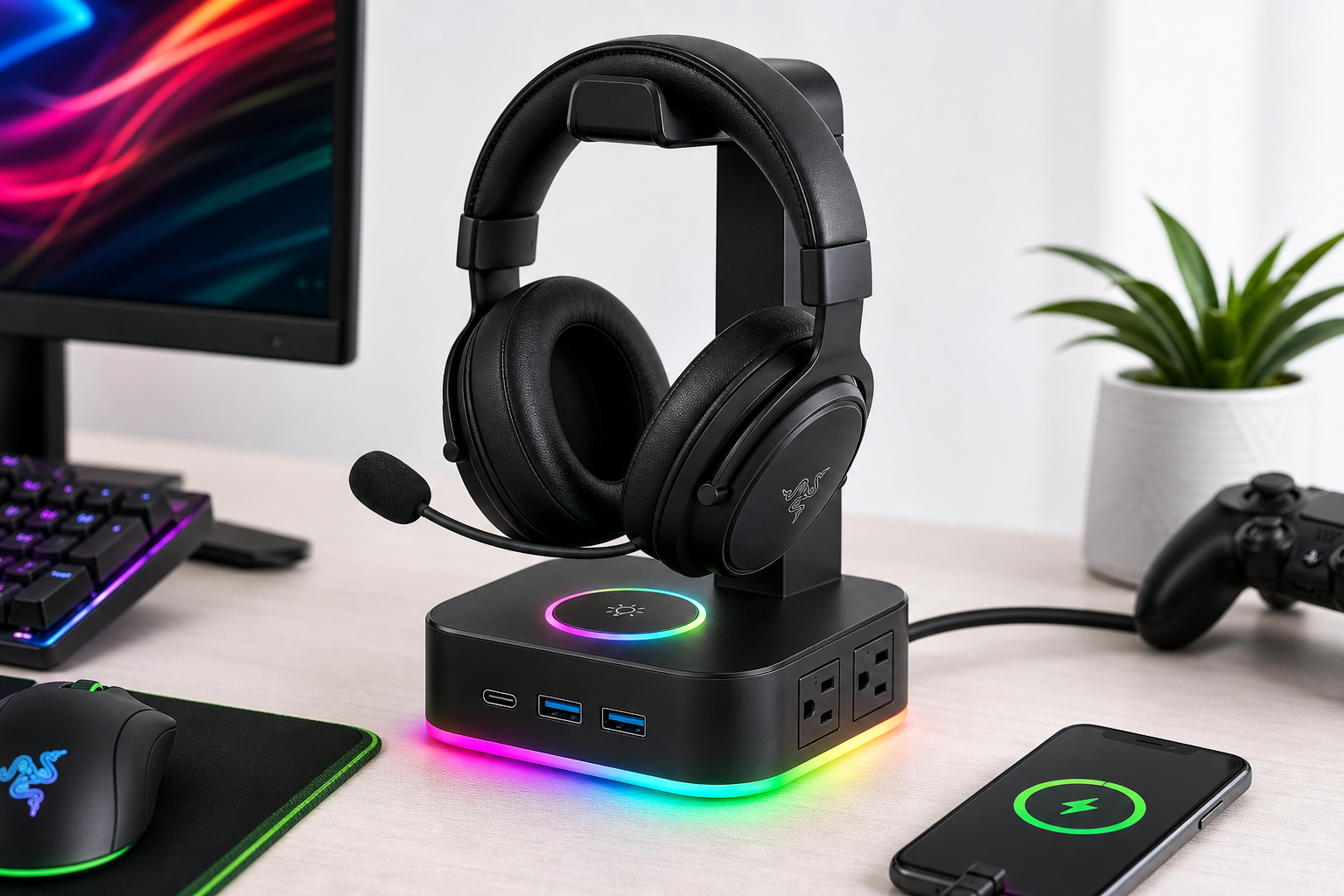
The KAFRI RGB Headphone Stand with USB A & C charger is a compact desktop accessory that combines a stable headphone holder, three USB charging ports, and two AC outlets into a single RGB‑lit base. Aimed at gamers and home office users who want to tidy up their desk while adding ambient lighting, it offers convenient front‑facing power and charging, basic surge and overload protection, and simple touch‑controlled lighting effects. This review looks at its standout RGB design, charging and power capabilities, day‑to‑day usability, and overall value, while also noting limitations such as modest USB power output and the absence of full USB‑hub data connectivity.
Overview
The KAFRI RGB Headphone Stand with USB A & C Charger is designed as a multifunction desktop accessory that does more than simply store a headset. It combines a single‑headband stand, three USB charging ports (including one USB‑C) and two AC power outlets in a compact RGB‑lit base.
For users building a gaming setup or trying to tame cable clutter on a small desk, the KAFRI stand aims to replace a basic power strip and a separate charging block with one unit that also provides a dedicated storage spot for their headphones.
From a value perspective, it sits in the budget accessory category (roughly $16.99 at the time of writing), which makes it appealing for students, casual gamers, or anyone looking for an inexpensive way to add both function and ambient lighting to their workspace.
Standout Features
RGB lighting with multiple effects
The KAFRI stand’s most visible feature is its RGB LED ring on the base. It supports 9 lighting effect modes and up to 16.8 million colors, controlled via a touch‑sensitive switch on the top surface of the base.
- Static single‑color modes (e.g., red, green, blue, cyan, purple).
- Breathing or cycling effects that step through multiple colors.
- Simple one‑tap control: a short press cycles modes; a long press typically turns the lighting off.
This implementation is basic but effective. There is no software integration or per‑game lighting profiles, but the touch control is straightforward and works regardless of platform, since it’s powered by the stand’s own power cord.
Integrated USB charging
On the front of the base you get three USB charging ports:
- 1 × USB‑C port for devices such as recent phones, handheld consoles (e.g., PS Portal), and tablets.
- 2 × USB‑A ports for legacy phones, Bluetooth headsets, power banks, and other accessories.
The stand uses a smart charging circuit that automatically negotiates the appropriate current for each device up to 2.4 A per port, which is typical for basic 5 V charging. It’s enough for overnight phone charging or topping up a wireless headset, but it does not support USB Power Delivery or laptop‑class charging.
Two AC power outlets
On the side of the base are two 3‑prong AC outlets rated for a total output of up to 1250 W. These are intended for low‑ to medium‑draw peripherals such as:
- Game consoles (PS5, PS4, Xbox Series X/S, Switch dock).
- VR base stations and headsets.
- Routers, speakers, or small desk lamps.
They allow you to bring a couple of power sockets up to the desk surface, which can be more convenient than reaching down to a floor‑mounted strip. However, the total capacity is lower than a full‑size surge protector, so it is best treated as a convenience power strip rather than the primary outlet for a complete multi‑monitor, multi‑PC rig.
Safety and protection features
The stand employs a fire‑resistant plastic housing and integrated safety circuitry, including:
- Overload and over‑current protection.
- Short‑circuit protection.
- Basic surge protection for connected devices.
This level of protection is standard for modern desk power accessories and is important given that the device consolidates multiple charging ports and AC outlets into a small footprint.
Supporting Features
Beyond its headline RGB and power capabilities, several supporting details contribute to the overall experience:
- Balanced headphone hanger: The vertical arm is designed to support one over‑ear or on‑ear headset, with a curved top that distributes pressure across the headband to reduce creasing.
- Compact footprint: At roughly 5.5 × 3.9 inches at the base and around 9.8 inches tall, it fits comfortably on smaller desks or shelves while still providing enough clearance for most full‑size gaming headsets.
- Detachable power cord: A 5 ft (1.5 m) cable provides flexibility in routing to a wall outlet or floor strip while keeping extra cable out of the way.
- Non‑slip base: Rubberized pads on the underside help stabilize the stand, though many users may still want to place it on a mat or use an adhesive strip if the desk surface is particularly slick.
- Universal compatibility: The hanger can accommodate the majority of consumer headsets, including gaming headsets from brands such as Razer, Logitech, SteelSeries, and HyperX, as well as standard studio or office models.
Usability
Setup and installation
Out of the box, the KAFRI stand requires little to no assembly:
- Attach the vertical post to the base (if shipped unassembled) using the provided fastener or slot mechanism.
- Plug the included power cord into the base and then into a wall outlet.
- Place your headset on the hanger and connect devices to the USB or AC ports as needed.
No drivers or software are required. The RGB lighting and USB charging work as soon as the stand is powered.
Day‑to‑day use
In daily use, the stand functions as a central hub for a small set of devices:
- Headphones always have a dedicated location, reducing clutter and the risk of cable damage.
- A phone or wireless headset can be left plugged into the front USB ports while not in use.
- Console or VR gear can tap into the AC outlets without adding another power strip to the floor.
The front‑facing USB ports are easy to access when seated, which encourages actually using them rather than leaving cables draped across the desk. Touch control for the RGB lighting is intuitive, although it is possible to trigger color changes accidentally if you rest small items on the base.
Ergonomics and desk fit
Because of its relatively small base, the KAFRI stand works well:
- On narrow keyboard trays or side shelves.
- Between dual monitors where depth is limited.
- Next to a PC tower or console for quick USB charging.
However, if you routinely plug and unplug stiff USB cables or heavy wall‑wart style power bricks, the light weight of the stand means it can shift slightly unless anchored. Placing it on a grippy mousepad or using double‑sided tape can mitigate this.
Performance
Headphone storage and stability
As a stand, the KAFRI does a respectable job:
- The vertical support is tall enough for most over‑ear gaming headsets without the earcups touching the desk.
- The top cradle spreads the weight across the band, minimizing dents in softer materials.
- The base is adequately weighted for a single headset; it does not reliably support two full‑size headsets at once and is not intended for that purpose.
For typical use with one wired or wireless gaming headset, stability is more than sufficient.
Charging performance
The integrated USB ports are optimized for convenience charging rather than high‑wattage fast‑charging. In practice, you can expect:
- Phones and tablets to charge at speeds comparable to a standard 5 V / 2.4 A wall charger when only one or two ports are heavily loaded.
- Wireless headsets, earbuds, and controllers to top up reliably overnight.
- No support for USB‑PD laptop charging or very fast proprietary charging standards.
The USB‑C port is particularly useful for modern accessories like handheld consoles or newer phones, though it’s important to note that it doesn’t replace a dedicated high‑power USB‑C charger for power‑hungry devices.
AC outlets
The two AC outlets are convenient for low‑power peripherals:
- Ideal: console, router, monitor light bar, speakers, or a desk lamp.
- Less ideal: high‑draw devices like space heaters, large laser printers, or multiple gaming PCs, which can approach or exceed the 1250 W total rating when combined.
As long as you stay within the specified wattage and treat the stand as a secondary power point for lighter gear, it performs reliably and helps reduce cable sprawl.
Thermal and electrical safety
Under typical loads (one headset, a phone charging over USB, and one or two modest peripherals on AC), the stand remains only slightly warm to the touch. The housing’s fire‑resistant plastic and internal protection circuitry provide additional reassurance for long‑term desk use.
Pros and Cons
Pros
- All‑in‑one design: Combines headphone stand, USB charging, and AC outlets in one compact accessory.
- RGB lighting: 9 lighting modes with touch control for simple customization and ambient desk lighting.
- Front‑facing USB ports: Easy to access for phones, controllers, or wireless headsets.
- USB‑C + USB‑A mix: Works with both newer and older devices without separate adapters.
- Small footprint: Fits comfortably on crowded desks and gaming setups.
- Basic surge and overload protection: Adds a layer of safety for connected devices.
- Budget‑friendly: Priced in an accessible range (around $16.99), making it an easy upgrade for most setups.
Cons
- Not a data hub: USB ports are for charging only; they do not provide USB data connectivity to a PC.
- Limited power headroom: AC outlets are capped at 1250 W total, unsuitable for multiple high‑draw devices.
- No software integration: RGB modes are fixed and cannot be synced with games or other RGB ecosystems.
- Lightweight base: Can move slightly when plugging in stiff cables unless placed on a non‑slip surface.
- No high‑wattage fast charging: Lacks USB‑PD or similar protocols for laptop‑class fast charging.
Summary
The KAFRI RGB Headphone Stand with USB A & C Charger is a practical, budget‑friendly accessory for users who want to organize their headphones, simplify charging, and add a touch of RGB lighting without investing in more complex or expensive solutions.
Its strongest points are the compact all‑in‑one design, front‑facing USB charging, and convenient AC outlets, all wrapped in an RGB base that complements gaming setups. The main trade‑offs are the lack of USB data functionality, modest power capacity compared to full‑size surge strips, and basic, non‑synchronized lighting effects.
If you’re looking for a simple way to declutter your desk, keep your headset safely stored, and gain a few extra charging ports and outlets at roughly $16.99, the KAFRI RGB Headphone Stand is a solid option that delivers good utility and aesthetics for the price.