
Dell 27 Plus QHD Monitor (S2725DSM) Review: A Versatile 27‑Inch QHD All‑Rounder
The Dell 27 Plus QHD Monitor (model S2725DSM) is a 27‑inch IPS display aimed at users who split their time between productivity, everyday entertainment, and casual gaming. With a sharp QHD (2560×1440) resolution, 144 Hz refresh rate, 1 ms MPRT response option, and AMD FreeSync support, it promises a smoother experience than basic 60 Hz office monitors while retaining Dell’s clean design and ergonomic stand. Built‑in speakers, HDMI and DisplayPort connectivity, and eye‑comfort features make it a practical single‑monitor solution, especially for users who value image clarity and comfort over extreme esports performance.
Introduction
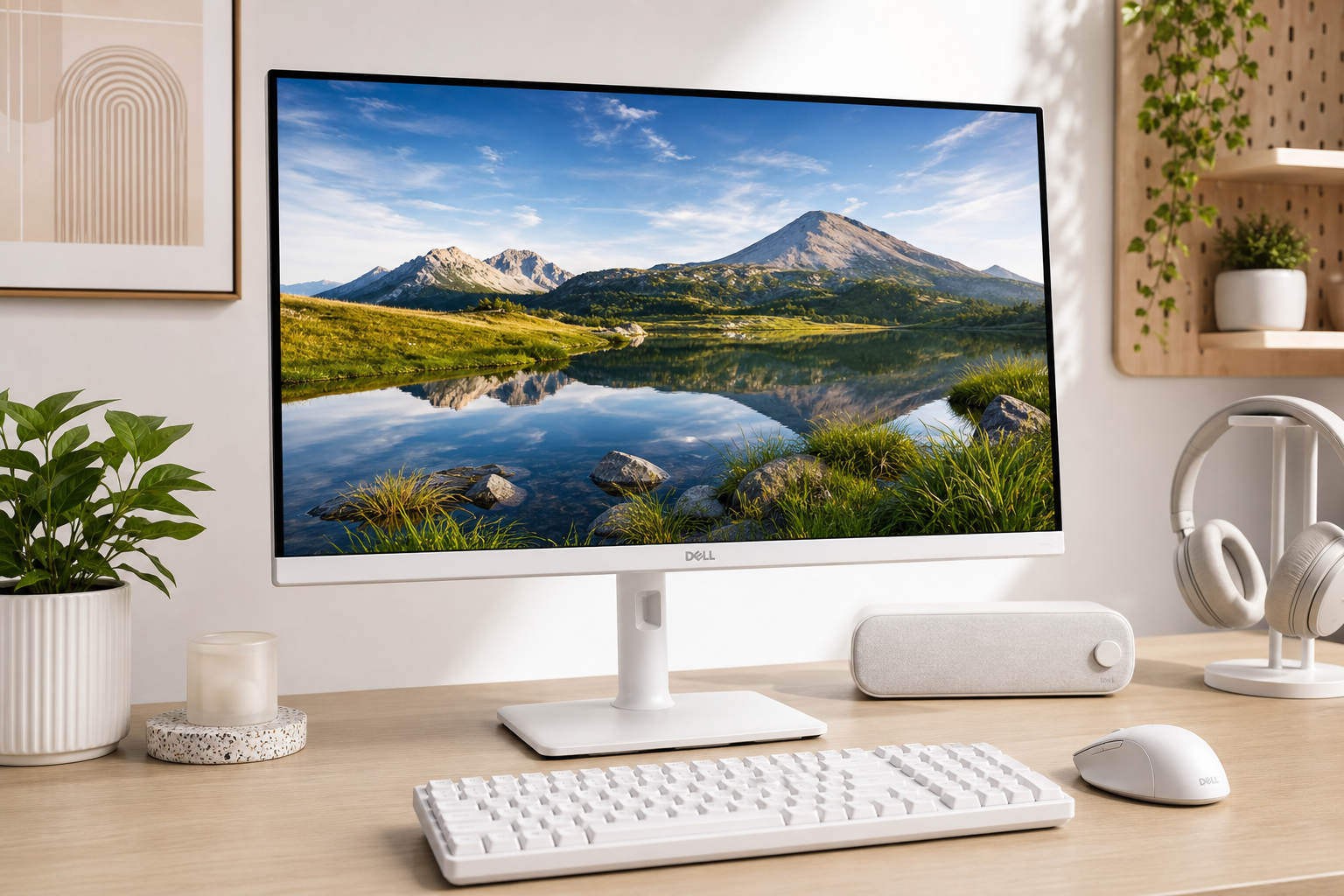
The Dell 27 Plus QHD Monitor – S2725DSM is a 27‑inch IPS panel that targets a broad audience: office workers, students, and casual gamers who want a single display that can handle everything from spreadsheets to streaming and single‑player games. It pairs a QHD (2560×1440) resolution with a 144 Hz refresh rate, 1 ms MPRT option, and AMD FreeSync, wrapped in an ash‑white chassis with a fully adjustable stand and built‑in speakers.
Rather than chasing the highest refresh rates or aggressive gaming aesthetics, the S2725DSM focuses on balanced image quality, eye comfort, and usability. It aims to be the kind of monitor you can sit in front of all day and still enjoy in the evening for games and media.
A typical street price around $169.99 often places it in the mid‑range bracket for 27‑inch QHD displays, competing against both budget gaming monitors and more work‑oriented alternatives.
Key Points
- 27‑inch QHD IPS panel (2560×1440) – Sharp image with ~109 PPI, a sweet spot between clarity and readability on a 27‑inch screen.
- 144 Hz refresh rate + 1 ms MPRT – Noticeably smoother motion than 60 Hz for gaming and general use, with a fast backlight‑strobing mode aimed at reducing motion blur.
- AMD FreeSync support – Helps reduce tearing and stutter when paired with compatible GPUs.
- Typical brightness of 350 cd/m² and 1500:1 contrast ratio – Respectable for an IPS panel, with slightly stronger contrast than many standard IPS monitors.
- sRGB 99% (typical) color gamut – Good coverage for general productivity, web content, and casual content creation without oversaturated gaming‑monitor colors.
- 2 x 3 W integrated speakers – Serviceable audio for basic use, reducing the need for external speakers in tight setups.
- Connectivity: HDMI + DisplayPort 1.4 – Simple, widely compatible inputs that cover most PCs, laptops, and consoles at QHD 144 Hz.
- Ergonomic stand – Height, tilt, swivel, and pivot adjustments with up to 110 mm of height range.
- Matte, anti‑glare coating and eye‑comfort features – Designed to handle bright rooms and long work sessions more comfortably.
Experience
Design & Build Quality
The S2725DSM adopts Dell’s familiar minimalist aesthetic, this time in ash white, which will appeal to users building lighter‑colored or more design‑focused setups. Bezels are slim on three sides, making it a good candidate for multi‑monitor layouts. The stand has a compact footprint but still offers height, tilt, swivel, and pivot adjustments, so you can dial in a comfortable viewing position or rotate the panel to portrait mode for coding or reading.
Build quality feels in line with Dell’s mainstream line‑up: mostly plastic but solid, with a sturdy stand that keeps wobble under control. Cable management is aided by the stand design, and a standard VESA mount allows you to switch to an arm if desired.
Image Quality
With a 27‑inch QHD (2560×1440) panel and ~109 pixels per inch, the monitor delivers a crisp picture without requiring aggressive scaling. Text appears clean, and UI elements are comfortably sized at 100–125% scaling on most desktop OSes.
The IPS panel’s typical brightness of around 350 cd/m² is more than adequate for most indoor environments, while the 1500:1 contrast ratio is slightly higher than the ~1000:1 often seen on older IPS monitors. Blacks still won’t match VA or OLED, but dark scenes look a bit richer than on entry‑level IPS screens. The 178°/178° viewing angles help preserve color and contrast when viewing off‑axis, which is useful in dual‑monitor or shared‑view settings.
Color coverage is quoted at sRGB 99% (typical), which is well‑suited to office work, web content, and general media consumption. Out of the box, Dell typically ships its monitors with reasonably accurate color presets; for casual content creation, this is sufficient, though professionals who need strict color accuracy may still prefer a calibrated, wider‑gamut display.
The matte, anti‑glare coating does a good job of controlling reflections, aiding visibility in bright rooms or near windows. Combined with Dell’s eye‑comfort options (including low‑blue‑light features and flicker‑free backlighting), it’s tuned for long hours at the desk.
Gaming & Motion
The 144 Hz refresh rate is a major step up from 60 Hz panels, making cursor movement, scrolling, and game motion feel much smoother. For everyday gaming—single‑player titles, RPGs, racing, or casual competitive matches—this will be more than fast enough for most users.
Dell quotes a 1 ms MPRT response time (via a backlight‑strobing mode) and multiple overdrive settings (Normal/Fast/Extreme). In Extreme mode, you can expect very low blur but also the potential for overshoot artifacts, which is common on gaming‑oriented IPS panels. Using a more moderate response‑time mode typically strikes a better balance, delivering clean motion with minimal ghosting.
AMD FreeSync support reduces screen tearing and stuttering when your frame rate fluctuates within the supported range. Paired with a mid‑range or better GPU at 1440p, this can provide a smooth, consistent experience without needing to lock exactly to 144 Hz.
Compared with high‑end esports monitors that push 240 Hz or beyond, the S2725DSM is not positioned as a competitive‑gaming specialist. Instead, it targets users who want fluid gameplay that looks good without paying for extreme refresh rates or specialized HDR capabilities.
Productivity & Everyday Use
For office work, the 27‑inch QHD combination is particularly comfortable. You get significantly more workspace than 1080p without text becoming too small, making it ideal for multitasking across documents, browser tabs, and communication tools. The ability to pivot the screen to portrait is handy for reading long documents, code, or social feeds.
Eye‑comfort features and the relatively neutral color tuning help reduce fatigue during long workdays. Users sensitive to overly vivid gaming monitors may appreciate the more balanced, less punchy color profile of the S2725DSM.
The 2 x 3 W speakers are basic but useful. They are adequate for system sounds, calls, and casual video watching. Audio lacks the depth and bass of dedicated speakers, but they are a welcome convenience if desk space is limited.
Connectivity & Setup
Connectivity is straightforward: the S2725DSM includes HDMI and DisplayPort 1.4 ports, covering typical PC, laptop, and console setups. DisplayPort is the best choice for PCs to unlock QHD at 144 Hz; many newer laptops can also take advantage of this via a dock or direct DP output. HDMI works well for consoles and secondary devices.
Initial setup is simple—tool‑less stand assembly in most cases, followed by a quick OSD walk‑through. Dell’s on‑screen menu provides presets for different scenarios (Standard, Movie, Game, etc.), plus detailed control over brightness, contrast, and color temperature. On Windows, Dell’s Display and Peripheral Manager (DDPM) software lets you adjust monitor settings from the desktop and organize window layouts, which can further streamline productivity.
Pros
- Sharp 27‑inch QHD resolution with a comfortable pixel density for both work and play.
- 144 Hz refresh rate with FreeSync for smoother gaming and desktop use compared with 60 Hz office monitors.
- IPS panel with 178° viewing angles and sRGB 99% (typical) coverage for accurate, natural‑looking colors.
- Better‑than‑average IPS contrast (around 1500:1) for slightly deeper blacks and improved perceived depth.
- Ergonomic stand offering height, tilt, swivel, and pivot adjustments for more comfortable setups.
- Matte anti‑glare coating and eye‑comfort features, suitable for long work sessions and bright rooms.
- Integrated 2 x 3 W speakers, useful for basic audio without extra peripherals.
- Clean, ash‑white design that fits modern, minimal, or light‑themed desks.
Cons
- No USB‑C or USB hub, unlike some closely related Dell variants; you rely on HDMI/DisplayPort only.
- HDR support is limited or absent in practice, so HDR enthusiasts should look elsewhere.
- IPS contrast still trails VA and OLED, which offer deeper blacks for dark‑room movie watching.
- Backlight‑strobing 1 ms mode can introduce artifacts, so not ideal for all content or users.
- Speakers are functional but basic, lacking bass and richness for music or cinematic audio.
Verdict
The Dell 27 Plus QHD Monitor – S2725DSM is a strong all‑rounder for users who want a single display to cover productivity, general media consumption, and casual gaming. Its 27‑inch QHD IPS panel, 144 Hz refresh rate, and FreeSync support provide a visibly smoother and sharper experience than budget 1080p 60 Hz monitors, while Dell’s ergonomics and eye‑comfort features make it comfortable for long workdays.
It’s not the right choice if you need USB‑C docking, advanced HDR, or esports‑grade refresh rates, and dedicated audiophiles will still want external speakers. But for many users building a clean, practical setup around a mid‑range GPU or modern laptop, the S2725DSM hits a sweet spot of features and usability at around $169.99.
If you’re looking for a versatile, neutral‑looking 27‑inch QHD monitor that handles both spreadsheets and single‑player games with ease, the Dell S2725DSM is well worth a spot on your shortlist.