
Dell 27 Plus QHD Monitor (S2725DSM) Review: A Versatile 1440p 144Hz All‑Rounder
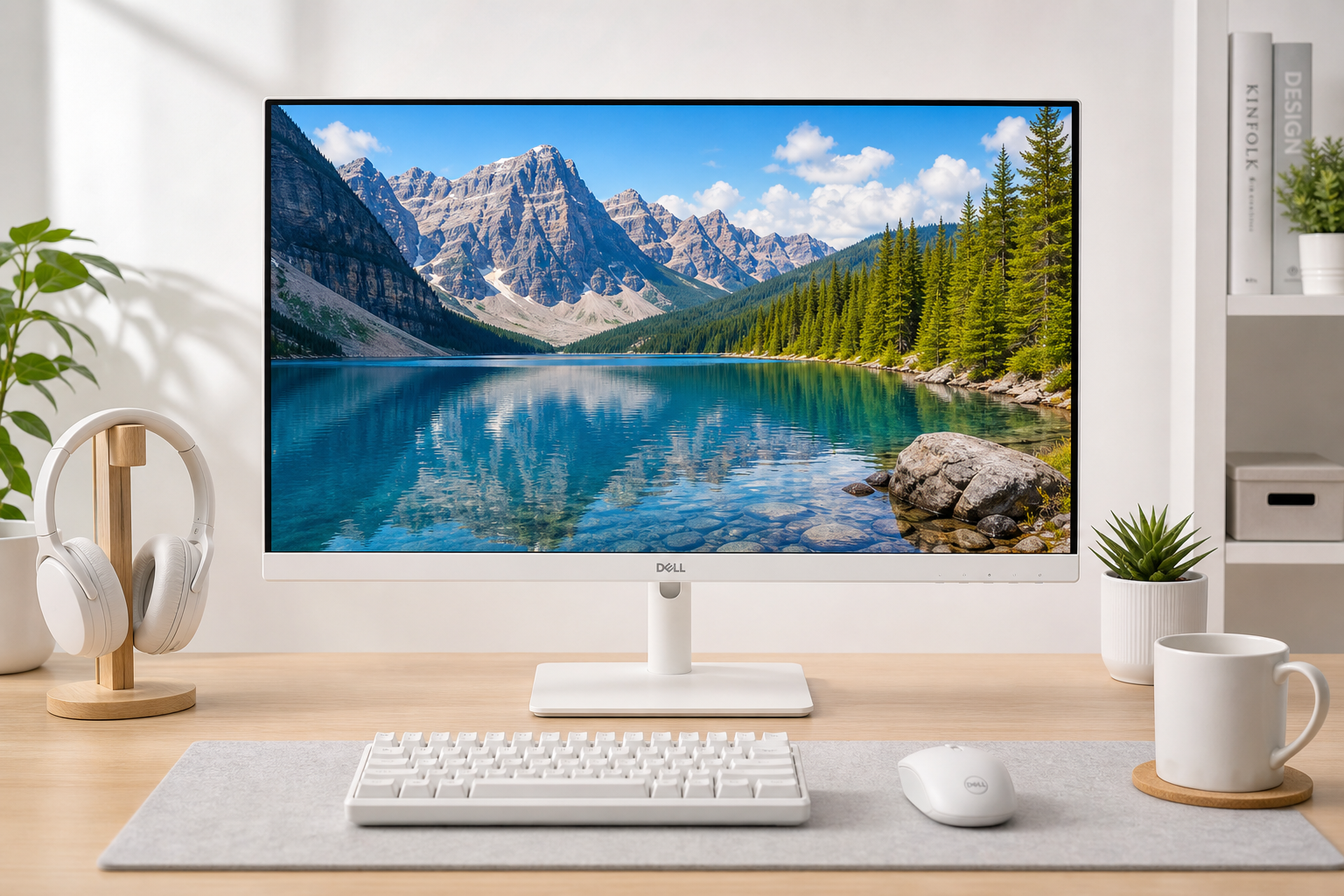
The Dell 27 Plus QHD Monitor (S2725DSM) is a 27‑inch IPS display that targets users who want one screen for both productivity and gaming. With a 2560x1440 resolution at 144Hz, AMD FreeSync support, and a fully adjustable stand, it aims to balance sharp image quality, smooth motion, and ergonomic comfort. Built‑in speakers, low‑blue‑light features, and a minimalist ash‑white design round out the package, making it a strong option for mixed use if you don’t need advanced connectivity like USB‑C or a hub.
Overview
The Dell 27 Plus QHD Monitor – S2725DSM is a 27‑inch IPS panel with a native 2560 x 1440 (QHD) resolution and a 144Hz refresh rate, designed as an everyday monitor that can comfortably handle office work, media, and gaming.
Key specifications include:
- 27‑inch IPS panel at 2560 x 1440
- 144Hz refresh rate with AMD FreeSync
- 1ms MPRT (with overdrive), multiple GTG modes
- 2 x 3W integrated speakers
- HDMI and DisplayPort 1.4 inputs
- Height, tilt, pivot, and swivel stand
- ComfortView/low blue light and flicker‑free backlight
On paper, it’s intended as a do‑it‑all 1440p monitor: sharp enough for productivity, fast enough for casual to mid‑range gaming, and flexible enough in ergonomics for long days at the desk.
Note: On Amazon, the Dell 27 Plus QHD Monitor – S2725DSM is typically positioned in the mid‑range QHD price bracket (listed around $169.99 at the time of writing), which strongly influences its value proposition relative to other 1440p 144Hz options.
Standout Features
1. QHD Resolution with 144Hz Refresh
On a 27‑inch panel, QHD (2560 x 1440) is a popular sweet spot between clarity and GPU load. Text and UI elements look noticeably sharper than on 1080p monitors of the same size, but you don’t need the same GPU horsepower that 4K demands. Paired with a 144Hz refresh rate, the S2725DSM delivers much smoother motion in everyday scrolling and gaming compared with a 60Hz or 75Hz screen.
The panel supports:
- Up to 2560 x 1440 at 144Hz over both DisplayPort and HDMI (with VRR via HDMI)
- Vertical scan range from roughly 48–144Hz, which aligns well with adaptive‑sync operation
For gaming, the 144Hz refresh and FreeSync support help reduce tearing and stuttering when frame rates fluctuate, provided your GPU is compatible.
2. IPS Panel with Wide Viewing Angles
The S2725DSM uses an IPS (In‑Plane Switching) panel, giving it:
- Wide 178°/178° viewing angles
- 99% sRGB color gamut (typical)
- 16.7 million colors and a typical brightness around 350 nits
For office work, content creation in the sRGB space, and casual photo editing, this level of color performance is more than adequate. While it’s not marketed as a calibrated professional display, it offers a good baseline of accuracy and consistency for general users.
3. Fully Adjustable Ergonomic Stand
A major strength of this monitor versus many budget 1440p options is its full ergonomic stand. Adjustments include:
- Height adjustment (up to ~110mm)
- Tilt (-5° to 21°)
- Swivel (±30°)
- Pivot (±90° for portrait orientation)
This makes the S2725DSM far easier to position at a comfortable eye level and angle, reducing neck and shoulder strain in long sessions. There’s also VESA 100 x 100 support if you prefer an arm or wall mount.
4. Integrated Eye‑Comfort Features
Dell’s ComfortView Plus and related eye‑comfort technologies aim to reduce eye fatigue by:
- Lowering potentially harmful blue‑light emissions
- Using a flicker‑free LED backlight
- Providing an anti‑glare matte coating
If you spend hours at the screen each day, these features can help make the experience more comfortable, especially in office and study environments.
5. Minimalist Ash‑White Design
The S2725DSM comes in Ash White, with slim bezels on three sides and a clean stand design. This aesthetic can blend well into lighter, modern workspaces and is a differentiator if you specifically want a white or off‑white monitor rather than the usual black.
Supporting Features
Beyond the headlining specs, several secondary features add day‑to‑day value:
- 2 x 3W built‑in speakers – Suitable for basic system audio, video calls, and light media without needing external speakers.
- Ports – 1 x DisplayPort 1.4, 1 x HDMI (HDCP 1.4), both supporting QHD 144Hz. Enough for typical PC + console or PC + laptop setups.
- Power efficiency – Typical power draw is relatively modest for a 27‑inch 1440p 144Hz display, with low standby consumption.
- Included cables – Usually ships with a power cable and HDMI cable, so it’s usable out of the box for most setups.
- VESA mount compatibility – Makes it easy to integrate into multi‑monitor arms or wall‑mounted setups.
One notable omission is USB‑C or a USB hub. If you want single‑cable laptop docking or built‑in USB ports, you’d need to step up to a higher‑end variant (such as Dell’s USB‑C QHD series) or use a separate dock.
Usability
Setup and Installation
Setup is straightforward:
- Attach the stand to the panel (typically tool‑less or with minimal screws).
- Connect via DisplayPort or HDMI.
- Adjust height/tilt/swivel to your preference.
- Fine‑tune picture mode and brightness in the OSD.
Dell’s on‑screen display (OSD) is well‑structured, with directional buttons or a small joystick (varies by revision) making it reasonably quick to switch inputs, change profiles, or adjust color.
Everyday Productivity
For office work, web browsing, and multitasking, the combination of 27 inches + 1440p is very comfortable. You can fit multiple windows side by side without text becoming too small, and the QHD resolution yields crisp fonts and UI elements.
The ergonomic stand is especially useful if you’re at the desk for long hours, letting you dial in the correct height and angle. Automatic features like low blue light and flicker‑free operation further support long‑term comfort.
Media and Entertainment
For streaming video and casual media consumption:
- Colors are vivid and consistent across the screen.
- The anti‑glare surface helps in brighter rooms.
- Integrated speakers are convenient for light use, though they won’t rival dedicated speakers or quality headphones.
If you sit fairly close, the 27‑inch size offers an immersive feel without overwhelming your field of view.
Gaming Experience
While not a high‑end esports monitor, the S2725DSM is quite capable for mainstream gaming:
- 144Hz refresh provides much smoother motion than 60Hz.
- 1ms MPRT / fast GTG modes help reduce perceived blur when overdrive is enabled.
- AMD FreeSync (and compatibility modes with some NVIDIA GPUs) can minimize tearing and stutter within the supported VRR range.
For competitive shooters and action titles, it’s a noticeable step up from basic 60–75Hz office displays. At the same time, QHD at 27 inches keeps image clarity high in open‑world and RPG games.
Performance
Image Quality
Out of the box, Dell monitors in this class tend to offer reasonably accurate color in the sRGB space. The S2725DSM’s IPS panel and 99% sRGB coverage make it suitable for:
- Office documents and spreadsheets
- Web and app development
- Casual photo editing and design in sRGB
Contrast is typical of IPS, and the specified 1,500:1 native contrast ratio is slightly above the usual 1,000:1 you see on many IPS panels, which can help black levels look a bit deeper in darker scenes.
Motion Handling
With proper configuration (using the faster response mode while avoiding overshoot), motion clarity at 144Hz is significantly better than on a 60Hz office monitor. You can expect:
- Reduced trailing behind moving objects
- Better clarity in panning camera movements
The MPRT setting can further improve perceived sharpness in motion at the cost of some brightness and possible flicker for sensitive users.
Input Lag
While specific input‑lag numbers aren’t highlighted in the listing, 144Hz IPS gaming‑oriented monitors like this typically exhibit low enough latency for all but the most demanding competitive players. For general gaming, responsiveness should feel snappy and in line with other mid‑range 144Hz panels.
Audio
The 2 x 3W speakers are serviceable for:
- System sounds and notifications
- Video calls and webinars
- Background YouTube or streaming
They lack low‑end punch and detail compared with dedicated speakers, but for a clean desk setup or secondary system, they’re a practical bonus.
Pros and Cons
Pros
- Sharp 27‑inch QHD (2560 x 1440) resolution ideal for both work and play
- 144Hz refresh rate with AMD FreeSync for smooth gaming and everyday use
- IPS panel with 99% sRGB for good color and wide viewing angles
- Full ergonomic stand (height, tilt, swivel, pivot) plus VESA mount support
- Low blue light and flicker‑free technologies for improved eye comfort
- Integrated speakers reduce the need for external audio in simple setups
- Clean ash‑white design that fits modern, light‑themed desks
Cons
- No USB‑C or USB hub, limiting single‑cable laptop workflows and peripheral connectivity
- Speakers are basic and won’t satisfy users who care about rich audio
- Black levels and contrast, while decent, are still limited by IPS technology compared with VA panels
- Only one HDMI and one DisplayPort input, which might feel restrictive if you have multiple PCs/consoles
Summary
The Dell 27 Plus QHD Monitor – S2725DSM is a well‑rounded 27‑inch 1440p 144Hz IPS display that hits a strong balance of clarity, smoothness, and ergonomics. Its core strengths are the combination of QHD resolution and 144Hz refresh, a fully adjustable stand, and built‑in eye‑comfort features, all wrapped in an ash‑white design that stands out from standard black monitors.
It’s best suited to users who:
- Want one monitor for productivity and gaming
- Prefer IPS color and viewing angles over VA‑style deep contrast
- Need height/tilt/swivel/pivot flexibility for a comfortable workstation
- Don’t require USB‑C, KVM, or an integrated USB hub
If you’re looking for a middle‑ground 27‑inch display that can handle daily work, entertainment, and mainstream gaming without venturing into premium‑priced territory, the S2725DSM is a compelling candidate. At around $169.99 on Amazon, its feature set and performance make it a competitive choice in the QHD 144Hz segment, provided its limited connectivity and basic audio align with your expectations.