
BENGOO G9000 Stereo Gaming Headset Review: Popular Budget Pick for Casual Gamers
The BENGOO G9000 Stereo Gaming Headset is a widely popular, low-cost wired gaming headset aimed at players who want an easy way to upgrade from built‑in TV or laptop speakers without spending much. It offers broad platform compatibility, a flexible noise‑isolating microphone, and soft memory‑foam style ear pads with LED accents. Sound quality and build are serviceable for casual and younger gamers, but limitations like average microphone clarity, plastic construction, and long‑term durability keep it from competing with mid‑range or premium headsets. This review walks through the overall experience, key strengths, and trade‑offs to help you decide if it fits your needs.
Introduction
The BENGOO G9000 Stereo Gaming Headset has become one of the most visible budget headsets online, frequently topping sales charts and popping up in recommendation threads as an entry‑level option. Designed for use with PS4, PS5, Xbox One, Xbox Series X|S, PC, Nintendo Switch (via 3.5 mm), and mobile devices, it targets gamers who want an all‑round wired headset with RGB‑style LED lighting, a boom mic, and “7.1 surround” style audio processing—without paying more than $19.95.
In this review, we look at how the G9000 performs day‑to‑day, what it does well for the money, and where its compromises show up compared with more expensive gaming headsets.
Key Points
- Target user: Budget‑conscious and casual gamers, families, or first‑time headset buyers who primarily play on console or PC.
- Compatibility: Works with PS4, PS5, Xbox One, Xbox Series X|S, Nintendo Switch (handheld or docked with 3.5 mm), PCs, laptops, tablets, and phones that have a 3.5 mm jack. Older Xbox One controllers may require a separate Microsoft adapter.
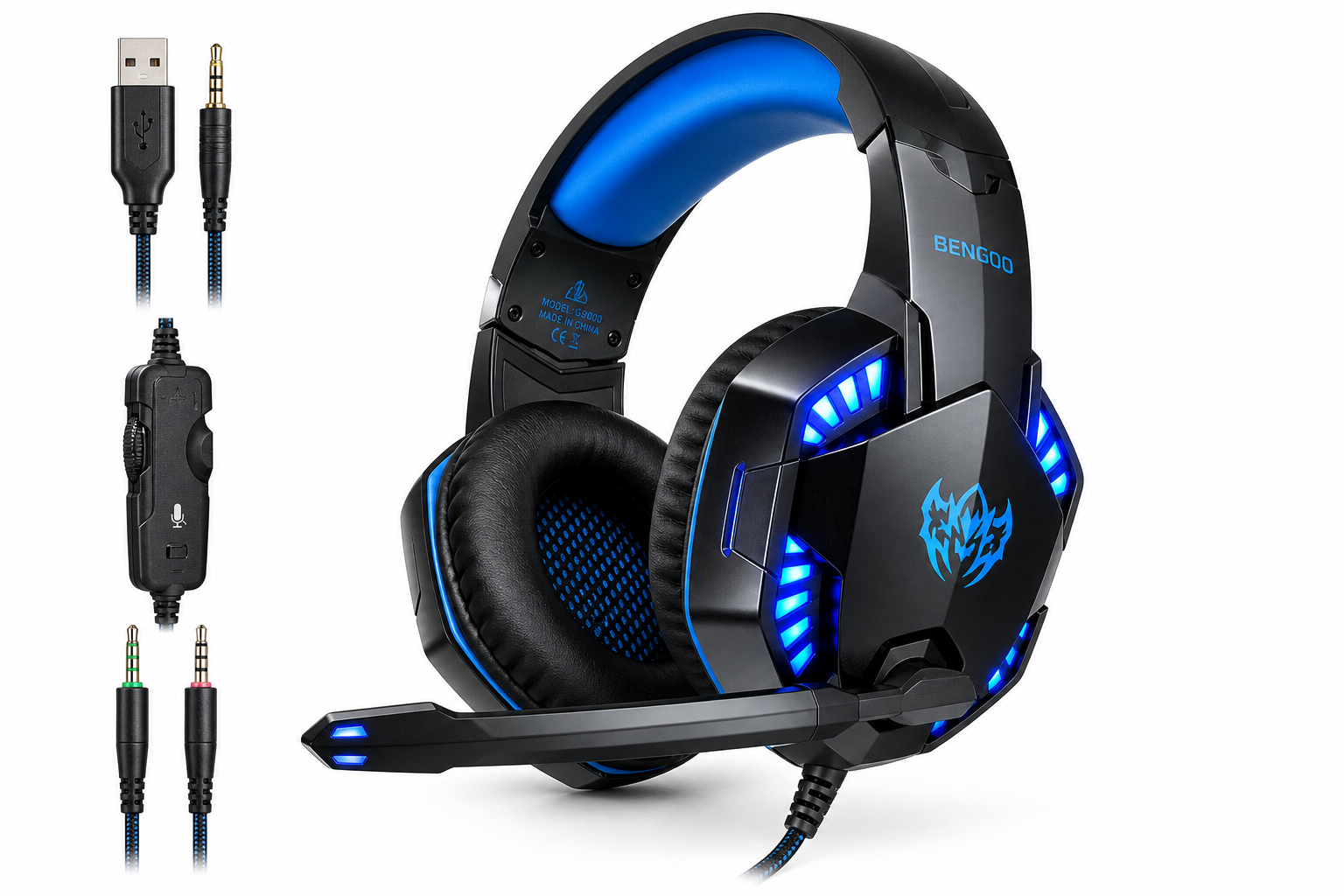
- Connection: Wired 3.5 mm audio plug for sound and mic; USB plug powers the LED lighting only.
- Drivers & sound: 40 mm dynamic drivers with a V‑shaped, game‑centric tuning—emphasis on bass and effects, with adequate clarity for voice and positional cues.
- Virtual surround: Marketed as 7.1 surround, but functionally it is stereo audio with virtual surround effects depending on your device or software.
- Microphone: Flexible, omni‑directional boom mic with basic noise isolation suitable for in‑game chat, though not broadcast‑grade.
- Comfort: Over‑ear design with soft, faux‑leather–covered memory‑style padding and a suspended or padded headband that aims to distribute weight evenly.
- Controls: In‑line remote with volume wheel and microphone mute switch.
- Build: Mostly plastic construction with RGB‑style LEDs on the earcups and a braided cable to reduce tangling.
Experience
Setup & Compatibility
Getting the BENGOO G9000 running is straightforward:
- Consoles (PS4/PS5/Xbox Series X|S/Xbox One): Plug the 3.5 mm connector into the controller’s headset jack, then adjust audio settings on the console to route voice and game audio to the headset.
- PC & laptops:
- If your system has a single 3.5 mm combo jack, plug the headset directly in.
- If you have separate mic and headphone jacks, use the included splitter (if provided) to break out mic and audio signals to two plugs.
- Nintendo Switch & mobile: Use the 3.5 mm jack directly; note that apps or games must support voice chat for the mic to be useful.
- USB plug: The USB connector powers the LED lights on the earcups but does not carry audio.
Most users will find the headset effectively plug‑and‑play, though desktop PC users should pay attention to whether they have a combo jack or separate jacks, and whether a splitter is required.
Sound Quality
For a budget headset, the G9000 provides a “fun” sound signature tuned for games:
- Bass: Elevated, giving explosions, gunfire, and engine noise more impact. This can make action games feel more cinematic, though it is not as controlled or detailed as higher‑end models.
- Mids: Voices and game dialogue remain intelligible, but some midrange detail can be recessed, especially in very busy soundscapes.
- Highs: Sufficient for footsteps and directional cues, though treble can sound slightly harsh or grainy at higher volumes.
The advertised 7.1 surround sound is essentially virtual processing rather than true discrete multi‑driver hardware. Positional audio relies heavily on the game’s own mix and, on PC, any surround‑sound software you enable. Even so, many casual players will find the stereo imaging and directional cues adequate for everyday gameplay.
For music and movies, the tuning leans strongly toward bass, which some listeners enjoy but others may find boomy or lacking in nuance. If you value neutral, hi‑fi audio quality, this is not the ideal choice; if your priority is impactful game sound at low cost, the profile is acceptable.
Microphone Performance
The boom microphone is flexible and easy to position. It is omni‑directional, so it picks up your voice clearly at typical speaking distances, but it will also catch some room noise—keyboard clicks, controller taps, or conversations in the background.
Strengths:
- Voice is usually clear enough for in‑game chat on Discord, Xbox Party Chat, and PlayStation voice channels.
- The physical mute switch on the in‑line control is convenient when you need to mute quickly.
Limitations:
- Noise reduction is basic; it helps tame some ambient noise but does not eliminate it.
- Microphone tone is functional but not rich—fine for casual use, but not suited for professional streaming or content creation.
Comfort & Fit
Comfort is one of the key selling points for this headset in its price bracket. The design includes:
- Soft over‑ear cushions with a memory‑foam style feel that create a decent seal without excessive clamping force.
- A padded or suspended headband that spreads weight across the top of the head, helpful for younger gamers or those wearing the headset for multiple hours.
- An adjustable slider mechanism to accommodate different head sizes.
For most users, the headset is reasonably comfortable for 1–3 hour sessions. Over very long sessions, heat build‑up and the faux‑leather material can cause sweating and discomfort, especially in warmer rooms.
Build Quality & Design
Visually, the G9000 embraces the classic budget‑gaming aesthetic:
- Angular earcups with LED lighting powered via USB.
- A primarily plastic frame with some metal reinforcement in the headband, depending on the revision.
- A braided cable to reduce tangling and improve perceived durability.
Given the price tier around $19.95, overall build quality is acceptable but not rugged. With typical daily use, many users will find it lasts long enough to justify the cost, but it is not designed to withstand heavy abuse, repeated cable yanking, or frequent drops.
Day‑to‑Day Use
In daily gaming, the BENGOO G9000 shines as an approachable, kid‑friendly, or backup headset:
- For console gaming: It provides an immediate upgrade over TV speakers, with clearer directional cues and private listening.
- For PC gaming: It pairs well with entry‑level setups where users want a single headset for chat, general play, and occasional music.
- For voice calls or online classes: The mic and headphones are serviceable, though long‑term wear comfort and background noise may be considerations.
Heavy or highly competitive players may soon run into its limitations in clarity and durability, but for casual gaming, it covers the basics.
Pros
- Very accessible price point (around $19.95), making it suitable for tight budgets and as a starter or spare headset.
- Broad multi‑platform compatibility via 3.5 mm connection, reducing the need for separate headsets per device.
- Simple plug‑and‑play setup on consoles and most PCs.
- Comfortable over‑ear design with soft padding that works reasonably well for moderate gaming sessions.
- Impactful, bass‑heavy sound profile that enhances explosions and cinematic effects in games.
- Flexible boom microphone with in‑line mute and volume control for quick adjustments.
- LED lighting on earcups (via USB power) adds visual appeal, especially for younger gamers or themed setups.
Cons
- Audio quality is average and tuned more for fun than accuracy; it lacks the refinement and detail of mid‑range or premium headsets.
- Microphone captures ambient noise and offers only basic noise isolation—adequate for casual chat but not ideal for streaming or recording.
- Mostly plastic construction and modest cable strain relief mean long‑term durability can be a concern with rough handling.
- Virtual 7.1 surround is limited, relying on software rather than dedicated hardware; performance varies by platform.
- Heat build‑up and ear fatigue can occur during very long sessions due to closed‑back, faux‑leather earcups.
- Requires correct adapter/splitter on some PCs and older Xbox One controllers, which may confuse less technical users.
Verdict
The BENGOO G9000 Stereo Gaming Headset delivers a lot of perceived value for its low cost. For around $19.95, you get multi‑platform compatibility, a comfortable fit for moderate sessions, a flexible boom mic, and a sound profile tuned for impactful, cinematic gaming.
It is best suited for:
- Casual or younger gamers who primarily need a first headset for consoles or PC.
- Households looking for a budget‑friendly, replaceable option for shared use.
- Users who value plug‑and‑play simplicity and visual flair over audiophile‑level sound or microphone quality.
If you are a competitive player, streamer, or someone who spends many hours a day gaming, you may quickly outgrow the G9000’s limitations in sound precision, mic performance, and durability. In that case, investing more in a mid‑range wired or wireless headset will provide a clearer upgrade path.
For its intended audience, however, the BENGOO G9000 earns its popularity by offering a straightforward, feature‑complete gaming headset experience at a very approachable price.