
ASUS ROG Strix Scope II 96 Wireless Review: Compact Layout, Enthusiast Feel, Gaming Focus
The ASUS ROG Strix Scope II 96 Wireless is a 96% mechanical gaming keyboard that blends full-size functionality with a more compact footprint. It offers tri-mode connectivity (2.4 GHz wireless, Bluetooth, and USB-C wired), hot-swappable pre-lubed ROG NX Snow linear switches, doubleshot PBT keycaps, and per-key RGB lighting. The keyboard targets gamers and power users who want wireless flexibility, mechanical feel, and near-full-size layout without moving into the fully custom keyboard space. In this review, we look at what this keyboard is, why it matters, its key strengths and weaknesses, and who is most likely to benefit from it.
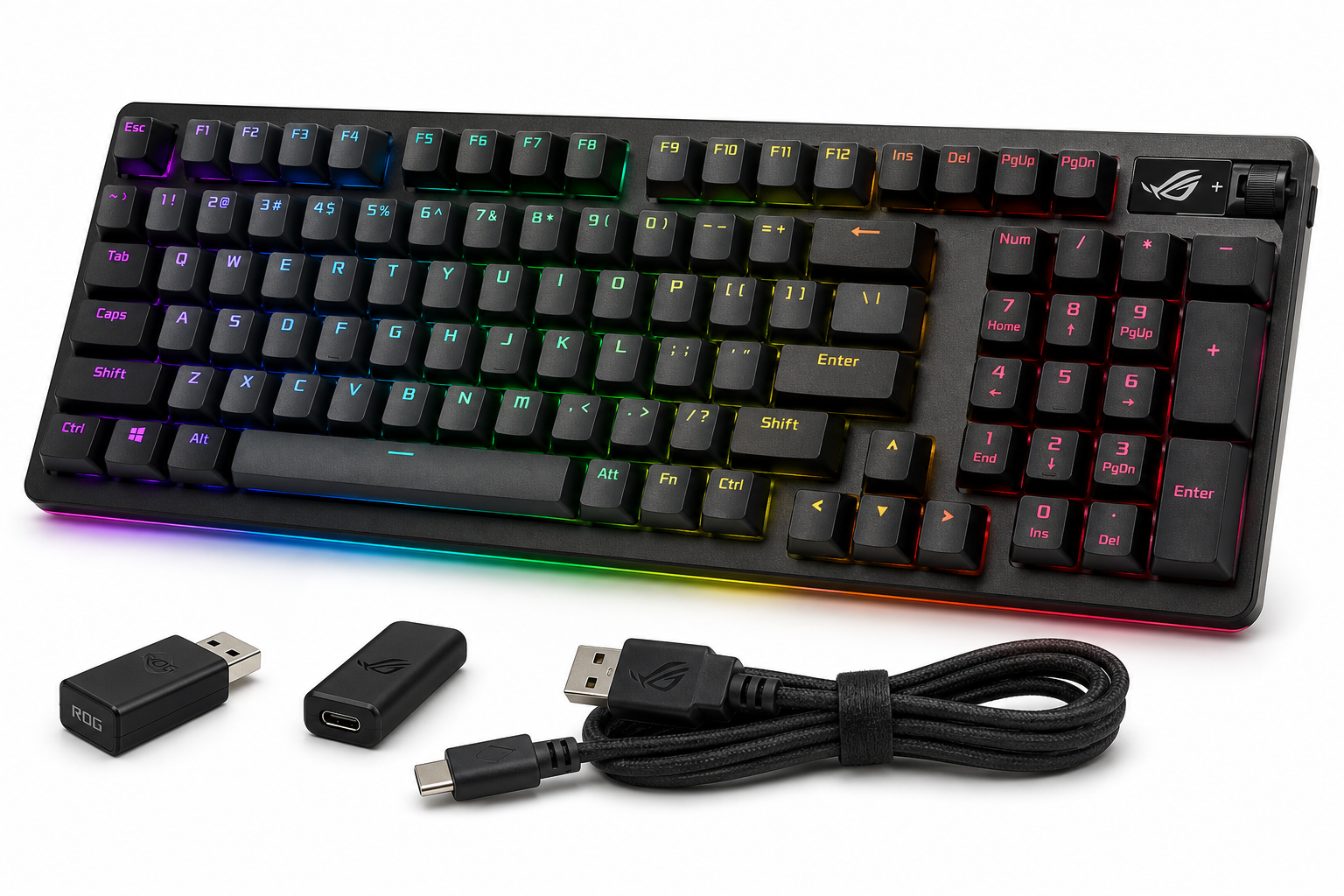
What This Product Is
The ASUS ROG Strix Scope II 96 Wireless Mechanical Gaming Keyboard is a compact 96% layout board that aims to deliver full-size functionality (including a number pad) in a tighter footprint. It’s designed primarily for gaming but borrows a number of features from enthusiast mechanical keyboards:
- 96% full-size layout with integrated numpad
- Tri-mode connectivity: 2.4 GHz wireless, Bluetooth, and USB-C wired
- Hot-swappable, pre-lubed ROG NX Snow linear switches
- Doubleshot PBT keycaps (on this configuration)
- Per-key RGB backlighting with ASUS Aura Sync support
- Onboard media and volume controls plus additional function shortcuts
- Support for PC and Mac layouts
On Amazon, the keyboard typically sits around $129.00, positioning it as a mid-to-upper-range option within the wireless gaming keyboard market.
Why It Matters
Mechanical gaming keyboards are common, but combining a nearly full-size layout, hot-swappable switches, and reliable tri-mode wireless in a single package is less typical. The ROG Strix Scope II 96 Wireless attempts to do exactly that.
This matters for three reasons:
-
Desk Space vs. Functionality
A 96% layout keeps the numpad and arrow keys, which many full-size users rely on, while trimming gaps and compressing the navigation cluster. That frees up mouse room without forcing you into a TKL or 75% layout. -
Wireless Flexibility Without Sacrificing Performance
With 2.4 GHz low-latency wireless, Bluetooth for multi-device use, and wired USB-C, you can tailor connectivity to gaming, productivity, and mobile use while maintaining 1000 Hz polling in 2.4 GHz mode. -
Gateway to Enthusiast Features
Hot-swappable sockets and pre-lubed switches, plus internal dampening foam and tuned stabilizers, move the typing feel well beyond older “gamer” boards. It offers a more refined sound and feel without requiring you to build a custom keyboard from scratch.
Key Advantages
1. Compact 96% Layout with Full Functionality
The 96% form factor includes:
- Full alphanumeric keys
- Dedicated numpad
- Arrow keys and navigation keys
Instead of removing sections, ASUS compresses spacing and rearranges the cluster to reduce width, giving more room for mouse movement while keeping familiar full-size functionality.
2. Tri-Mode Connectivity
The keyboard supports three modes:
- USB-C wired: for zero concern about battery and consistent 1000 Hz polling.
- 2.4 GHz RF wireless (via dongle): optimized for gaming with low latency.
- Bluetooth: convenient for quickly switching between devices (e.g., PC, laptop, tablet).
This flexibility makes it viable as a single keyboard across multiple systems, not just a stationary gaming rig.
3. Pre-Lubed ROG NX Snow Linear Switches
The included ROG NX Snow switches are:
- Linear: smooth keystroke with no tactile bump
- Factory pre-lubed: reduces scratchiness and spring ping
- Tuned for relatively quiet, soft bottom-out compared to many traditional gaming switches
For fast-paced games, linear switches are popular due to consistent travel and predictable actuation. The lubrication and internal damping also help deliver a more pleasant typing sound than typical out-of-the-box gaming boards.
4. Hot-Swappable PCB
The PCB uses hot-swap sockets compatible with standard MX-style 3-pin and 5-pin switches, letting you:
- Change the feel of individual keys or the whole board without soldering
- Experiment with tactiles or different linears over time
- Replace a failing or disliked switch easily
This substantially extends the keyboard’s usable life and customizability.
5. PBT Doubleshot Keycaps
The keycaps in this configuration are doubleshot PBT, which typically means:
- Better resistance to shine and wear over time compared with ABS
- Legends that won’t fade because they’re molded, not printed
- A slightly textured surface for improved grip
For users concerned about long-term durability and aesthetics, this is a notable plus.
6. Strong Gaming Feature Set
For gaming, this board provides:
- N-key rollover and anti-ghosting
- A high polling rate in wired and 2.4 GHz modes
- Onboard RGB lighting per key with effects and profiles
- Quick-access media and volume controls, often mapped with a multifunction dial or function combos
These features help keep it competitive with other dedicated gaming keyboards while the underlying hardware appeals to enthusiasts.
7. Sound and Feel Tuning
ASUS has added internal silicone dampening foam and tuned stabilizers to reduce hollow sound and rattle. Compared with older gaming keyboards that can sound metallic or pingy, the Scope II 96 Wireless tends to:
- Produce a more muted, thocky sound profile
- Exhibit fewer stabilizer issues on larger keys (space, Enter, Backspace)
For users sensitive to keyboard acoustics, this is a meaningful improvement.
Key Limitations
1. Software Dependence and Complexity
Full customization of lighting, macros, and profiles requires ASUS’s Armoury Crate software. While functional, it has a reputation for being heavy and occasionally finicky. Potential downsides include:
- Large installation footprint
- Background services running for lighting and device management
- Learning curve for users who just want basic settings adjustments
If you prefer minimal software or rely heavily on macOS, this may feel cumbersome.
2. Not the Lightest Wireless Board
The 96% layout and internal sound-dampening layers add weight. That’s great for stability on a desktop but makes the keyboard less ideal if you regularly move it between locations or use it as a travel board.
3. Compressed Layout Learning Curve
While you get full-size functionality, the key cluster is more condensed:
- Some keys are moved from their standard full-size positions
- Navigation cluster keys may be combined or moved closer to the numpad
If you’re used to a traditional 104-key layout, expect a short adjustment period before muscle memory fully adapts.
4. Price vs. Non-Gaming Enthusiast Boards
With a typical street price around $129.00, this keyboard competes not just with gaming-focused brands but also with enthusiast-leaning 75% and 96% boards that may offer:
- More premium materials (e.g., metal top cases)
- Quieter or more customizable mounting systems
If pure typing feel and acoustics matter more to you than brand ecosystem and dedicated gaming features, there are non-gaming alternatives worth considering in the same general budget bracket.
5. No Included Wrist Rest (on Many Configurations)
While the case has adjustable tilt feet, many packages do not include a wrist rest in the box. For long gaming or typing sessions, some users will want to add a separate rest to maintain comfort and ergonomics.
Who It’s For
The ASUS ROG Strix Scope II 96 Wireless is a strong fit if you:
- Game frequently and want low-latency 2.4 GHz wireless without giving up a numpad.
- Prefer a linear switch feel and appreciate a more refined out-of-box sound and smoothness.
- Want a single keyboard for multiple devices, using Bluetooth and wired modes as needed.
- Are curious about custom keyboards but not ready to fully commit; hot-swappable sockets let you experiment with different switches over time.
- Need PBT keycaps and a layout that balances desk space and full functionality.
It’s especially appealing for gamers who also spend a lot of time in productivity apps or spreadsheets and rely on the numpad but still want more mouse room than a standard full-size board allows.
Who Should Skip It
You may want to look elsewhere if you:
- Prefer a tenkeyless, 75%, or 60% layout and don’t use the numpad; smaller boards will free even more space and may be cheaper.
- Strongly dislike installing vendor software; while the keyboard works out of the box, you’ll need Armoury Crate to fully customize lighting and macros.
- Prioritize ultra-portability; lighter 65% or 75% wireless keyboards are more convenient to carry in a bag.
- Want a clicky or strong tactile switch feel; this variant’s ROG NX Snow switches are linear, so you would need to swap switches or choose a different configuration.
- Are focused purely on budget value; you can find basic mechanical keyboards (wired or simpler wireless) for significantly less than $129.00, though without this feature set.
Final Recommendation
The ASUS ROG Strix Scope II 96 Wireless is a well-rounded mechanical gaming keyboard that successfully blends enthusiast-oriented features with mainstream gaming needs. Its 96% layout provides a rare balance: full-size capability in a more compact chassis. With tri-mode connectivity, hot-swappable pre-lubed ROG NX Snow switches, and durable PBT keycaps, it offers a solid long-term platform for both gaming and productivity.
It’s not the lightest, cheapest, or most minimal option, and its full potential is tied to ASUS software. However, for gamers and power users who want a near-full-size wireless keyboard that feels and sounds more refined than typical gaming boards—without building a custom keyboard themselves—the ROG Strix Scope II 96 Wireless is an easy product to recommend at around $129.00.