
ASUS ROG Spatha X Wireless Gaming Mouse Review: A Heavyweight MMO/MOBA Workhorse
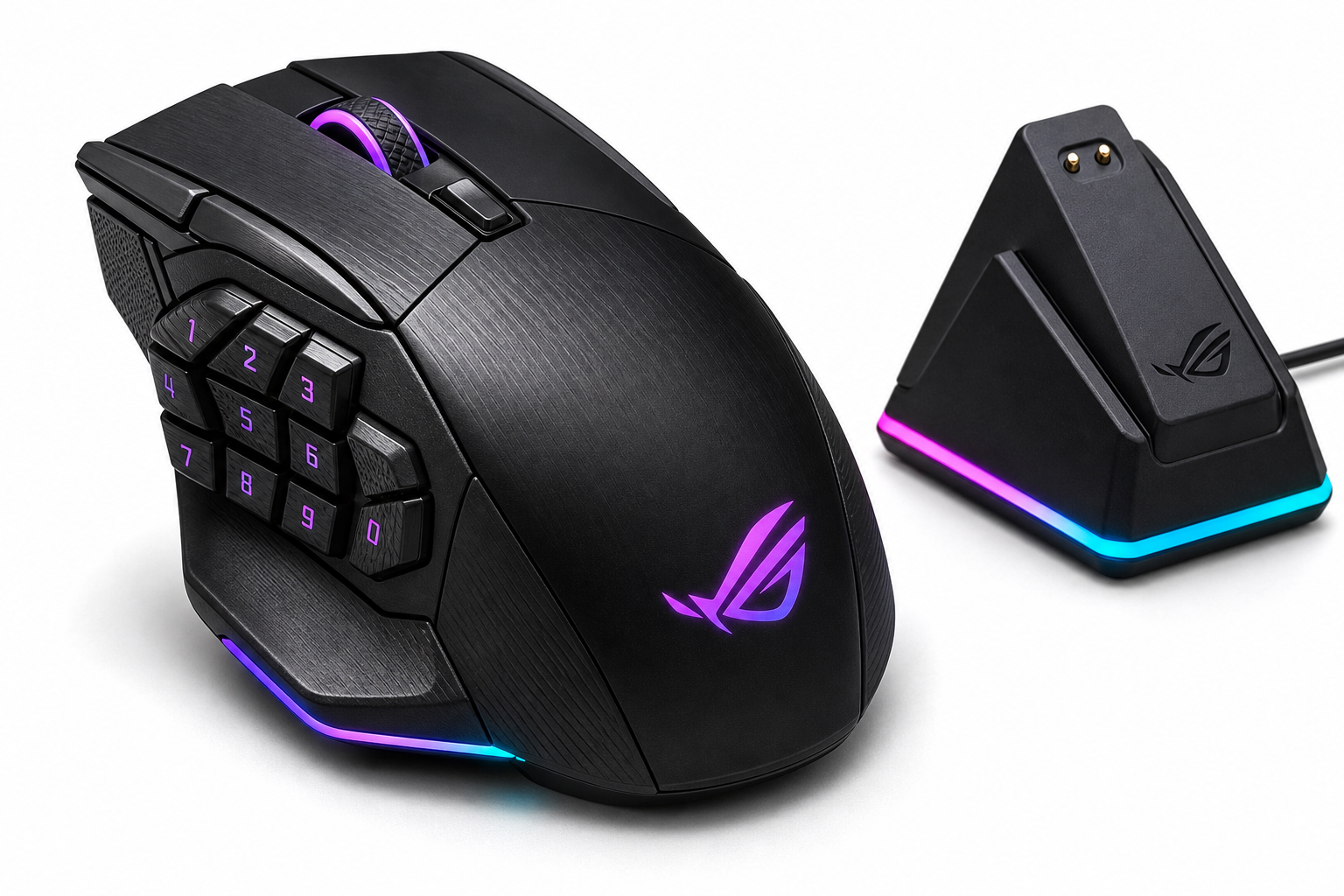
The ASUS ROG Spatha X is a large, right-handed wireless gaming mouse aimed at MMO and MOBA players who want an abundance of programmable buttons, dual wired/2.4 GHz connectivity, and a premium dock-based charging experience. With a 19,000 DPI optical sensor, 12 programmable buttons, hot-swappable switches, and extensive RGB customization, it targets enthusiasts with larger hands and palm grips. Its biggest strengths are build quality, button layout for complex keybinds, and flexible connectivity, while its high weight and reliance on ASUS Armoury Crate software will be the main deal-breakers for competitive FPS players or those who prefer ultra‑light mice.
Introduction
The ASUS ROG Spatha X Wireless Gaming Mouse is the successor to ASUS’s original ROG Spatha, refreshed with a modern 19,000 DPI sensor, refined ergonomics, and more reliable wireless performance. Designed primarily for MMO and MOBA gamers, it combines 12 programmable buttons, dual‑mode connectivity (wired USB‑C and 2.4 GHz RF), and a magnetic charging dock into a single, unapologetically large and heavy package.
On paper, the Spatha X aims to be a premium, feature‑rich controller for complex games where having multiple abilities bound to your mouse can be a real edge. In practice, it succeeds in many of those goals, but its 168 g weight and right‑hand‑only, palm‑focused shape make it a specialist tool rather than a universal crowd‑pleaser.
Note: At the time of writing, the ASUS ROG Spatha X is generally positioned in a higher price bracket around $112.99, reflecting its flagship feature set and bundled dock.
Key Points
- Form factor & weight: Large, right‑handed shell optimized for palm grip; 168 g without cable, making it significantly heavier than most modern FPS‑oriented mice.
- Buttons & layout: 12 programmable buttons, including a cluster of side buttons shaped and angled for thumb access in MMO/MOBA titles.
- Sensor: 19,000 DPI optical sensor, up to 400 IPS tracking, 50 g acceleration, and 1000 Hz polling in both wired and 2.4 GHz modes for low‑latency inputs.
- Connectivity: Dual‑mode operation – wired via USB‑C (with ROG Paracord cable) or 2.4 GHz RF wireless via the included dock/receiver.
- Charging & dock: Magnetic charging dock that doubles as the RF receiver, with RGB accents and a compact footprint.
- Switches & durability: ASUS ROG Micro Switches rated for up to 70 million clicks, plus push‑fit switch sockets so advanced users can swap the primary switches.
- Battery life: Rated for up to around 67 hours of use (lighting off / typical mixed usage), depending on RGB brightness and polling‑rate settings.
- RGB & software: Per‑zone RGB lighting with Aura Sync support, configured via Armoury Crate (macOS support limited vs Windows).
Experience
Design, Build, and Comfort
The ROG Spatha X immediately feels like a premium device. The shell uses a mix of matte and textured surfaces, with sharp, angular ROG styling and prominent RGB zones (scroll wheel, logo, and dock). The fit and finish are excellent: no creaks, no rattles, and a solid, weighty feel that matches its price class.
Ergonomically, the mouse is clearly tuned for large hands and palm grip. The high back and wide body give your palm somewhere to rest, and the right‑side contour supports the ring and little fingers. Claw and fingertip users, especially with smaller hands, may find it bulky or fatiguing.
At 168 g, it is one of the heaviest mainstream gaming mice on the market. For MMO/MOBA players who prioritize comfort and button access over ultra‑fast flicks, that can be acceptable, particularly at lower sensitivities. Competitive FPS players or those used to sub‑70 g mice may struggle to adjust to the extra inertia.
Buttons and Customization
The defining characteristic of the Spatha X is its 12‑button layout. In addition to the standard left/right click, clickable scroll wheel, and DPI button, the thumb side hosts a sculpted array of buttons that can be mapped to abilities, macros, or media controls.
The shape and spacing of these thumb buttons are more three‑dimensional than a flat 12‑button grid. Each button has a distinct angle or ridge, making it easier to identify by feel once you build muscle memory. This is particularly useful in MMOs with many active skills or in MOBAs where you might map items and commands to your mouse.
Using ASUS Armoury Crate software, you can:
- Reassign any button to keystrokes, macros, system commands, or multimedia controls.
- Store multiple profiles on the mouse and switch between them on the fly.
- Adjust DPI steps, polling rate, angle snapping, and surface calibration.
- Sync lighting with other ASUS Aura devices.
The integration is powerful, but Armoury Crate is relatively heavy software and can feel over‑engineered for users who just want to set and forget. On Windows, the experience is reasonable once configured; on macOS, functionality is more limited, and many advanced settings will require a Windows machine for initial setup.
A standout enthusiast feature is the inclusion of push‑fit switch sockets for the main left and right buttons. This lets you hot‑swap the click switches (ASUS even includes spare ROG Micro Switches in the box) to tune click feel or replace worn switches without soldering.
Performance and Wireless Reliability
In everyday gaming, the 19K DPI sensor and 1000 Hz polling feel predictable and precise. There are no obvious acceleration issues or tracking glitches on standard cloth and hard pads. DPI can be configured across multiple stages and toggled via the dedicated DPI button, letting you switch from a higher value for general navigation to a lower one for precise aiming.
The 2.4 GHz RF wireless connection, using the dock as a receiver, is designed to deliver low latency that’s effectively indistinguishable from wired for most players. For best results, the dock should be kept close to your mouse area to minimize interference and provide the most stable link.
When you prefer a wired connection or need to conserve battery, the included ROG Paracord USB‑C cable offers a reasonably flexible feel, and the raised front port on the mouse helps reduce cable drag against the mouse pad.
Battery life is advertised at up to around 67 hours depending on your settings. With RGB at moderate brightness and a 1000 Hz polling rate, you can expect to charge every few days under intensive use. The magnetic charging dock makes topping up the battery painless—simply drop the mouse on the cradle when you step away from your desk.
RGB Lighting and Dock
RGB is a central part of the ROG aesthetic, and the Spatha X does not shy away from it. The mouse features multiple lighting zones, and the dock adds a glowing accent that makes it a visual centerpiece on your desk.
All lighting can be customized or disabled through Armoury Crate. If you already run an ASUS‑centric setup (keyboards, GPUs, motherboards with Aura Sync), the Spatha X slots neatly into a unified lighting scheme.
Pros
- Feature‑rich MMO/MOBA design: 12 programmable buttons with a sculpted layout that’s easier to distinguish by feel than a flat numeric grid.
- High‑end sensor: 19,000 DPI optical sensor, 1000 Hz polling, and strong tracking characteristics suitable for both MMO and general gaming.
- Dual‑mode connectivity: Wired USB‑C and 2.4 GHz RF modes give you flexibility between latency, battery, and convenience.
- Premium dock with magnetic charging: Dock doubles as RF receiver and provides effortless charging, enhancing day‑to‑day convenience.
- Excellent build quality: Solid chassis, precise buttons, and high‑quality materials.
- Hot‑swappable primary switches: Push‑fit sockets and included spare switches extend lifespan and let enthusiasts tune click feel.
- Rich software customization: Extensive button remapping, macro support, profile storage, and RGB control via Armoury Crate.
- Comfortable for large hands and palm grip: Generous support areas and a pronounced hump reduce fatigue for users the shape is designed for.
Cons
- Very heavy at 168 g: Significantly heavier than most modern competitive gaming mice, which can hinder fast flicks and rapid aim adjustments.
- Not ideal for small hands or non‑palm grips: Claw and fingertip grippers, or users with smaller hands, may find it bulky and difficult to control.
- Software dependency: Many advanced features require Armoury Crate, which is large and sometimes overcomplicated, especially for users who prefer lighter utilities.
- Right‑hand‑only design: No left‑handed or ambidextrous variant; southpaw users are excluded.
- Premium pricing: With a typical street price around $112.99, it competes with other high‑end MMO and wireless mice, so buyers should be sure they need its full feature set.
Verdict
The ASUS ROG Spatha X Wireless Gaming Mouse is a niche but highly capable option aimed squarely at MMO and MOBA enthusiasts with larger hands who want maximum button flexibility, rock‑solid build quality, and the convenience of a magnetic charging dock.
Its strengths lie in its ergonomic support for palm grip, its sculpted multi‑button layout, hot‑swappable primary switches, and its flexible wired/2.4 GHz operation. The mouse feels like a tank, both in weight and durability, and it integrates neatly into ASUS‑centric setups via Aura Sync.
Its weaknesses are equally clear: the 168 g weight will turn away many FPS‑focused or ultra‑light‑mouse users; small‑handed gamers may struggle with control; and reliance on Armoury Crate is a downside if you prefer minimalist software or non‑Windows platforms.
If you are an MMO or MOBA player who values lots of well‑placed buttons, appreciates a heavier, substantial mouse, and wants a premium docked wireless experience at a flagship‑level price such as $112.99, the ROG Spatha X is a strong contender. If you primarily play fast‑paced shooters or prefer lightweight designs, you will likely be better served by a lighter, simpler mouse—even if it means sacrificing the impressive button count and dock‑based convenience that define the Spatha X.