
ALACOO Multi-Function Desk Headphone Hanger Hook Review: Space-Saving Power and Organization in One Accessory
The ALACOO Multi-Function Desk Headphone Hanger Hook combines a dual-headset under-desk hook with a compact power and charging station, offering 2 AC outlets, 2 USB-A ports, and 1 USB-C PD port. Designed for gamers, office workers, and home users who want to reduce desktop clutter, it adds convenient power access, supports fast charging for phones and tablets, and keeps headphones, bags, and cables neatly organized. This review covers its design, target users, everyday benefits, key trade-offs, and how it compares with simpler under-desk hooks and other desktop headphone stands.
Product Summary
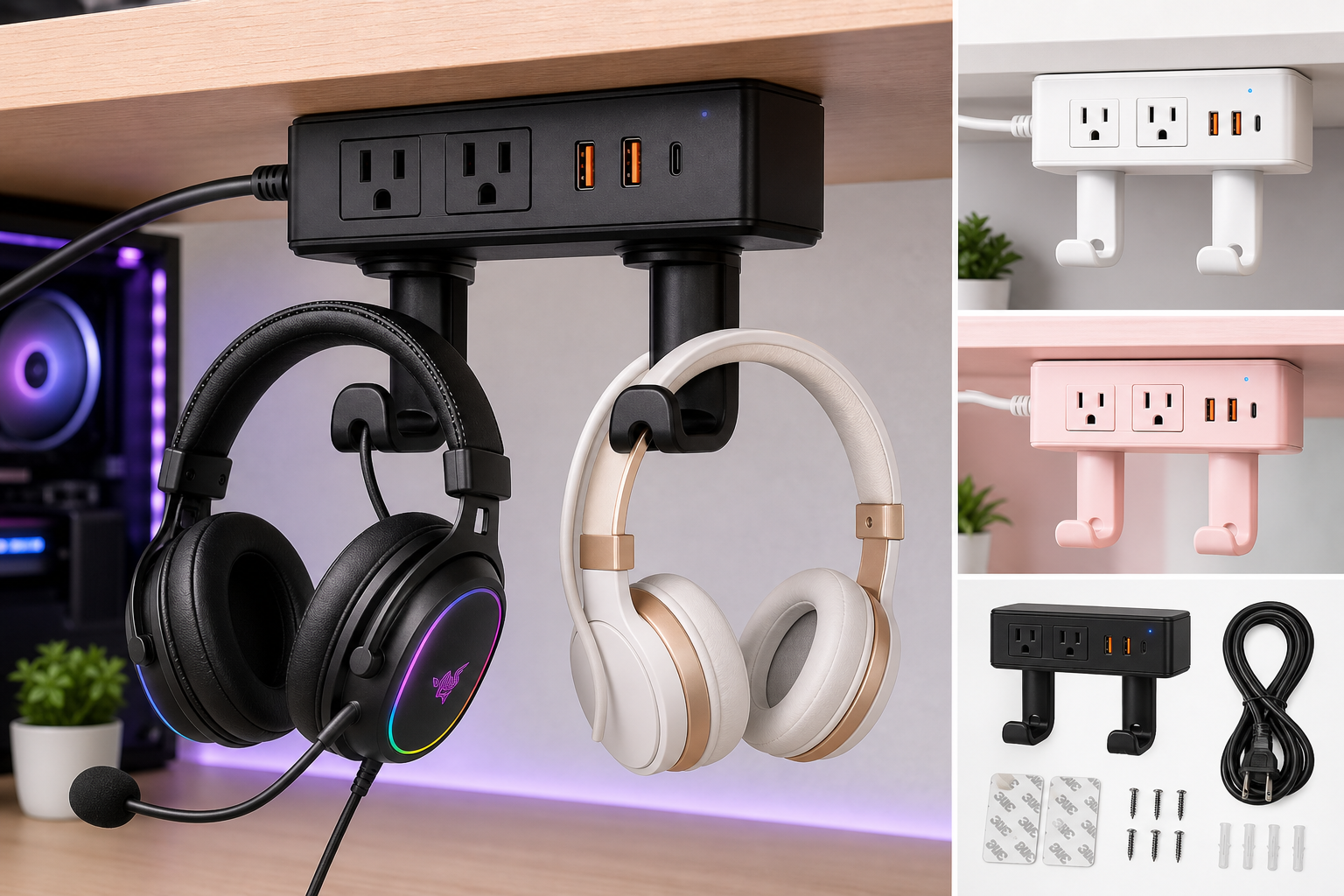
The ALACOO Multi-Function Desk Headphone Hanger Hook Gaming Office is an under-desk headset holder that doubles as a compact power and charging hub. Instead of just giving you a place to hang your headphones, it integrates:
- 2 x 2-prong AC outlets (up to 800W total)
- 2 x USB-A ports (up to 20W fast charging each)
- 1 x USB-C PD port (up to 30W fast charging)
- 360° rotating dual hooks with cable holes
- A 6 ft power cord for flexible placement
Mounted under or along the edge of your desk, kitchen counter, or shelf, it aims to clear space on your work surface, reduce cable clutter, and bring charging ports closer to where you actually sit. For users who want more than a simple metal hook but don’t want a full desktop power strip, the ALACOO offers an all-in-one option typically available around $19.99.
Target Users
This multi-function hanger is best suited for:
- PC and console gamers who use one or more headsets and want quick access plus extra power for controllers, phones, and accessories.
- Office workers and remote professionals who want to keep work headphones, conference call headsets, and laptop accessories off the desktop and close at hand.
- Students in dorms or small apartments who need to maximize limited desk space and add convenient charging ports without large power strips.
- Home users who want a neat place to hang purses, bags, or umbrellas under an entryway table or kitchen counter, while also adding charging ports for phones and tablets.
- Anyone with multiple devices (phone, tablet, wireless headset, smartwatch dock, etc.) who prefers to power and charge them from a single, compact station near their desk.
If you simply need one hook and never plug much into your desk, this may be more functionality than you require. But if you’re regularly charging devices or powering small accessories, the combination of hook and charging station is the main draw.
Main Benefits
1. All-in-One Storage and Power
Instead of buying a separate under-desk hook, USB charger, and mini power strip, the ALACOO combines these into one unit. The dual hooks support one or two headsets, while the 2 AC outlets plus 3 USB ports reduce the number of chargers and power bricks you need.
For typical use cases, that means you can:
- Hang your gaming headset and a spare pair of headphones (or a bag)
- Charge a phone and tablet simultaneously using the USB-A and USB-C ports
- Power small accessories such as a desk fan, lamp, or monitor light via the AC outlets
2. Under-Desk, Space-Saving Design
Unlike freestanding headphone stands that take up desk space, this model is designed to mount under your desk or shelf. The 360° rotating hook assembly lets you turn the hangers inward when not in use or angle them for easier access.
This is especially useful in:
- Tight workspaces where every inch of desktop real estate matters
- Minimalist setups where users want a clean surface with as few visible cables as possible
3. Integrated Cable Management
Each hook includes cable holes that guide and hold your headphone or charging cables. This helps:
- Prevent headphone cables from dragging on the floor
- Keep USB and charging cords routed toward your devices instead of tangling behind the desk
- Reduce the need for additional cable clips or organizers
4. Fast Charging via USB-C PD and USB-A
The charging side is more capable than many basic USB power strips:
- USB-A ports support up to 5V/3A, 9V/2.22A, or 12V/1.67A (max 20W), enough for most smartphones and smaller tablets.
- USB-C PD port supports up to 30W, which can charge many phones at high speed and provide comfortable charging for some compact tablets and accessories.
This makes it a practical daily charging hub, not just a slow trickle charger.
5. Versatile Mounting Options
The unit ships with high-strength adhesive pads and screw holes, giving you two installation approaches:
- Adhesive mounting for quick, tool-free setup under desks, counters, and shelves.
- Screw mounting for extra security, especially on textured, uneven, or high-load surfaces.
Because it’s compact and finished in neutral colors (commonly black, white, or pink depending on the variant), it blends into gaming setups, home offices, or even kitchen and hallway furniture.
Key Considerations
Before choosing the ALACOO Multi-Function Desk Headphone Hanger Hook, there are a few trade-offs and limitations to keep in mind.
1. Power Limitations
The AC outlets are rated for up to 800W total. This is fine for small devices like:
- Desk lamps
- Monitors or monitor lights
- Laptop chargers (typically 45–100W)
- Routers or small speakers
However, it is not intended for high-draw appliances (space heaters, kettles, large gaming PCs directly, etc.). For those, a dedicated wall outlet or a higher-capacity surge protector is safer.
2. Surge Protection and Safety
Some listings mention fire-resistant materials, but this is primarily a power extension and charging hub, not a heavy-duty surge protector. If your priority is robust surge suppression and line conditioning for expensive equipment, you may want a separate surge protector between the wall and this unit.
3. Headphone Clearance and Layout
Because the hooks live under the desk, clearance matters:
- Large, over-ear headsets may hang close to your knees if your desk is low.
- If you plug large power bricks or angled plugs into the AC outlets right next to the hanging headphones, the space can feel cramped.
Planning placement—slightly off to one side rather than directly in front of your chair—usually solves this, but it’s worth considering if you use bulky headsets.
4. Adhesive vs Screw Mounting
The included adhesive offers quick setup, but its reliability depends on:
- Surface cleanliness and texture
- Humidity and temperature
- Total load (headphones plus cables and occasional tugs)
For heavier use or long-term installations, screw mounting is the more secure option. Users who don’t want to drill into their desk may need to accept the small risk of adhesive failure over time.
5. Limited Port Count
For a compact accessory, 2 AC outlets and 3 USB ports are reasonable, but:
- If you intend to power multiple monitors, speakers, and a PC, this won’t replace a full power strip.
- It’s best considered a secondary, easily accessible power hub rather than the only power source for your entire setup.
Pros
- All-in-one design: Combines under-desk dual headphone hook with 2 AC outlets and 3 USB ports.
- Space-saving under-desk mount: Keeps your desktop clear compared to freestanding stands.
- 360° rotating dual hooks: Flexible positioning and the ability to hold two headsets or a mix of headphones and bags.
- Integrated cable holes: Built-in cable management improves organization without extra accessories.
- Fast charging support: USB-A up to 20W and USB-C PD up to 30W for modern smartphones and tablets.
- Versatile mounting options: Choose between adhesive for easy installation or screws for a permanent, sturdy fix.
- Multi-use storage: Works for headphones, game controllers, purses, umbrellas, or keys, not just headsets.
- Multiple color options: Commonly available in black, white, and pink to match different setups.
Cons
- Not a full surge protector: Limited power protection; best paired with a separate surge strip for critical devices.
- 800W AC limit: Not suitable for high-wattage appliances or as the only power source for a high-end gaming rig.
- Adhesive reliability varies: Surface preparation and load affect how well the tape holds; heavy setups are better with screws.
- Limited port count: 2 AC and 3 USB ports may not be enough as a main power solution for complex battlestations.
- Under-desk clearance required: Very low desks or large chairs might interfere with hanging headsets.
- Fixed cable length: The 6 ft power cord is flexible but cannot be detached or shortened, which might require extra cable management.
Alternatives
If the ALACOO’s power and charging integration appeals to you but you’re still comparing options, consider the following categories of alternatives (without specific brand recommendations):
-
Simple Under-Desk Hooks (No Power)
Basic metal or plastic under-desk hooks offer a minimal solution for hanging one or two headsets or bags. They usually cost less than $19.99 and are ideal if you don’t need integrated power or charging. -
Freestanding Headphone Stands with USB Ports
Desktop headphone stands with built-in USB hubs offer easier access to ports but occupy surface space. Compared to the ALACOO, they’re better if you prefer visible, top-of-desk storage and don’t mind giving up some room. -
Under-Desk Power Strips with Separate Hooks
You can pair a dedicated under-desk power strip (with more outlets and stronger surge protection) with a separate headset hook. This combination typically gives:- More AC outlets
- Better surge protection
- More flexibility in hook placement
The trade-off is more components to install and manage.
-
Cable Management Trays with Hook Add-ons
Some under-desk cable trays and organizers include small hooks or attachment points for headsets. They’re excellent for comprehensive cable management, but often don’t include USB-C PD ports or fast USB charging like the ALACOO.
If you specifically want a compact, under-desk hook that also powers and charges multiple devices, the ALACOO remains relatively unique in that niche.
Conclusion
The ALACOO Multi-Function Desk Headphone Hanger Hook is best viewed as a hybrid accessory: part under-desk headset holder, part mini power extension, part USB charging station. It suits users who:
- Want to keep headphones, bags, or controllers off the desktop
- Need a handful of easily reachable AC and USB ports
- Prefer a clean, minimalist workspace with reduced cable clutter
Its strengths lie in space-saving design, integrated cable management, and fast USB-A/USB-C charging in a relatively compact form factor. It does have limitations—an 800W AC cap, basic surge characteristics, and reliance on either adhesive or screw mounting—but for many gaming and office setups, those trade-offs are acceptable.
If you’re looking for a simple hook only, cheaper single-purpose alternatives will suffice. But if you want your headphone hanger to also serve as a convenient power and charging hub, the ALACOO offers a practical, all-in-one solution at around $19.99, making it a strong candidate for modern gaming desks, home offices, and small living spaces.