
SteelSeries Apex Pro TKL Gen 3 Review: Hyper-Fast Hall-Effect Control in a Compact Form
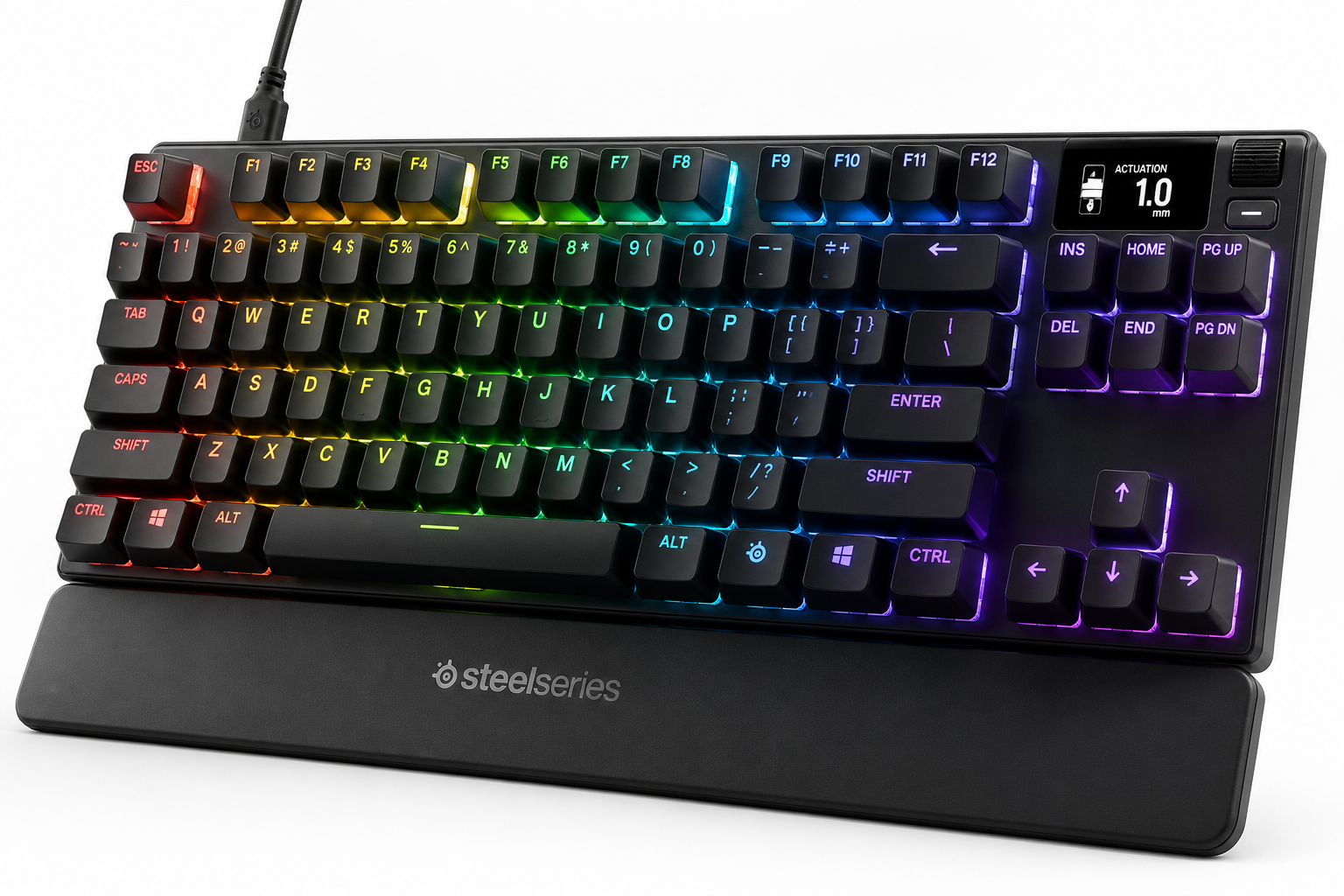
The SteelSeries Apex Pro TKL Gen 3 is a tenkeyless gaming keyboard built around OmniPoint 3.0 analog magnetic switches, offering ultra-fast actuation, deep per-key customization, and advanced features like Rapid Trigger, Rapid Tap/SOCD options, and Protection Mode. With PBT keycaps, per-key RGB, a small OLED display, and USB-C connectivity, it targets competitive players who want granular control over actuation and input behavior. However, its complex software and premium positioning make it best suited to users willing to invest time in tuning their setup.
Overview
The SteelSeries Apex Pro TKL Gen 3 Gaming Keyboard is a compact, tenkeyless (TKL) board oriented squarely at competitive PC gamers who want the feel and flexibility of modern Hall-effect switches without sacrificing mainstream comfort features. Its OmniPoint 3.0 analog magnetic switches provide adjustable actuation from extremely light, hair-trigger presses to deeper, more deliberate keystrokes, along with advanced behaviors like Rapid Trigger and dual-actuation.
By combining these switches with doubleshot PBT keycaps, an integrated OLED display, per-key RGB, and USB-C connectivity, the Apex Pro TKL Gen 3 aims to be a high‑end, configurable centerpiece for FPS, MOBA, and action gamers who like to fine-tune every input. It is positioned as a premium option in its class, and typically sells in the $214.99 range depending on configuration and ongoing discounts.
Standout Features
OmniPoint 3.0 Analog Magnetic Switches
The core of this keyboard is SteelSeries’ OmniPoint 3.0 Adjustable HyperMagnetic switches. These are Hall‑effect switches that detect the position of the key stem via magnets rather than relying on traditional mechanical contacts.
Key capabilities:
- Highly adjustable actuation: You can set actuation from about 0.1 mm up to 4.0 mm in roughly 40 steps on a per-key basis via SteelSeries GG or directly from the keyboard OLED menu. This enables ultralight taps for rapid strafing or very deep presses for typing accuracy.
- Very fast response: Compared to standard mechanical switches, OmniPoint 3.0 is engineered for significantly lower latency and faster actuation, which matters in high‑level competitive play.
- Per-key tuning: You can mix ultra-short actuation on movement keys (WASD) with deeper actuation on ability keys or modifiers to reduce accidental presses.
Rapid Trigger and Advanced Input Modes
The Apex Pro TKL Gen 3 implements a set of advanced behaviors that take advantage of the analog nature of the switches:
- Rapid Trigger: Instead of a fixed reset point, the key can re‑arm as soon as it starts to rise. This allows extremely quick repeated presses, especially useful in shooters for counter‑strafing or in platformers for fine, repeated jumps.
- Rapid Tap / SOCD options: Quickset presets (Rapid Tap, SOCD settings) allow better control over how opposite directional inputs are resolved, which is helpful for certain FPS and fighting‑game scenarios.
- Protection Mode: Adds an extra layer of reliability and helps mitigate unintended behavior from stray or partial inputs during intense play.
These features can be managed through SteelSeries GG and, importantly, many of them can be toggled on the board itself via the SteelSeries function key and the OLED interface.
OLED Display and On-Board Controls
A small OLED display in the top‑right corner acts as a control and status hub:
- Adjust actuation depth, Rapid Trigger, profiles, and lighting without opening software.
- Display system info (volume, track, profiles) or simple custom images.
- Navigate settings using the volume roller and function key combinations.
This reduces dependence on software once the keyboard is configured, which is particularly useful for tournament or LAN settings where installing software may not be practical.
PBT Keycaps and Build
The Apex Pro TKL Gen 3 uses:
- Doubleshot PBT keycaps: More resistant to shine and wear than ABS, with a crisp, textured surface.
- TKL layout: No number pad, but full function row, arrows, and navigation keys. This frees up mouse space while remaining comfortable for productivity.
- Detachable USB‑C cable: Easier transport and replacement compared to hard‑wired cables.
- Aluminum top plate and plastic chassis: A familiar SteelSeries look with a low-profile, open‑deck design that also makes dust removal straightforward.
RGB Lighting
Per‑key RGB backlighting is standard, with:
- Multiple built‑in effects and brightness controls accessible via shortcuts.
- More detailed configuration available through SteelSeries GG, including per‑key colors and reaction effects.
Supporting Features
Beyond its headline switches, the Apex Pro TKL Gen 3 includes a range of quality-of-life and ecosystem features:
- SteelSeries GG software integration: Deep customization of:
- Actuation levels (per profile, per key)
- Rapid Trigger sensitivity and activation
- Dual‑binding and custom macros
- RGB layers and reactive effects
- Game-specific profiles that auto‑load when titles launch
- On-board memory: Store profiles and actuation settings directly on the keyboard, letting you retain your setup across PCs.
- Media controls: A metal volume roller and dedicated media button for quick playback adjustments.
- Angle adjustment and rubber feet: Multiple tilt options and a stable base for different desk setups.
These supporting features help the keyboard serve not only as a game‑only device, but also as a capable all‑rounder for daily tasks, streaming, and content creation.
Usability
Setup and Configuration
Out of the box, the Apex Pro TKL Gen 3 works like a standard USB keyboard: plug in via USB-C and it’s usable instantly. To unlock its capabilities you will want to install SteelSeries GG.
Configuration flow typically looks like this:
- Baseline profile: Choose a default actuation depth (e.g., 1.0–1.5 mm) suitable for both gaming and typing.
- Per‑key tuning: Shorten actuation on movement and action keys (WASD, space, shift, control) and lengthen actuation on number keys or modifiers to reduce misfires.
- Rapid Trigger setup: Enable for movement keys in FPS or specific action keys where fast re‑presses matter. Leave it off for keys where accidental presses would be problematic.
- Macro and RGB configuration: Layer in macros for complex in‑game actions or productivity workflows, and refine lighting to your preference.
Once the main profiles are set, you can switch between them using shortcuts or the OLED menu without reopening the software.
Learning Curve
Because of the analog switches and advanced modes, the Apex Pro TKL Gen 3 can feel more complex than a traditional mechanical keyboard:
- Actuation sensitivity: At the lowest settings, keys can feel almost too eager to fire, leading to accidental presses until you dial in a comfortable depth.
- Feature density: Understanding Rapid Trigger, Protection Mode, and SOCD options may take some experimentation, especially if you’re new to Hall‑effect boards.
However, for users who like to tweak, that complexity translates into control. You can run multiple game‑specific profiles and fall back to a more conservative profile for typing and general productivity.
Everyday Use
For general typing and office work:
- The feel is smooth and consistent, with a more refined, slightly clacky sound profile typical of PBT on a metal top plate.
- Adjustable actuation allows you to find a deeper setting that reduces typos without losing the benefits of fast response when you switch to gaming.
- The TKL layout keeps essential keys close, which can be ergonomic for both typing and gaming on tighter desks.
Performance
In its intended use—competitive or fast‑paced gaming—the Apex Pro TKL Gen 3 is designed to excel:
- Latency: The Hall‑effect sensing and firmware are optimized for fast actuation and low overall input delay, placing it among the quicker mainstream gaming keyboards.
- Precision movement: With Rapid Trigger enabled and low actuation depths, it’s easier to control strafes, jiggle peeks, and micro‑adjustments in FPS titles.
- Consistency: Magnetic sensing eliminates contact wear found in traditional mechanical switches, promoting more consistent actuation over time.
- Durability: PBT keycaps and a sturdy frame help the keyboard tolerate heavy daily use, although long‑term switch durability will still depend on environmental factors.
Productivity performance is also strong. You can maintain a slightly deeper actuation profile on a dedicated “work” profile so the keyboard feels stable and controlled for extended writing or coding sessions, then flip back to a short‑throw profile for gaming.
Pros and Cons
Pros
- Highly adjustable Hall‑effect switches (OmniPoint 3.0) with actuation from roughly 0.1–4.0 mm per key.
- Rapid Trigger and advanced input modes for fine control in competitive gaming.
- On‑board OLED display allows actuation, profile, and lighting adjustments without software.
- Doubleshot PBT keycaps for improved durability and feel.
- TKL form factor that saves desk space while keeping essential keys.
- Per-key RGB lighting with robust customization options via SteelSeries GG.
- Detachable USB‑C cable for easier replacement and transport.
- Profile and setting storage on the keyboard for consistent behavior across PCs.
Cons
- Premium pricing: Positioned at the high end of the gaming keyboard market ($214.99 range), which may be overkill for casual users.
- Software complexity: SteelSeries GG is powerful but can feel heavy and non‑intuitive until you learn its layout.
- Feature overkill for non‑competitive play: Many users may not fully leverage Rapid Trigger, SOCD modes, or hyper‑short actuation.
- Limited switch variety: You are largely committed to OmniPoint 3.0 for primary keys; traditional switch enthusiasts may miss the choice of linear, tactile, or clicky variants.
Summary
The SteelSeries Apex Pro TKL Gen 3 is a specialized yet versatile keyboard that delivers advanced Hall‑effect technology in a mainstream, tenkeyless layout. Its OmniPoint 3.0 switches, Rapid Trigger, and deep actuation control make it particularly attractive for competitive FPS and action gamers who want to tune every aspect of their inputs.
For users who value plug‑and‑play simplicity, its feature set and $214.99 positioning may be more than necessary. But if you’re willing to spend time dialing in per‑key actuation and taking advantage of its analog capabilities, the Apex Pro TKL Gen 3 offers a rare combination of speed, customization, and build quality that few boards in the TKL gaming space currently match.