
MSI Codex Z2 (A8NVP-436US) Review: A Ready-to-Play 1440p Gaming Desktop with RTX 5070 Power
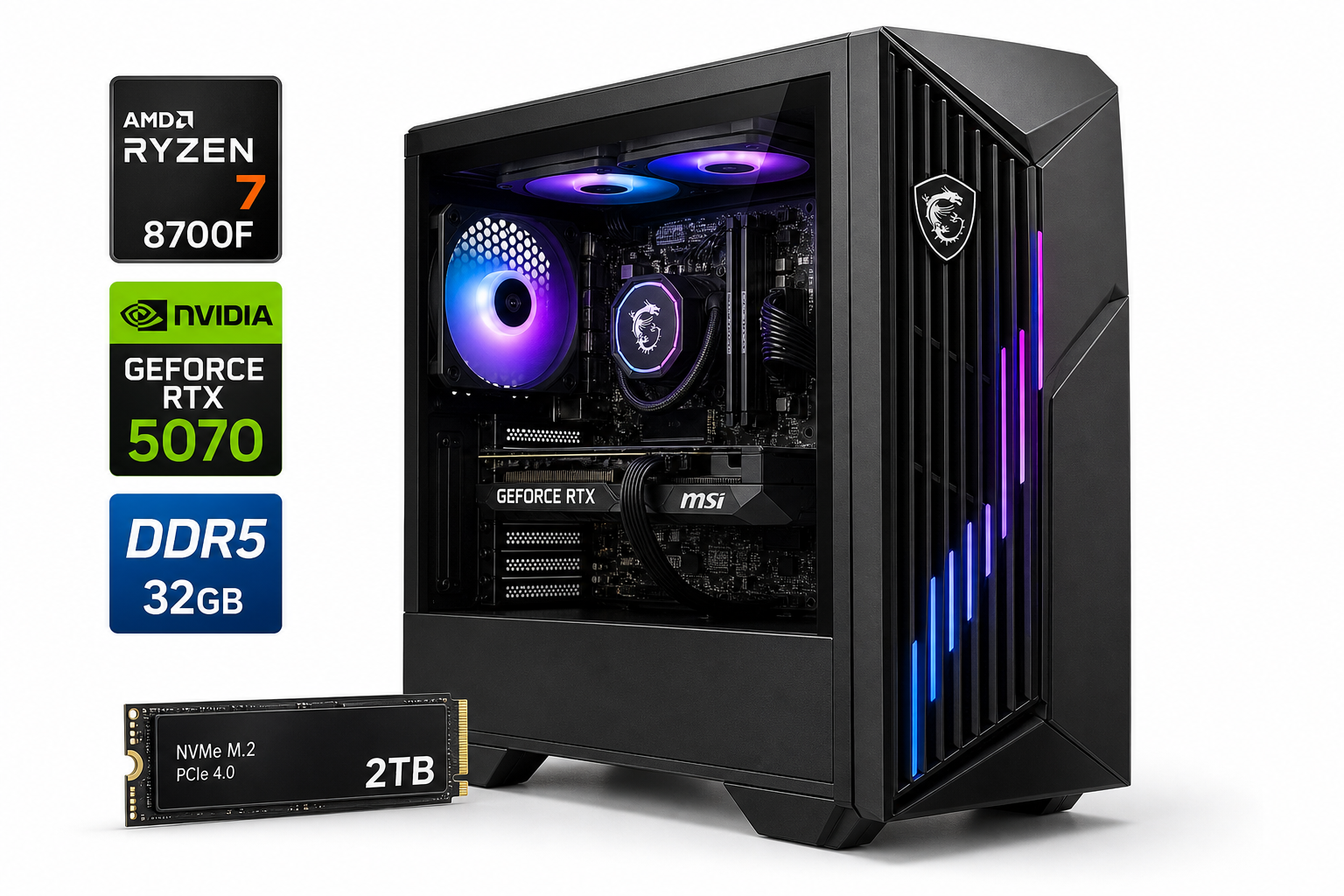
This review looks at the **[msi Codex Z2 Gaming Desktop, AMD R7-8700F, RTX 5070, 32GB DDR5, 2TB SSD | NVIDIA GeForce RTX 5070, USB Type-C, VR-Ready, Windows 11 Home. Model A8NVP-436US](https://www.amazon.com/dp/B0F15TM77B)** as a turnkey gaming and productivity machine. With an 8-core Ryzen 7 8700F processor, NVIDIA GeForce RTX 5070 graphics, 32GB of fast DDR5 memory, and a spacious 2TB NVMe SSD, it targets players who want comfortable 1440p and entry-level 4K gaming, plus headroom for streaming and content creation. This article covers setup, day-to-day experience, performance expectations, strengths, and notable trade-offs such as limited upgrade flexibility and typical prebuilt OEM BIOS constraints.
Introduction
The msi Codex Z2 Gaming Desktop, AMD R7-8700F, RTX 5070, 32GB DDR5, 2TB SSD | NVIDIA GeForce RTX 5070, USB Type-C, VR-Ready, Windows 11 Home. Model A8NVP-436US is a prebuilt tower aimed at players who want modern performance without building a system from scratch. Centered around AMD’s Ryzen 7 8700F processor and NVIDIA’s GeForce RTX 5070 GPU, it’s designed to handle demanding games at 1440p, push into 4K with settings tweaks, and comfortably support VR and creative workloads.
With 32GB of DDR5 memory and a 2TB NVMe SSD, the Codex Z2 is positioned as a long-term, do‑everything machine: gaming, streaming, multi-monitor productivity, and light to moderate content creation.
Setup / Getting Started
Unboxing and setup are straightforward:
-
Physical setup
- Remove protective foam and plastic, then check that the internal GPU support brackets and packing are cleared.
- Connect power, HDMI/DisplayPort from the RTX 5070 to your monitor, plus keyboard, mouse, and any USB peripherals.
-
First boot & Windows 11 Home
- The system ships with Windows 11 Home preinstalled. Initial setup consists of region selection, Wi‑Fi/Ethernet configuration, and signing in with or creating a Microsoft account.
- As with many prebuilts, expect a few OEM utilities and possibly trial software. Uninstalling non-essential apps helps keep the machine lean.
-
Driver & firmware updates
- Use Windows Update to grab OS patches.
- Install or update NVIDIA GeForce drivers via GeForce Experience or the manual driver package for the RTX 5070.
- MSI’s utilities can assist with chipset drivers and offer basic system monitoring.
-
Initial configuration for gaming
- Set your monitor to its native refresh rate (144Hz or 165Hz if supported).
- Configure game libraries (Steam, Epic, Battle.net, etc.) to install on the primary 2TB SSD.
- Optionally, adjust Windows power settings to "High performance" or a similar profile to avoid aggressive power saving.
Overall, the Codex Z2 behaves like a plug‑and‑play console replacement: connect, sign in, update, and you’re ready to install games.
Daily Usage
For typical day‑to‑day use, the Codex Z2 feels responsive and modern:
-
General productivity
Web browsing with many tabs, office work, messaging apps, and video calls all run smoothly thanks to the 8‑core / 16‑thread Ryzen 7 8700F and 32GB DDR5 RAM. Multitasking with multiple monitors is effortless. -
Gaming experience
The RTX 5070 is tuned for 1440p high‑refresh gaming. Modern titles should comfortably run at high or ultra presets at this resolution, while 1080p players can prioritize higher frame rates for competitive titles.
The system’s VR‑ready branding is backed by the GPU and CPU combination, which is more than adequate for mainstream VR headsets. -
Content creation & streaming
The CPU/GPU duo plus generous memory makes this tower suitable for:- Light to moderate video editing in tools like DaVinci Resolve or Premiere Pro.
- Photo editing and design work in Photoshop and similar apps.
- Streaming gameplay while encoding via NVENC on the RTX 5070 or using CPU‑based encoding for higher quality profiles.
-
Noise and thermals (typical expectations)
Under light workloads, the system should remain quiet with fans spinning slowly. Under heavy gaming or rendering, fan noise will be noticeable but typical for a gaming desktop. The mid‑tower design and dedicated GPU cooling help keep temperatures in check, assuming normal room airflow. -
Connectivity and expandability
Front and rear USB ports, including USB Type‑C, make it easy to connect external SSDs, headsets, and controllers. Internally, there’s usually some room for additional storage drives and potentially more case fans, though upgrade paths can be more limited than on a fully custom build.
Performance & Reliability
While exact benchmark numbers will vary by game and settings, the core hardware gives a good indication of expected performance:
-
CPU: AMD Ryzen 7 8700F
- 8 cores and 16 threads provide strong multi‑threaded performance for gaming, streaming, and productivity.
- As a modern Ryzen part, it offers solid single‑core performance, which benefits high‑FPS gaming and lightly threaded tasks.
-
GPU: NVIDIA GeForce RTX 5070
- Targeted at 1440p with high to ultra graphics presets.
- Supports ray tracing and DLSS, giving you flexibility to trade visual fidelity and frame rate.
- More than capable for popular esports titles (Valorant, Apex Legends, Fortnite, etc.) at high refresh rates.
-
Memory: 32GB DDR5
- 32GB is ample for today’s games and multitasking, and helps with heavier content‑creation workloads.
- DDR5 further improves bandwidth, which can benefit some memory‑intensive applications.
-
Storage: 2TB NVMe SSD
- Fast load times for games, quick OS boot, and responsive application launches.
- 2TB provides room for a sizable modern game library plus creative project files before you need external or secondary internal storage.
-
Reliability considerations
- As with most prebuilts, long‑term reliability largely depends on case airflow, dust management, and component quality (PSU, motherboard, fans).
- Keeping firmware and drivers up to date, and occasionally cleaning dust filters, will help maintain stable performance over time.
Overall, the MSI Codex Z2 configuration is balanced: none of the core components are likely to become an obvious bottleneck out of the box for mainstream 1440p gaming and mixed workloads.
What Works Well
-
Strong 1440p gaming and VR‑ready performance
The combination of a Ryzen 7 8700F and RTX 5070 offers a sweet spot for high‑resolution, high‑refresh gaming, with extra headroom for newer titles and VR experiences. -
Generous memory and storage
32GB of DDR5 RAM and a 2TB NVMe SSD give this system a long usable life for gaming, multitasking, and creative work without immediate need for upgrades. -
Turnkey Windows 11 Home environment
The system arrives preconfigured with Windows 11 Home, reducing friction for non‑enthusiast users who don’t want to install an operating system or hunt for drivers. -
Modern connectivity
USB Type‑C support, multiple USB‑A ports, and standard video outputs from the RTX 5070 make it easy to integrate with current monitors and peripherals. -
Balanced for gaming and productivity
This is not just a gaming box; it can comfortably handle coding, media editing, 3D work in lighter workflows, and heavy multitasking.
What Could Be Improved
-
Limited OEM customization versus a custom build
As a prebuilt, the Codex Z2 typically ships with an OEM motherboard and power supply that may offer fewer advanced BIOS options, fewer expansion slots, or lower‑wattage headroom than enthusiast‑grade components. -
Potential bloatware
Preinstalled utilities and trialware are common. While easy to remove, they can clutter the system initially and slightly impact startup times until cleaned up. -
Upgrade flexibility
While RAM and storage are generally upgradable, future GPU or CPU upgrades may be constrained by the power supply, motherboard, or case dimensions. Buyers planning frequent hardware refreshes might prefer a fully custom PC. -
Acoustic tuning
Out‑of‑the‑box fan curves on prebuilts often prioritize temperatures over noise. Enthusiasts may want to tune fan profiles via the BIOS or MSI utilities to strike a better balance for their environment.
Overall Impression
The MSI Codex Z2 Gaming Desktop (A8NVP-436US) presents a compelling option for users who want a powerful, modern gaming PC without the complexity of building their own system. With an AMD Ryzen 7 8700F, NVIDIA GeForce RTX 5070, 32GB DDR5, and 2TB NVMe SSD, it’s well‑equipped for 1440p gaming, VR, and serious multitasking.
Its strengths lie in its balanced component selection and ready‑to‑use nature: you plug it in, complete Windows setup, update drivers, and you’re effectively ready to play or create. The trade‑offs are familiar to any prebuilt—some bloatware, less granular upgrade flexibility, and typical OEM tuning—but for many buyers those are acceptable compromises for the convenience.
If you’re looking for a capable, future‑minded gaming and productivity desktop and prefer a turnkey solution over sourcing and assembling individual parts, the MSI Codex Z2 Gaming Desktop (A8NVP-436US) on Amazon is a strong contender in the prebuilt space.