
Alienware Aurora R16 (i7-14700F, RTX 4070 Super, 32GB DDR5) Review: Compact Premium Gaming Desktop for 1440p
The Alienware Aurora R16 Gaming Desktop with Intel Core i7-14700F, NVIDIA GeForce RTX 4070 Super, 32GB DDR5 RAM, and a 1TB SSD targets players who want strong 1440p performance in a compact, premium chassis. This review looks at its design, key hardware features, in-game performance, thermals and acoustics, overall user experience, and long‑term considerations such as upgradability and proprietary components. We also weigh its strengths and weaknesses to help you decide if this configuration is the right fit for your gaming and productivity needs.
Introduction
The Alienware Aurora R16 Gaming Desktop (Basalt Black) pairs Intel’s Core i7-14700F with NVIDIA’s GeForce RTX 4070 Super, 32GB of DDR5 memory, and a 1TB NVMe SSD, positioning it as an upper‑midrange to high‑end prebuilt for 1440p gaming and heavy multitasking. It continues Alienware’s move toward a more compact, airflow‑friendly design compared to earlier Aurora generations while keeping the brand’s signature aesthetics and software ecosystem. On major retailers like Amazon, this exact configuration is typically listed around $2599.99, placing it squarely in competition with other premium prebuilts and DIY builds based on the same GPU.
This review evaluates how well the Aurora R16’s hardware, thermals, and design work together in real‑world use, and whether the trade‑offs—especially around proprietary parts—make sense for your needs.
Product overview and key features
Core hardware configuration
This specific Aurora R16 configuration includes:
- CPU: Intel Core i7‑14700F (20 cores / 28 threads, hybrid P‑core + E‑core design)
- GPU: NVIDIA GeForce RTX 4070 Super, 12GB GDDR6X
- Memory: 32GB DDR5 RAM
- Storage: 1TB PCIe NVMe SSD
- Operating system: Windows 11 Home
- Chassis color: Basalt Black
- Warranty: 1‑Year onsite / in‑home service support
The i7‑14700F is a strong all‑rounder: it’s more than capable for modern AAA gaming and also well‑suited to streaming, content creation, and productivity. Paired with the RTX 4070 Super, this build is aimed primarily at 1440p high‑refresh gaming and can handle many titles at 4K with settings tweaks.
Chassis and design
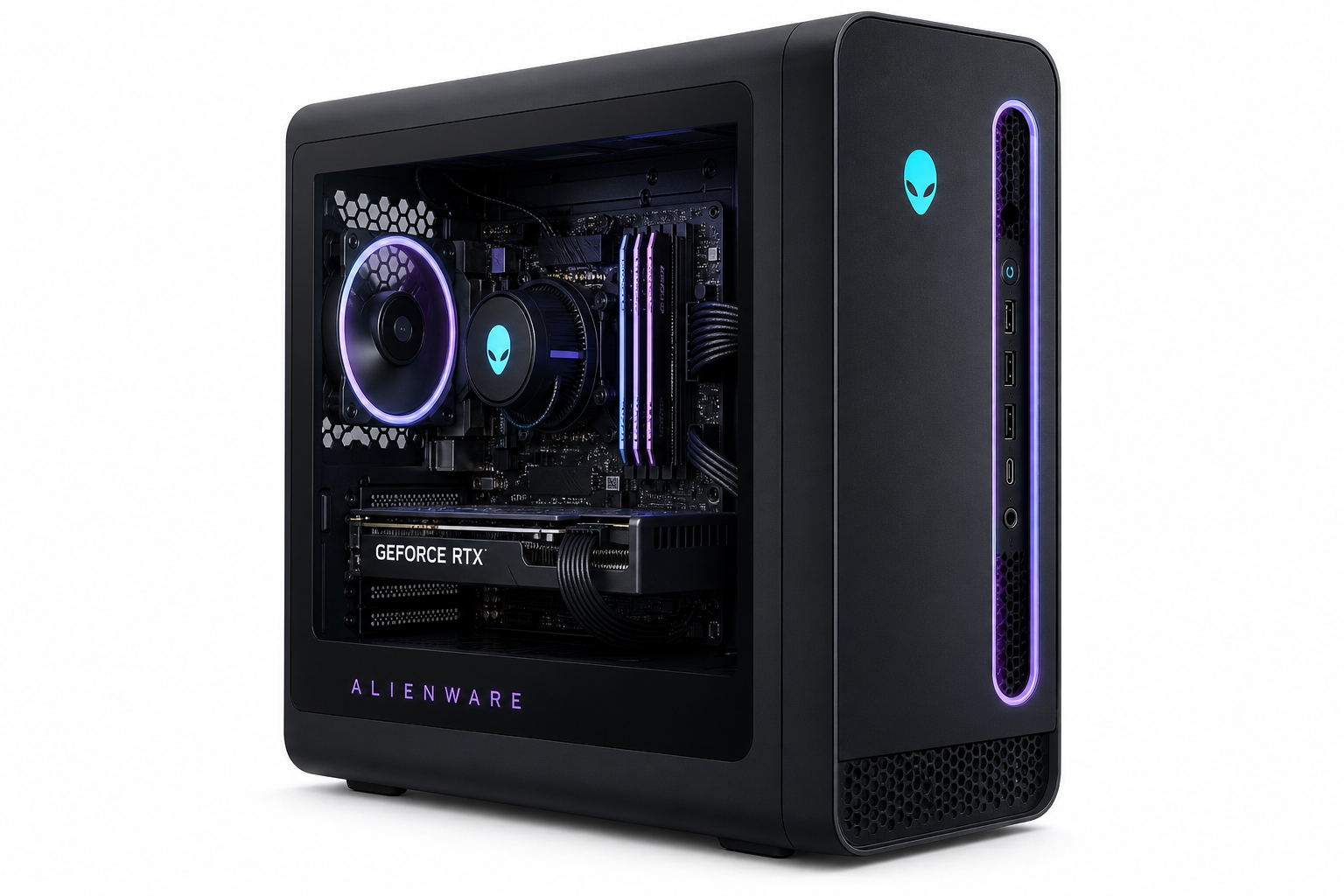
The Aurora R16’s case is noticeably more compact and conservative than earlier, more bulbous Aurora designs. The front panel focuses on a clean look with subtle lighting accents, and airflow has been improved versus prior generations, which were often criticized for being cramped and warm.
Key design notes:
- Compact mid‑tower footprint with a vertical layout optimized for front‑to‑back airflow.
- Side panel window on many configurations, offering a view of internal components.
- Cable management is mostly hidden, with pre‑routed cables to keep the interior clean.
- Front I/O typically includes USB‑A, USB‑C, and audio ports for easy access.
While it’s not as open as a large DIY case, Alienware has clearly tried to address common complaints about the thermal and acoustic design of previous Aurora lines.
Connectivity and expandability
Exact port layouts vary slightly by GPU and regional configuration, but in general you can expect:
- Rear I/O (motherboard): multiple USB‑A ports, USB‑C, 2.5 GbE LAN, audio jacks.
- GPU outputs (4070 Super): usually three DisplayPort 1.4a and one HDMI 2.1, suitable for multi‑monitor or high‑refresh 1440p/4K setups.
- Wireless: Wi‑Fi 6/6E and Bluetooth support (configuration‑dependent).
For storage and memory expansion, the Aurora R16 offers:
- Additional M.2 and/or 2.5"/3.5" drive options depending on model.
- Support for more than 32GB of DDR5, though the prebuilt’s OEM board and Dell’s memory qualification may mean you should use compatible modules if upgrading.
The main constraint versus a DIY build is Alienware’s partial use of proprietary components—notably the motherboard layout and sometimes the power supply form factor—which can limit certain upgrade paths or make replacement parts more expensive.
Performance and user experience
Gaming performance
With an RTX 4070 Super and i7‑14700F, this Aurora R16 is built squarely for high‑refresh 1440p gaming:
- 1440p AAA titles: You can expect high or ultra settings in many modern games while maintaining smooth frame rates suitable for 120–165 Hz monitors, especially with DLSS enabled where supported.
- 1080p esports titles: Competitive games like Valorant, CS2, and Overwatch 2 can push very high FPS, making full use of 240 Hz or even higher‑refresh panels.
- 4K gaming: Many less demanding or well‑optimized titles run well at 4K with a mix of high/ultra settings, though the 4070 Super is more comfortably a 1440p GPU.
The 32GB of DDR5 RAM helps with multitasking and newer titles that are starting to demand more than 16GB, giving this configuration better longevity.
Productivity, streaming, and multitasking
The i7‑14700F’s 20‑core design and high boost clocks make the Aurora R16 effective for:
- Game streaming while playing at 1440p, using either NVENC on the RTX 4070 Super or software encoding on the CPU.
- Content creation tasks such as photo editing, 1440p/4K video editing, and light 3D work.
- Heavy multitasking, like running multiple apps, browser tabs, and background tasks alongside games.
While not as extreme as a high‑core‑count workstation CPU, this setup offers a strong balance of gaming and productivity without obvious bottlenecks at this performance tier.
Thermals and noise
One of the historical concerns about Alienware desktops has been thermal performance and fan noise. The R16’s redesign and airflow improvements help mitigate these issues, but a few points are worth noting:
- Many R16 configurations ship with liquid cooling for the CPU, but some retail models (including those similar to this Amazon listing) may use a traditional air cooler. That can mean higher CPU temperatures and more noticeable fan ramps under heavy load, though still within safe operating limits.
- The RTX 4070 Super is efficient for its performance class, which helps keep GPU temperatures and fan noise in check compared with higher‑wattage cards.
- Under light to moderate loads (web, office, lighter games), the system is typically quiet or modestly audible. Under sustained AAA workloads, expect noticeable fan noise, but generally not extreme for a compact gaming desktop.
For most users, thermals are acceptable out of the box, but enthusiasts focused on ultra‑low noise or maximum cooling headroom may prefer a more open DIY case or R16 variants explicitly equipped with a higher‑end AIO cooler and larger PSU.
Software and overall experience
Alienware bundles its Command Center software, which centralizes:
- System monitoring (temperatures, fan speeds)
- Performance profiles (thermals vs acoustics)
- Lighting control for internal and external Alienware peripherals
The software is feature‑rich but can occasionally feel heavier than minimalist monitoring tools. For new or less technical users, however, having one unified control panel is convenient.
Windows 11 Home comes preinstalled, with the usual mix of OEM utilities. As with most prebuilts, some users may wish to uninstall unnecessary apps to streamline the experience.
Pros and cons
Pros
- Very strong 1440p gaming performance thanks to the RTX 4070 Super and i7‑14700F
- 32GB DDR5 RAM provides excellent headroom for future games and heavy multitasking
- 1TB NVMe SSD offers fast boot and load times for OS and several large games
- Compact, more airflow‑aware chassis compared with older Aurora designs
- Clean aesthetics with subtle Alienware styling and optional RGB lighting
- 1‑Year onsite/in‑home service adds convenience and peace of mind for non‑DIY users
- Good out‑of‑box experience with preconfigured hardware and preinstalled Windows 11
Cons
- Use of proprietary components (motherboard, sometimes PSU, case layout) can limit or complicate long‑term upgrades compared with standard ATX builds
- Some configurations rely on air cooling for the CPU, which may run warmer and louder under sustained load than higher‑end liquid‑cooled variants
- The compact chassis, while improved, still offers less airflow and modding flexibility than many DIY mid‑towers
- Premium brand pricing means you could potentially build a similar‑spec DIY system for less if you are comfortable sourcing parts and assembling
Conclusion and recommendation
The Alienware Aurora R16 Gaming Desktop with an Intel Core i7‑14700F, RTX 4070 Super, 32GB DDR5 RAM, and 1TB SSD is a well‑balanced, high‑performance prebuilt for players who prioritize strong 1440p gaming, clean aesthetics, and turnkey convenience over maximum upgradability or DIY cost optimization. At around $2599.99 on Amazon, it sits in the premium‑prebuilt segment, offering a mix of performance, design, and support that will appeal to many users who want a plug‑and‑play system rather than a custom build.
You should consider this Aurora R16 if:
- You want smooth 1440p gaming today with headroom for the next several years.
- You value on‑site support and a polished OEM experience over tinkering.
- You appreciate Alienware’s design and software ecosystem and are comfortable with some proprietary parts.
You may want to look elsewhere or build your own if:
- You prioritize maximum upgrade flexibility, standard components, and long‑term modding.
- You are highly sensitive to fan noise and willing to invest in a larger, more open case and custom cooling.
- You want to minimize total cost and are comfortable assembling a PC yourself.
Overall, this Aurora R16 configuration is a strong, cohesive package for gamers who want premium 1440p performance with minimal setup hassle, and who are willing to accept Alienware’s proprietary design choices in exchange for that convenience and design flair.