
Logitech G PRO X Superlight 2 SE Review: Flagship Shape, Streamlined Specs
The Logitech G PRO X Superlight 2 SE is a wireless, 60 g competitive gaming mouse built around Logitech’s proven PRO shape. It uses the HERO 2 sensor with up to 44,000 DPI, LIGHTFORCE hybrid optical-mechanical switches, and LIGHTSPEED wireless for low-latency performance. Compared with the mainline Superlight 2, the SE model is essentially the same mouse but ships with a 1,000 Hz receiver instead of 8,000 Hz, making it a slightly pared-back yet still tournament-ready option for FPS and competitive players who value weight, reliability, and a safe symmetrical shape.
Introduction
The Logitech G PRO X Superlight 2 SE Wireless Gaming Mouse is a streamlined spin on Logitech’s high-end Superlight 2. It keeps the same tried-and-true ambidextrous PRO shape, 60 g weight, and HERO 2 sensor rated up to 44,000 DPI, but trims the spec sheet slightly: the included LIGHTSPEED receiver is capped at a 1,000 Hz polling rate instead of 8,000 Hz. In practice, that means you get almost the full Superlight 2 experience at a more approachable cost, with the option to upgrade polling later via a separate receiver if you really want 8K.
If you play mouse‑centric genres like competitive FPS, tactical shooters, or MOBAs and prefer a low-profile, symmetrical shell with minimal extras, the G PRO X Superlight 2 SE aims squarely at you.
Note: This review is based on the Logitech G PRO X Superlight 2 SE as sold on Amazon at approximately $126.99.
Setup / Getting Started
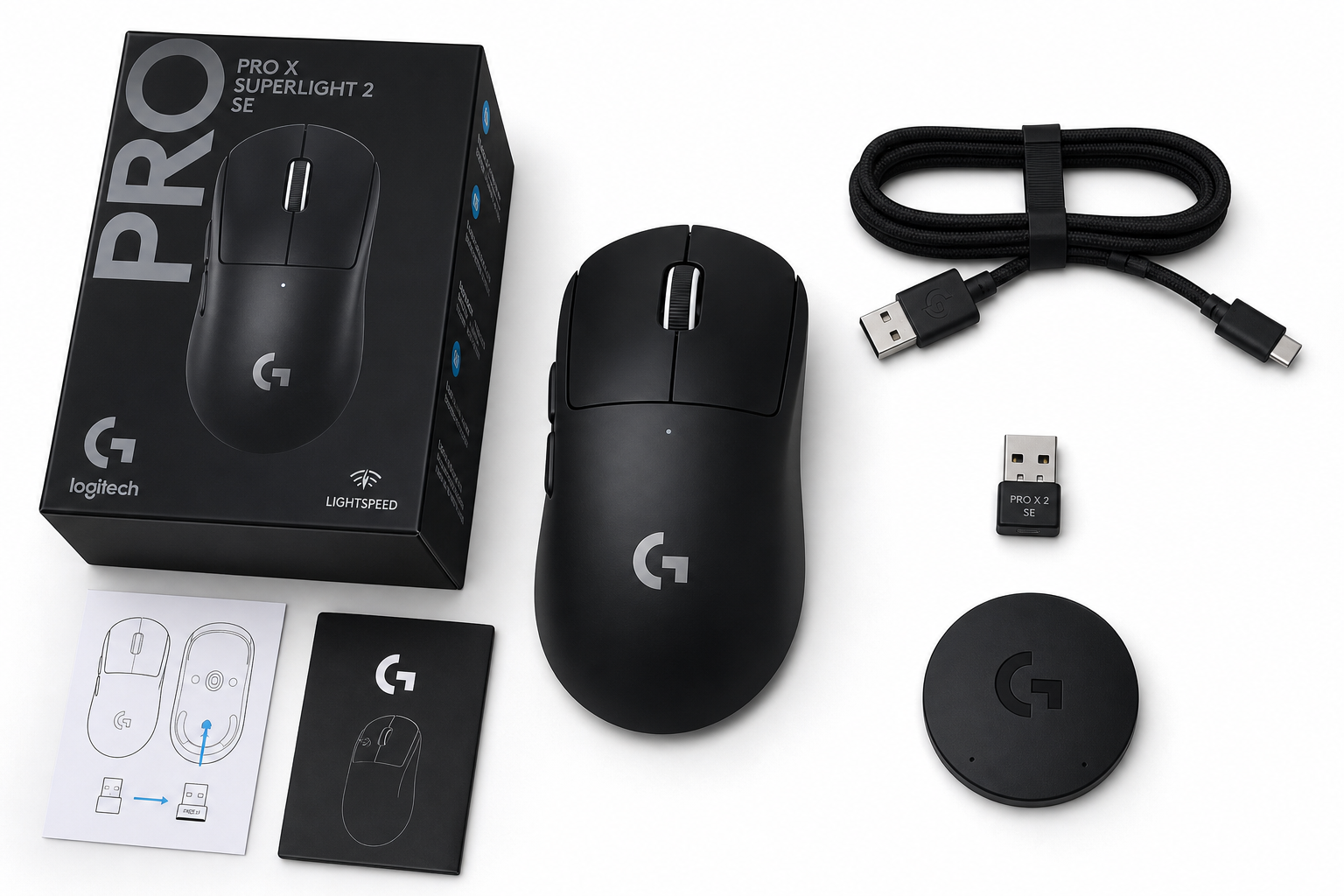
Out of the box, the G PRO X Superlight 2 SE is intentionally minimal: the mouse, a LIGHTSPEED USB‑A receiver, a USB‑A–to–USB‑C cable, and basic documentation. There’s no receiver extension dock in most SE packages, and no spare PTFE feet or extras that some enthusiasts might expect at this tier.
Setup on Windows or macOS is straightforward:
-
Charge and connect
Plug the USB‑C cable into the front of the mouse and a USB‑A port on your PC or Mac to top up the internal battery. You can use the mouse while charging, and the connection defaults to a wired mode with negligible latency. -
Wireless connection
Insert the LIGHTSPEED dongle into a USB‑A port. The mouse pairs automatically in seconds. For optimal signal, especially in a crowded 2.4 GHz environment, use a front‑panel port or a short USB extension if you have one. -
Install Logitech G HUB (optional but recommended)
Logitech’s G HUB software lets you:- Adjust DPI steps (with very fine granularity, far beyond what most will need)
- Rebind the 5 programmable buttons
- Set polling rate up to 1,000 Hz with the included receiver
- Create profiles that auto‑switch with games or apps
-
Optional wireless charging
The Superlight 2 SE supports Logitech’s POWERPLAY ecosystem. If you own a POWERPLAY mouse pad, you can swap the bottom plate and have continuous wireless charging while you play. This is more of a convenience than a necessity, given the battery life, but it’s a nice ecosystem advantage.
Overall setup is quick, and you can be playing in minutes. G HUB isn’t required, but you’ll want it to unlock DPI tuning, button remaps, and onboard profile management.
Daily Usage
Shape and ergonomics
The G PRO X Superlight 2 SE uses the classic PRO shape: a symmetrical, low‑profile shell with gentle curves and no aggressive flares. It’s designed as a safe, middle‑of‑the‑road shape that works for:
- Claw grip on small to large hands
- Fingertip grip across most hand sizes
- Palm grip for small to medium hands, or a hybrid palm/claw for larger hands
At around 60 g, the mouse feels extremely light but not fragile. The weight distribution is nicely centered, so quick flicks, micro‑adjustments, and tracking are all effortless. The included optional grip tape (if provided in your region) adds texture without making the mouse feel bulky.
Buttons and wheel
You get the standard PRO layout:
- Left and right main clicks (LIGHTFORCE hybrid optical‑mechanical switches)
- Scroll wheel with middle click
- Two side buttons on the left (right‑handed layout)
- A DPI/utility button on the underside
The main clicks feel crisp and fast, with a light actuation force and minimal pre‑travel. The hybrid optical design should also reduce double‑click failures compared with older mechanical‑only switches. Side buttons are well‑placed for most right‑handed users, with a low risk of accidental presses.
The scroll wheel is conventional: distinct steps, rubberized surface, and a solid middle click. There’s no free‑scroll or tilt functionality here—this is strictly a gaming‑focused wheel, not a productivity‑oriented one.
Portability and general use
For non‑gaming tasks—web, office work, creative apps—the Superlight 2 SE still feels excellent. The light weight means less fatigue in long sessions, and the five buttons are enough for basic macros or shortcuts. That said, left‑handed users may find the side‑button placement limiting, and the lack of tilt/fast scroll is noticeable if you’re coming from a productivity mouse.
Battery life is strong for a performance‑oriented wireless mouse. With RGB entirely absent and a 1,000 Hz polling cap, you can expect many days to weeks of mixed use between charges, depending on how heavily you game.
Performance & Reliability
Sensor and tracking
The G PRO X Superlight 2 SE uses Logitech’s HERO 2 sensor, rated at up to 44,000 DPI and very high IPS and acceleration figures. In actual use, performance is effectively flawless:
- No hardware acceleration
- No observable smoothing at typical DPI ranges
- Excellent tracking across a variety of cloth and hard pads
Most players will run somewhere between 400 and 3,200 DPI, far below the maximum specification, but the oversized headroom signals that the sensor won’t be the bottleneck even in high‑level play.
Polling rate limitations (1K vs 8K)
Where the SE differs most from the flagship Superlight 2 is polling rate:
- Included SE receiver: up to 1,000 Hz (1 ms report interval)
- Optional separate receiver (sold separately): up to 8,000 Hz (0.125 ms report interval), if you decide to upgrade later
At 1,000 Hz, click latency and cursor response are already excellent and more than sufficient for virtually all players, including many competitive and professional users. 8K polling can improve micro‑smoothness and further shave latency, but most people won’t see a clear in‑game difference outside of synthetic tests or ultra‑high‑refresh (360 Hz+) scenarios with highly trained aimers.
If you’re a serious competitor chasing every last millisecond, keep in mind that unlocking 8K requires additional spend on the separate dongle. For everyone else, the SE’s default 1K ceiling is effectively a non‑issue.
Wireless stability
Logitech’s LIGHTSPEED wireless has a strong track record and it shows here: connection dropouts are rare to nonexistent in typical desk setups, and there’s no perceivable input delay versus wired mode. As long as the receiver has a clear path and isn’t buried behind dense obstacles, reliability is excellent.
Software and firmware
G HUB remains a mixed but generally solid experience:
- Profiles and settings sync correctly once set up
- DPI steps can be stored onboard, so you don’t need software running all the time
- Occasional updates can introduce bugs, but Logitech tends to patch major issues
Crucially, the Superlight 2 SE doesn’t rely on persistent background software for core performance. Once configured, you can uninstall or disable G HUB and keep using your saved settings.
What Works Well
-
Proven, accommodating shape
The PRO shape has become a default recommendation for good reason: it’s neither too large nor too small, and it supports multiple grip styles comfortably. If you’re unsure what shape you like, this is a safe high‑end starting point. -
Extremely lightweight without holes
At around 60 g, the Superlight 2 SE achieves a featherweight feel without using a honeycomb shell. The solid body feels premium and avoids dust ingress issues common with perforated designs. -
Top‑tier sensor and low latency
The HERO 2 sensor and LIGHTSPEED wireless combination deliver excellent real‑world performance. Even locked to 1,000 Hz, click latency and tracking are more than sufficient for high‑level competitive play. -
Clean, distraction‑free design
No RGB, no extra buttons, no gimmicks—just a focused gaming layout. This makes the mouse lighter, cleaner looking, and simpler to configure. -
Ecosystem advantages
Integration with Logitech G HUB and optional POWERPLAY wireless charging gives the Superlight 2 SE a strong ecosystem story. If you already use Logitech keyboards or other G‑series gear, the mouse slots in neatly. -
More accessible pricing vs the flagship
The SE typically undercuts the standard Superlight 2. At around $126.99 on Amazon, it delivers most of the same hardware and build quality with only a few spec compromises.
What Could Be Improved
-
1K polling cap out of the box
While 1,000 Hz is enough for nearly everyone, competitive enthusiasts may feel short‑changed knowing that 8K capability exists but requires a separate purchase. A higher‑tier bundle with the 8K receiver included would make the lineup more straightforward. -
Limited in‑box accessories
The lack of a receiver extension dock and spare feet is disappointing at this price segment. Many competing high‑end mice ship with more complete accessory kits. -
Right‑handed only side buttons
The symmetrical shell is physically ambidextrous, but side buttons are only on the left. Left‑handed players looking for full button access still have limited options. -
No productivity‑oriented features
No Bluetooth, no tilt or free‑scroll wheel, and no extra function layers on the wheel make this a pure gaming tool. That’s by design, but some users hoping to use one mouse for both work and play may miss those features. -
Price pressure from boutique brands
While the SE is more affordable than the flagship Superlight 2, it still competes against numerous ultra‑light mice from smaller brands that offer 4K/8K polling and rich accessory packs for less money. Logitech’s reputation, support, and ecosystem help justify the premium, but value‑focused buyers will notice the gap.
Overall Impression
The Logitech G PRO X Superlight 2 SE is effectively a Superlight 2 “lite”: same elite shape, weight, and sensor, but trimmed to a 1,000 Hz polling ceiling and a slightly leaner package. For many players, that trade‑off is entirely reasonable, especially when the SE is noticeably cheaper than the full‑fat Superlight 2 and regularly discounted to around $126.99.
If you:
- Play competitive shooters or MOBAs
- Prefer a clean, symmetrical shell around 60 g
- Don’t strictly need 8K polling out of the box
…then the G PRO X Superlight 2 SE is an excellent choice that feels every bit like a modern flagship in day‑to‑day play.
However, if you:
- Are chasing the absolute lowest possible latency and smoothest cursor data
- Want higher polling without buying a separate receiver
- Or prioritize maximum accessories and features for the money
…you may want to consider the standard G PRO X Superlight 2, other 8K‑capable mice, or more aggressively priced boutique options.
Overall, the Superlight 2 SE is a smart, performance‑first mouse that delivers Logitech’s best fundamentals at a slightly more attainable price, making it a strong recommendation for serious gamers who value reliability, comfort, and a no‑nonsense design over raw spec sheet bragging rights.