
Alienware Aurora vs. Lenovo Legion Tower 5: Which Gaming PC Is Better?
Choosing a prebuilt gaming PC can be challenging, especially when two systems offer similar hardware and target the same group of gamers. The Alienware Aurora and Lenovo Legion Tower 5 are both popular gaming desktop lines, but they take different approaches to design, performance, cooling, upgradeability, and overall value. This comparison examines the key differences between the two systems to help gamers decide which one better fits their needs and budget.
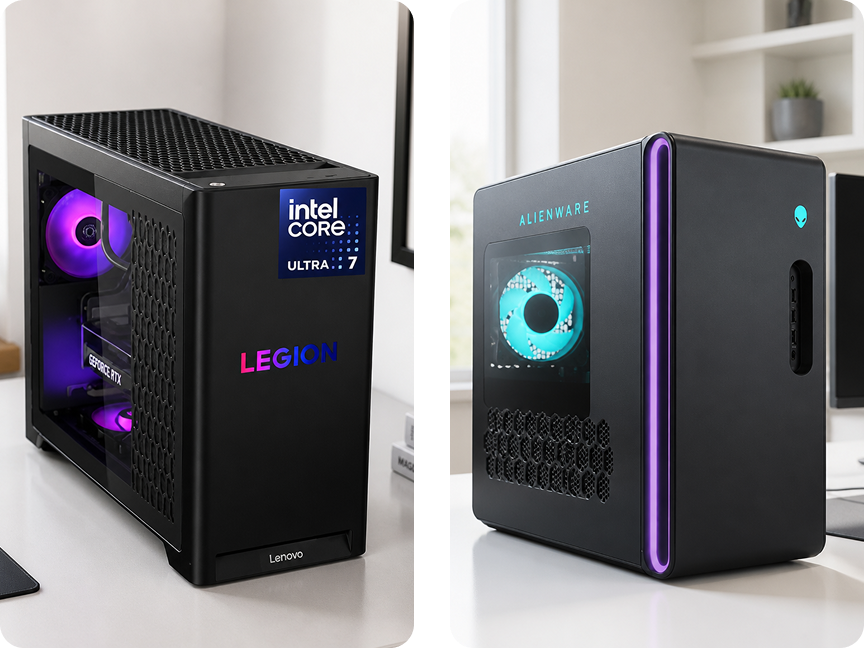
1. Overview
For gamers who want to enjoy PC gaming without building a computer from individual components, a prebuilt gaming desktop can be a convenient option.
The Alienware Aurora and Lenovo Legion Tower 5 are two well-known gaming desktop lines that combine powerful processors, dedicated graphics cards, fast SSD storage, and modern gaming features.
At first glance, they may look quite similar. However, there are meaningful differences in design, cooling, upgrade potential, performance, and value.
So, which one should you choose?
2. Performance
Performance is naturally one of the most important factors when buying a gaming PC.
Depending on the configuration, both the Alienware Aurora and Lenovo Legion Tower 5 can be equipped with powerful modern CPUs and NVIDIA GeForce RTX graphics cards.
For gaming, the GPU usually has the biggest impact on frame rates, especially when playing demanding games at 1440p or 4K.
If the two systems use the same or similar GPU, their gaming performance can be relatively close. Differences in CPU configuration, cooling, memory, and power limits may still affect performance in certain games.
Key point: Don't choose based only on the brand name. Compare the exact CPU, GPU, RAM, and storage configuration of each model.
3. Cooling and Thermal Performance
Gaming PCs generate considerable heat, particularly when running demanding games for long periods.
The Alienware Aurora has a distinctive chassis designed around gaming performance, while newer configurations have placed greater emphasis on airflow and cooling.
The Lenovo Legion Tower 5 takes a more traditional gaming desktop approach, with a tower-style chassis and an airflow-focused design.
For extended gaming sessions, effective cooling can help maintain stable performance and reduce the risk of thermal throttling.
Advantage: The Legion Tower 5 may appeal more to users who prefer a conventional desktop design with a straightforward airflow layout.
4. Upgradeability
One major advantage of a desktop PC is the ability to upgrade components over time.
The Lenovo Legion Tower 5 generally follows a more conventional desktop layout, which can make upgrading components such as RAM and storage relatively straightforward.
Alienware systems have historically used more proprietary design elements in some generations, although newer Aurora systems have become more upgrade-friendly.
If you plan to keep your PC for several years and gradually upgrade it, pay close attention to:
- RAM slots
- M.2 storage slots
- Power supply capacity
- GPU clearance
- Cooling options
- Available case space
Winner for traditional upgrade flexibility: Lenovo Legion Tower 5
5. Storage and Memory
Modern games can consume a surprising amount of storage, so having enough SSD capacity is important.
Both gaming PC families are available with configurations featuring fast SSD storage and substantial RAM.
For a modern gaming system, 16GB of RAM can handle many games, while 32GB provides more headroom for multitasking, streaming, content creation, and future games.
Similarly, a 1TB SSD is a practical starting point for many gamers, but frequent players may eventually want additional storage.
Tip: When comparing two prebuilt PCs, don't focus only on the headline price. A slightly more expensive system may provide significantly more RAM or storage.
6. Design
The Alienware Aurora is known for its distinctive futuristic appearance.
Its design is aimed at gamers who want their desktop to stand out, making it an attractive choice for a gaming setup where aesthetics matter.
The Lenovo Legion Tower 5 has a more understated appearance. Its conventional tower design can fit more easily into a home office or gaming setup without attracting too much attention.
This category is subjective.
Choose Alienware if you want a bold gaming aesthetic.
Choose Lenovo if you prefer a more traditional and understated desktop.
7. Ease of Use
One of the biggest advantages of a prebuilt gaming PC is convenience.
You don't have to select every individual component, assemble the system, install everything from scratch, or troubleshoot compatibility issues.
Both Alienware and Lenovo provide ready-to-use systems with Windows and gaming-oriented hardware.
For first-time PC gamers, this can make the transition from console gaming much easier.
However, users who are comfortable building PCs may find that a custom-built system offers more flexibility in component selection.
8. Gaming Experience
When it comes to actual gaming, the graphics card and processor configuration matter much more than the logo on the front of the case.
A system with a stronger GPU will generally provide better gaming performance, particularly at higher resolutions.
For competitive games such as shooters and esports titles, a strong CPU combined with a high-refresh-rate gaming monitor can also be important.
For visually demanding single-player games, GPU performance becomes even more significant.
Therefore, when comparing an Aurora and a Legion Tower 5, always compare their exact hardware configurations, not just their product families.
9. Price and Value
Price can be one of the most important differences between two prebuilt gaming PCs.
Alienware often places a strong emphasis on design, branding, and the overall premium gaming experience.
Lenovo Legion, on the other hand, tends to focus more heavily on balancing hardware specifications with price.
That doesn't automatically make one better than the other.
A good deal on an Alienware Aurora can be a better purchase than a poorly configured Legion Tower 5, and vice versa.
The best value comes from comparing the actual hardware inside the PC rather than simply comparing the retail price.
10. Which One Should You Buy?
Choose Alienware Aurora if you:
- Want a distinctive gaming PC design
- Prefer a premium gaming aesthetic
- Want powerful prebuilt configurations
- Care about the overall appearance of your setup
- Prefer a ready-to-use gaming desktop
Choose Lenovo Legion Tower 5 if you:
- Want a more conventional desktop design
- Prioritize hardware value
- Care about upgrade flexibility
- Prefer a traditional airflow-oriented chassis
- Want a balanced gaming PC for long-term use
Final Verdict
The Alienware Aurora and Lenovo Legion Tower 5 are both capable choices for PC gaming, but they appeal to slightly different types of buyers.
The Alienware Aurora is a strong option for gamers who want a distinctive design, a polished prebuilt experience, and powerful hardware in a recognizable gaming-focused system.
The Lenovo Legion Tower 5 is more appealing to gamers who prioritize practical design, upgradeability, and hardware value.
If you're deciding between the two, don't choose based solely on the brand. Compare the CPU, GPU, RAM, SSD capacity, cooling system, power supply, and current price of the exact configurations you're considering.
For most buyers, the best gaming PC is simply the one that delivers the right combination of performance, upgrade potential, and value for the games they actually play.