
XBOX Wireless Gaming Controller Carbon Black Review
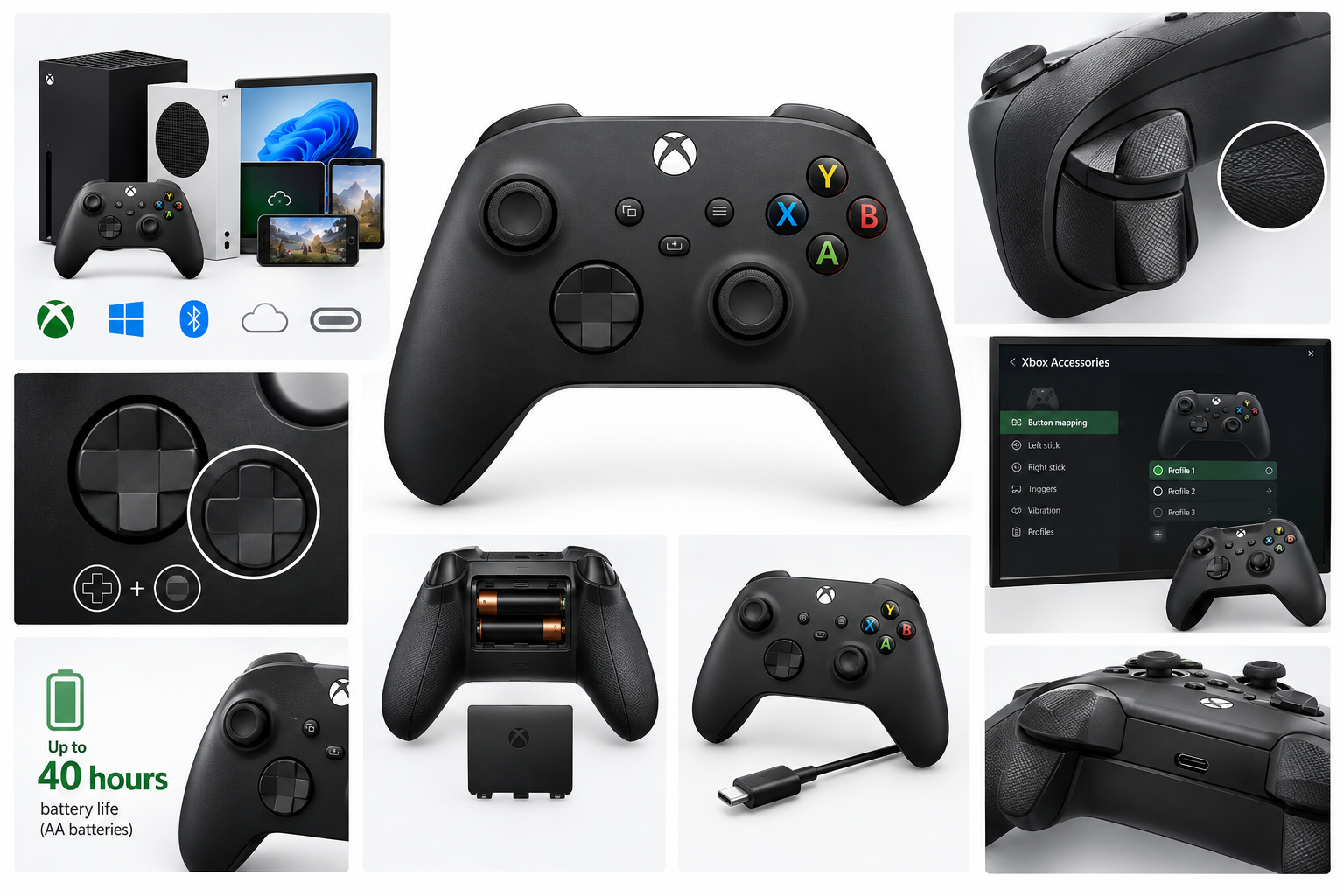
The XBOX Wireless Gaming Controller in Carbon Black is a versatile gamepad designed for Xbox consoles, Windows PCs, compatible mobile devices, and cloud gaming. It combines textured triggers and bumpers, a hybrid D-pad, Xbox Wireless and Bluetooth connectivity, USB-C support, customizable button mapping, and up to 40 hours of battery life with standard AA batteries. Its broad compatibility and familiar layout make it a practical choice for multi-platform gaming, although some features depend on compatible devices, software, cables, or subscriptions.
Product Context
The XBOX Wireless Gaming Controller | Carbon Black | Textured triggers and bumpers, Hybrid D-pad, XBOX Wireless, Bluetooth, USB-C, Play across Console & PC & Cloud Devices is a Microsoft Xbox controller aimed at players who use more than one gaming platform. It is designed for Xbox Series X|S and Xbox One consoles, Windows PCs, and supported devices used for cloud gaming, including select mobile devices, handhelds, smart TVs, and compatible VR headsets.
The controller follows the familiar Xbox layout, with offset analog sticks, shoulder buttons, triggers, a central Xbox button, and a hybrid D-pad. Its Carbon Black finish gives it a conventional appearance, while the textured control surfaces are intended to improve grip during extended play.
Feature Breakdown
Multi-platform connectivity
The controller supports Xbox Wireless for compatible consoles and Bluetooth for supported PCs and mobile devices. This gives it more flexibility than a console-only gamepad and makes it suitable for users who switch between local console gaming, PC gaming, and cloud-based play.
A USB-C port is also included for wired connections and compatible accessories. The product information indicates that a compatible USB-C cable may be required for certain Windows configuration features, and a cable is not necessarily included with the controller.
Textured triggers and bumpers
Textured triggers and bumpers provide additional tactile feedback and can make the controller easier to hold during fast-paced games. The textured surfaces are particularly useful for shooters, racing games, and action titles where players frequently use the shoulder controls.
Hybrid D-pad
The hybrid D-pad is designed to combine the directional precision of a traditional cross-style pad with a more rounded feel. It should work well for menu navigation, platformers, fighting games, and titles that require frequent diagonal inputs. Individual preferences will vary, especially for players accustomed to a clickier or fully circular D-pad.
Customization through the Xbox Accessories app
Button mapping and custom profiles can be managed through the Xbox Accessories app on supported Xbox consoles and Windows 10 or Windows 11 devices. This allows users to remap controls for different games and switch between saved profiles rather than relying only on default layouts.
Battery operation
Microsoft rates the controller for up to 40 hours of battery life when using standard AA batteries. Actual runtime can vary depending on usage, connected accessories, wireless activity, and other factors. The removable-battery design also allows users to carry spare batteries or use a compatible rechargeable battery solution.
Performance Insights
The controller's strongest performance advantage is its adaptability. Xbox Wireless provides a direct wireless option for compatible consoles, while Bluetooth makes the same controller useful with supported PCs and mobile devices. This reduces the need to maintain separate gamepads for different platforms.
The standard Xbox control layout is well suited to a wide range of genres. Analog-stick placement favors many console-style games, while the textured triggers and hybrid D-pad add useful control detail without changing the familiar overall design. The controller is also a sensible fit for cloud gaming setups where one gamepad may be used across several supported screens.
Performance is dependent on the host device and game. Compatibility can vary by operating-system version, Bluetooth implementation, game support, and the specific cloud gaming application. Xbox Cloud Gaming also requires a supported device and an appropriate Game Pass subscription, so the controller itself does not provide access to cloud game content.
Usability
The sculpted shape and familiar button placement make the controller relatively easy to use for players already accustomed to Xbox hardware. The textured grip areas help maintain control during longer sessions, while wireless operation keeps the play area free of a permanent cable.
The Xbox Accessories app adds useful flexibility for players who prefer alternate button layouts or different controls for specific genres. However, configuring profiles may require access to a compatible Xbox or Windows device, and some Windows customization functions may require a compatible USB-C cable.
The controller's AA battery compartment is convenient for quick replacement, but users seeking built-in rechargeable power will need to use rechargeable AA batteries or a compatible battery accessory. This is a practical trade-off rather than a universal advantage or disadvantage.
Trade-offs
- Broad compatibility: Works across compatible Xbox consoles, Windows PCs, and supported Bluetooth devices, but compatibility varies by platform and software.
- Flexible power options: Standard AA batteries are easy to replace and can provide long runtime, but rechargeable power is not built in.
- Wireless and wired use: Xbox Wireless and Bluetooth support provide flexibility, while USB-C enables wired operation and configuration on supported devices. A compatible USB-C cable may be required separately.
- Customizable controls: The Xbox Accessories app supports button remapping and profiles, though setup depends on compatible hardware and operating systems.
- Cloud gaming support: Suitable for supported cloud gaming devices, but cloud access requires separate service availability and subscription requirements.
- Traditional Xbox design: The familiar layout benefits most Xbox users, while players who prefer symmetrical analog sticks or a different D-pad style may need time to adjust.
Conclusion
The XBOX Wireless Gaming Controller in Carbon Black is a versatile, conventional Xbox gamepad with useful multi-platform support. Its combination of Xbox Wireless, Bluetooth, USB-C connectivity, textured triggers and bumpers, hybrid D-pad, customizable controls, and long claimed AA-battery runtime makes it a strong general-purpose option for Xbox, PC, and supported cloud gaming setups.
Its main limitations are the dependence on platform-specific compatibility, the use of replaceable AA batteries instead of an integrated rechargeable cell, and the possibility that a USB-C cable or separate cloud gaming subscription may be needed for particular use cases. For players who value a familiar Xbox layout and want one controller for several compatible devices, it offers a practical and flexible design.