
VOYEE Switch Controller (S08) Review: Feature-Rich RGB Gamepad for Switch and PC on a Budget
The VOYEE Switch Controller (model S08, ASIN B0BZJ4RFKR) is a wireless, RGB-lit gamepad designed for Nintendo Switch, Switch Lite, Switch OLED, and Windows PCs (wired). It offers mainstream features such as motion controls, programmable buttons, turbo firing, adjustable vibration, and a 1000mAh battery rated for 10–15 hours of play. With its comfortable ergonomics, easy one-key pairing, and wake-up support for the console, it aims to be a cost-effective alternative to Nintendo’s official Pro Controller. This review covers its design, features, performance, and real-world pros and cons to help you decide if it fits your gaming setup.
Introduction
The VOYEE Switch Controller (S08) is a third-party wireless gamepad targeting Nintendo Switch owners who want Pro Controller-style ergonomics, RGB lighting, and advanced features without paying first-party prices. Compatible with Switch, Switch Lite, Switch OLED, and Windows PCs (via wired mode), it combines a 1000mAh internal battery, 6-axis motion sensing, programmable inputs, turbo, and multi-level vibration in a compact, lightweight shell.
If you are looking for a single controller that can handle casual couch play, portable sessions, and occasional PC gaming, this model is positioned as a value-focused all-rounder at around $19.99.
Product overview and key features
Design and build
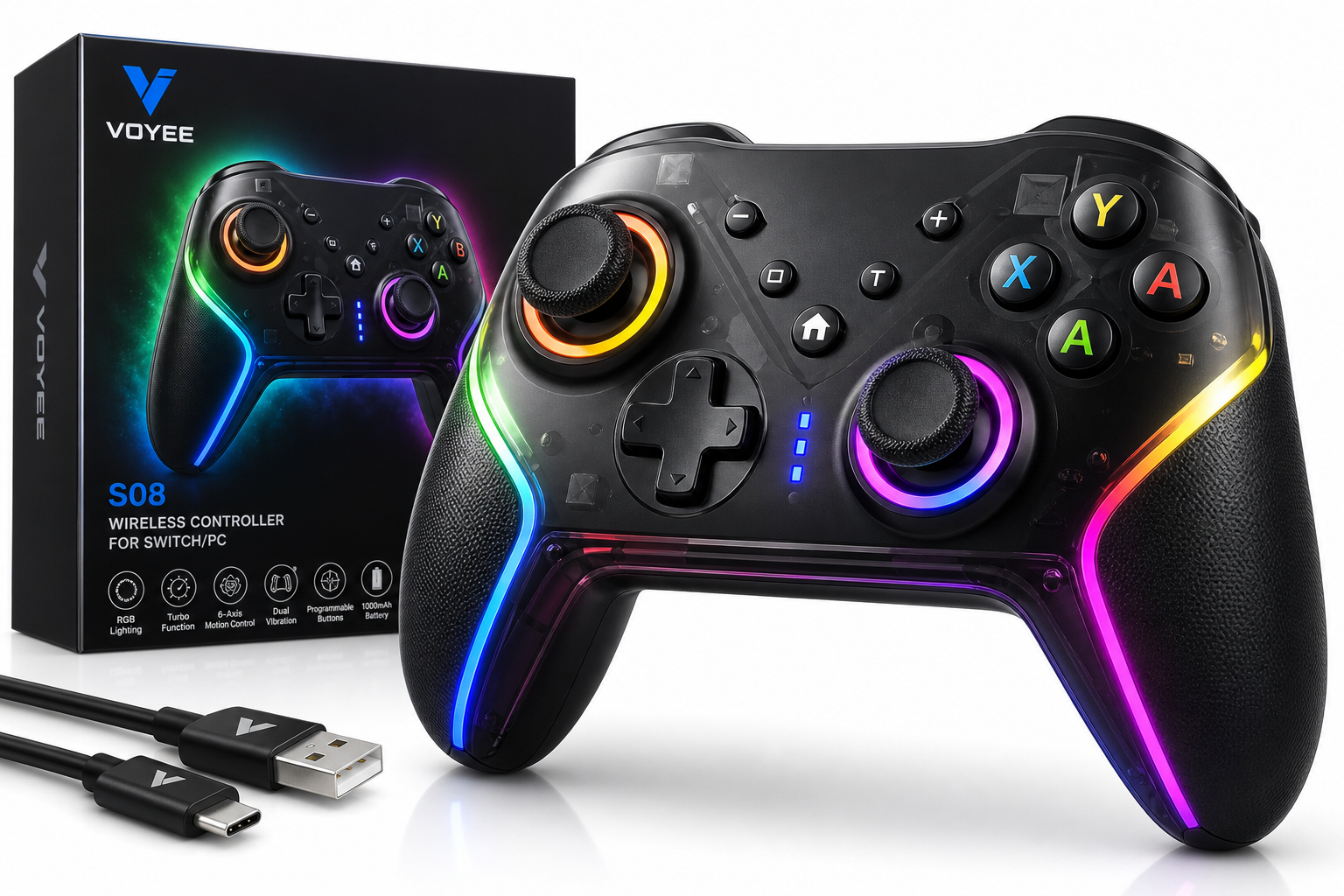
The VOYEE Switch Controller uses a familiar Xbox-style layout with asymmetric analog sticks, a traditional D-pad, four face buttons, and shoulder/trigger buttons. It’s finished in black plastic with translucent areas that let the RGB lighting shine through. At about 0.43 lb (roughly 195 g), it sits in the typical weight range for modern wireless controllers, avoiding both toy-like lightness and excessive heft.
Key design characteristics include:
- Ergonomic grips: Contoured handles aim to support longer play sessions without causing hand strain.
- 14-button layout: Standard ABXY, D-pad, shoulder buttons, triggers, plus additional function and programmable inputs.
- RGB lighting: 9-color RGB schemes (depending on the specific firmware/batch) illuminate the sticks and front shell for a more dynamic look, with multiple effects and brightness options.
Connectivity and compatibility
The S08 is built first and foremost for the Nintendo Switch family, but it also covers basic PC use:
- Switch / Switch Lite / Switch OLED: Wireless connectivity, supports pairing as a Pro Controller replacement.
- PC (Windows): Works in wired mode via USB; detected as a standard game controller for most modern titles.
Some product variants and documentation also mention support for iOS and Android when used as a Bluetooth gamepad, but the core, most reliable use cases are Switch and Windows.
Features at a glance
- Wireless Pro Controller-style gamepad
- Compatibility: Switch, Switch Lite, Switch OLED, and Windows PC (wired)
- Battery: 1000mAh lithium-ion, advertised 10–15 hours of runtime per charge
- RGB lighting: Programmable 9-color effects, on-controller controls to switch modes
- Programmable buttons: Rear or auxiliary buttons can be mapped for shortcuts or macro-like input sequences
- Turbo mode: Adjustable-speed turbo for rapid-fire actions
- 6-axis motion control: Gyro and accelerometer support for motion aiming and tilt-based controls in compatible games
- Adjustable vibration: Multi-level rumble strength
- One-key pairing and wake-up: Quick pairing button and the ability to wake the Switch from sleep in supported scenarios
Performance and user experience
Setup and pairing
On the Nintendo Switch, pairing is handled via a dedicated “one-key” function. After entering the controller pairing screen on the console, holding the designated pairing or Home button on the VOYEE unit for a few seconds typically completes setup without needing to dig through additional menus. Subsequent connections are faster, and the controller can usually reconnect with a single button press.
On Windows, the simplest route is a wired USB connection. Once plugged in, it’s recognized as a standard controller by Steam and most modern games, often without additional drivers. For motion controls on PC, support depends heavily on the specific game and whether you use middleware like Steam Input; gyro is generally accessible when the controller is recognized in “Switch mode,” but setup can be more involved than on console.
Comfort and ergonomics
The grips are moderately sized, matching many mainstream console controllers. Most users should find the controller comfortable for multi-hour sessions. The plastic is smooth rather than heavily textured, which may feel slightly slippery if your hands run warm, but the overall contouring helps maintain control.
Button feel can be summarized as:
- Face buttons: Responsive with medium travel and a reasonably crisp actuation, suitable for platformers and action titles.
- D-pad: Adequate for menu navigation and light 2D play; some users may find it less precise than premium first-party pads for demanding fighting games.
- Triggers and bumpers: Digital (non-analog) design aligned with the Switch control scheme, with a light-to-medium actuation force.
- Analog sticks: Standard-size sticks with textured tops. They’re generally accurate, though, like many budget controllers, they may be more prone to long-term wear if used heavily.
Motion controls, vibration, and RGB lighting
The integrated 6-axis motion sensor allows for gyro aiming in shooters or tilt steering in racing games that support the Switch Pro Controller style of input. On Switch, motion behavior is typically plug-and-play once the controller is registered as a Pro Controller; on PC, results vary, but with proper configuration in Steam Input or other tools, gyro can be mapped for more precise aiming.
The vibration system offers adjustable intensity levels. At higher levels, rumble is punchy but not as nuanced as the HD Rumble found in Nintendo’s own controllers. Still, for a budget gamepad, feedback is generally strong enough to convey hits, explosions, and environmental cues.
The RGB lighting is one of the standout features. You can cycle through multiple colors and patterns directly on the controller, adding ambience during dark-room gaming. The lighting system is purely cosmetic—it doesn’t interact with on-screen events—but it gives the pad a distinctive look, especially in multi-controller households.
Battery life and charging
With a 1000mAh internal battery, VOYEE advertises 10–15 hours of gameplay on a full charge, depending on vibration intensity and whether RGB lighting is active. In typical mixed use with moderate rumble and lighting enabled, you can expect to charge it every few evenings of regular play.
Charging is handled over USB (commonly USB-C on more recent batches), allowing you to plug into the Switch dock, a PC, or a standard USB charger. You can continue playing while the controller is connected in wired mode, which is useful if you forget to top up the battery.
Reliability and durability considerations
User feedback for this model is broadly positive, with aggregated ratings hovering around 4.4–4.5 out of 5 stars across several retailers. Many owners highlight the value, battery life, and lighting as strong points. Common praise includes:
- Stable wireless performance with little noticeable lag on Switch
- Easy pairing and reconnection
- Long-lasting charge and acceptable standby drain
However, as with many budget third-party controllers, there are some recurring concerns:
- Stick wear / drift: A minority of users report directional dead zones or drift developing over time, particularly with heavy usage.
- PC configuration quirks: On Windows, button layouts and gyro may need manual remapping; the controller might present itself as an Xbox-style or Switch-style device depending on mode, which can confuse some games until adjusted.
- Firmware and compatibility evolution: With new hardware like updated Switch models, some third-party controllers may require firmware updates to maintain full compatibility, especially for features such as wake-up.
Overall, build quality is good for the price bracket but not on par with premium first-party hardware.
Pros and cons
Pros
- Full-featured alternative to the official Pro Controller: Includes motion controls, turbo, programmable buttons, and multi-level vibration.
- Strong value proposition: Delivers a wide feature set at around $19.99, significantly undercutting first-party options.
- Good compatibility: Works with Switch, Switch Lite, Switch OLED, plus Windows PCs (wired), covering most everyday gaming setups.
- RGB lighting system: 9-color RGB effects provide a customizable, visually striking look that many users appreciate.
- Comfortable ergonomics: Well-shaped grips and balanced weight suitable for long sessions.
- One-key pairing and wake-up support: Simplifies daily use on the Switch.
- Respectable battery life: 1000mAh capacity provides roughly 10–15 hours per charge under typical conditions.
Cons
- Not first-party build quality: Plastics and long-term durability may not match Nintendo’s official Pro Controller.
- Potential for analog stick wear: As with many budget controllers, heavy use can increase the likelihood of drift or calibration issues over time.
- Less refined rumble: Vibration lacks the nuanced feel of HD Rumble, even if overall strength is acceptable.
- PC setup can be fiddly: Gyro and button mapping on Windows may require extra configuration and familiarity with Steam Input or similar tools.
- Limited advanced ecosystem features: No NFC/amiibo reader and no built-in voice chat support, which may matter to some users.
Conclusion and recommendation
The VOYEE Switch Controller (S08, ASIN B0BZJ4RFKR) offers a compelling blend of functionality and flair for budget-conscious players. With wireless support for the entire Switch family, wired compatibility on Windows, motion controls, turbo, programmable buttons, and striking RGB lighting, it covers most of the core needs of casual to intermediate gamers.
It’s best suited for:
- Switch owners who want a secondary or backup controller without paying premium first-party prices.
- Players who value RGB aesthetics and customizable lighting in their setup.
- Households that need several controllers for local multiplayer and are balancing cost against features.
You might want to look elsewhere if you:
- Demand top-tier build quality and long-term analog stick robustness.
- Rely heavily on features like NFC/amiibo or advanced rumble effects.
- Prefer plug-and-play PC gyro support without any configuration.
For most users seeking an affordable, full-featured alternative to Nintendo’s own Pro Controller, the VOYEE Switch Controller delivers a strong mix of comfort, features, and style at around $19.99, making it a worthy contender in the crowded third-party gamepad market.