
VOYEE RGB Star LED Switch Controller Review: Stylish Pro-Style Gamepad on a Budget
The VOYEE Switch Controllers for Switch/Lite/OLED/PC Windows combine a starry RGB shell, programmable buttons, turbo, and 6-axis gyro into a budget-friendly wireless gamepad. This review looks at setup on Switch and PC, everyday comfort, RGB lighting customization, battery life, and input performance, and highlights where the controller excels—particularly visual flair and general Switch usability—as well as compromises in build refinement and PC gyro support.
Introduction
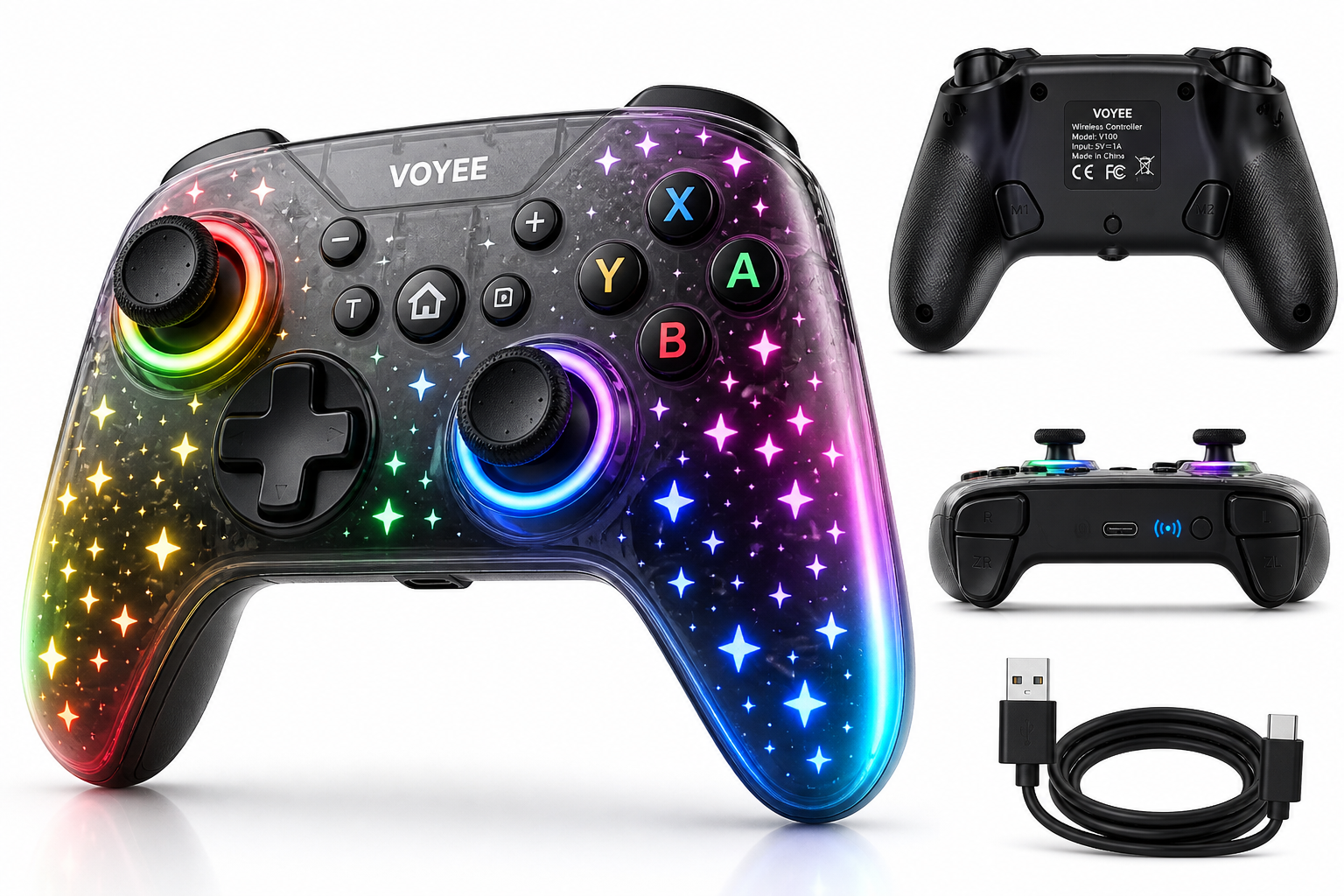
The VOYEE Switch Controllers for Switch/Lite/OLED/PC Windows (RGB Star LED) are designed as an affordable alternative to Nintendo’s official Pro Controller, aimed at players who want extra flair and features without spending first‑party money. Under the translucent, starry shell you get 2.4 GHz/Bluetooth-style wireless connectivity, 9-color RGB lighting with multiple modes, a 6-axis gyro sensor, programmable back buttons, turbo fire, adjustable vibration, and a 1000 mAh internal battery rated for roughly 10–15 hours of play per charge.
On paper, it’s positioned as a value-focused, full-size controller for:
- Nintendo Switch, Switch Lite, and Switch OLED
- Windows PCs (primarily via wired USB-C)
Considering its feature list at around $19.79, it targets players who want a visually distinctive controller for docked play, couch gaming, or PC sessions without a large investment.
Setup / Getting Started
In the box
You typically get:
- 1 × VOYEE LED Star wireless controller
- 1 × USB‑C cable
- 1 × User manual
There is no USB wireless dongle; the controller relies on Bluetooth-style pairing for Switch and a wired USB‑C connection for Windows.
Charging and first use
Before first use, VOYEE recommends fully charging the controller. The built‑in 1000 mAh battery charges over USB‑C and usually takes about 3–4 hours for a full charge, after which you can expect approximately 10–15 hours of runtime depending on vibration level and RGB brightness.
The USB‑C port is on the top edge, next to the pairing/signal button. You can play while charging, so it can double as a wired controller in a pinch.
Pairing with Nintendo Switch / Lite / OLED
The controller supports two primary pairing methods on Switch:
-
B + HOME combination
- On your Switch, go to Controllers → Change Grip/Order.
- On the VOYEE controller, hold B + HOME until the LEDs flash rapidly.
- After a few seconds, the Switch should detect it as a Pro‑style controller.
-
One-key pairing button
- Again open Controllers → Change Grip/Order on the console.
- Press the small pair / signal key near the USB‑C port once.
- The LEDs begin scanning; the controller pairs when detected.
Once paired, you can use the HOME button to wake the Switch from sleep wirelessly, and the controller works at typical living-room distances (up to around 10 meters) as long as there’s no heavy interference.
Connecting to Windows PC
For PC, VOYEE explicitly recommends a wired USB‑C connection for stability.
- Plug the USB‑C cable into the controller and your PC.
- Windows should detect it as a generic XInput gamepad, so it will work out-of-the-box in most modern games that natively support Xbox controllers.
- Wireless Bluetooth support may vary by system and driver and often does not expose gyro; for the most predictable results, treat this as a wired PC pad.
No extra drivers are typically required, though third‑party tools (Steam Input, DS4Windows‑style tools, or community gyro utilities) may help if you want customized layouts or advanced gyro support.
Daily Usage
Ergonomics and comfort
The form factor is close to a standard modern gamepad:
- Full-size grips with a slightly chunky profile
- Asymmetric analog stick layout (left stick high, right stick low)
- Standard face buttons (A/B/X/Y), D‑pad, triggers, bumpers, and HOME/Capture/Plus/Minus
The surface is smooth plastic with some texturing on the grips. It’s lighter than the official Pro Controller, which makes long handheld sessions easier on the wrists but can also make it feel a bit less premium.
For most users, it’s comfortable for multi-hour sessions, though very large hands may find the grips a bit narrow compared to some premium third‑party pads.
RGB lighting in everyday play
A signature feature is the starry RGB shell and lit joystick rings. You get:
- 9 color options (8 solid colors + 1 rainbow mode)
- Multiple lighting modes (e.g., static, breathing, strobe, cycling)
- Adjustable brightness for both the star field and the stick rings
- Memory for the last-used lighting mode, so it powers on with your preferred effect
Lighting controls use a combination of the dedicated TURBO or function key and another button or stick press (the exact combos are in the manual, but once memorized, they’re easy to toggle mid‑game). Brightness at max is very noticeable in a dim room and can be reduced if you find it distracting.
Button mapping, turbo, and macros
On the back, you’ll typically find two programmable buttons (M1 and M2). These can be mapped to one or more front‑facing buttons, so you can:
- Map a commonly used face button (e.g., B or A) to a rear paddle for easier jumps or dodges
- Record a short sequence of button inputs to fire off with a single press (within the controller’s macro limitations)
Turbo fire is available with three burst speeds, useful for shooters or action titles that still rely on rapid button presses:
- Single-shot, medium, and fast auto-fire rates
- Applied by holding the TURBO key and pressing the button whose turbo you want to enable/disable
For most competitive online games, turbo is not recommended (and may violate rules), but it’s handy for grinding in single-player titles.
Performance & Reliability
Wireless stability and input lag
On Switch, once paired, the connection is generally stable in typical living-room setups. Input latency is comparable to other budget wireless controllers and usually not noticeable for casual platformers, adventure games, or JRPGs.
For fast-paced fighters or rhythm games where timing is critical, highly sensitive players may still prefer a wired or first‑party controller, but for the price bracket the VOYEE performs respectably.
Sticks, triggers, and face buttons
- Analog sticks: Smooth travel with standard dead zones. They feel lighter than premium sticks but track reliably for most users. As with many budget controllers, long-term drift resistance is an open question, though community feedback suggests they’re serviceable for everyday gaming rather than esports‑grade precision.
- Triggers and bumpers: Digital (not analog) triggers suited to Switch games. Travel is moderate, with a noticeable click at actuation.
- Face buttons and D‑pad: Tactile enough for most platformers and action games. The D‑pad is usable but not as crisp as a premium fight‑stick‑grade pad.
Gyro and motion controls
The controller includes a 6‑axis gyro sensor for motion aiming and tilt-based input on Switch. It works as expected in games that support motion, such as shooters with gyro aiming or motion-based puzzles.
On Windows, motion support is more limited. Games typically see the controller as a standard XInput pad, so you may need additional software or specific modes to expose gyro as mouse input. If gyro on PC is critical to you, this controller can do it in principle, but setup may be more involved than on Switch and is dependent on third-party tools.
Vibration and haptics
Vibration is dual-motor rumble, not HD Rumble, with multiple strength levels. At mid strength it adds decent feedback for hits and explosions; at maximum it can feel a bit buzzy. Adjusting vibration (and even disabling it) is straightforward via key combos, which also helps extend battery life.
Battery life
VOYEE’s 1000 mAh battery target of 10–15 hours of runtime is realistic, particularly if you:
- Keep RGB brightness at medium or low
- Use moderate vibration strength
With all lighting and vibration maxed out, expect runtime closer to the lower end of that range. Standby drain is minimal, and the controller supports a wake‑up function via the HOME button, which is convenient for daily use.
What Works Well
-
Distinctive RGB star design
The starry translucent shell and joystick ring lights are a standout feature. For players who game in low light or want a themed setup, the VOYEE looks more interesting than most budget controllers. -
Multi‑platform support
Native support for Switch, Switch Lite, Switch OLED, and Windows PC (wired) makes it flexible as your main couch controller or a backup across devices. -
Programmable rear buttons
M1/M2 buttons let you move common actions (jump, dodge, reload) to the back of the pad or record small macros, improving comfort in action-heavy games. -
Turbo with adjustable speeds
Multiple turbo rates are great for grinding in RPGs, shmups, or retro collections that demand rapid presses. -
Solid value for features
At around $19.79, you get RGB, gyro, programmable buttons, wake‑up, and vibration—a feature set that’s unusually rich for a controller in this price tier. -
Reasonable battery life
10–15 hours per charge is competitive, especially considering the power draw of RGB lighting.
What Could Be Improved
-
Build feel vs. premium controllers
While the controller is comfortable, the plastics and button feel don’t match the solidity and refinement of Nintendo’s official Pro Controller or higher‑end brands. There’s a bit more flex and rattle than on premium pads. -
PC gyro support is not plug‑and‑play
On Windows, the controller usually registers as a standard gamepad without exposing gyro out of the box. Players who rely heavily on gyro aiming on PC may find setup more complex than expected and may require third‑party utilities. -
RGB controls require memorizing key combos
All lighting and configuration options are set via button combinations, which can be confusing at first. A small reference card or clearer labeling would help. -
Not ideal for competitive play
While turbo and macros are handy, serious competitive or tournament players typically prefer more robust, officially licensed pads with ultra‑low latency and stricter quality control. This controller is better suited for casual and mid‑core gaming. -
Long‑term durability is budget-tier
As with many controllers in this price range, long-term wear on analog sticks and buttons is a consideration. It’s best viewed as a good everyday or backup controller rather than a lifetime purchase.
Overall Impression
The VOYEE Switch Controllers for Switch/Lite/OLED/PC Windows, RGB Star LED deliver a compelling mix of features and visual flair at a budget-friendly price. Between the programmable rear buttons, turbo, gyroscope, wake‑up support, and 9‑color RGB effects, it checks nearly every box a casual or mid‑core Switch player could want, while still working as a wired controller on Windows.
It does not fully replace a first‑party Pro Controller for players who demand the very best build quality, rumble fidelity, and long-term durability. Nor is it the simplest path to gyro gaming on PC. But if your priority is a stylish, full-size, feature-rich controller for Switch with occasional PC use, and you want to stay close to the $19.79 mark, the VOYEE LED Star controller is easy to recommend as a high‑value option.