
TEFELE TFEFLE Switch 2 Wireless Pro Gamepad Review: A Feature‑Rich Alternative for Nintendo Switch and PC Gamers
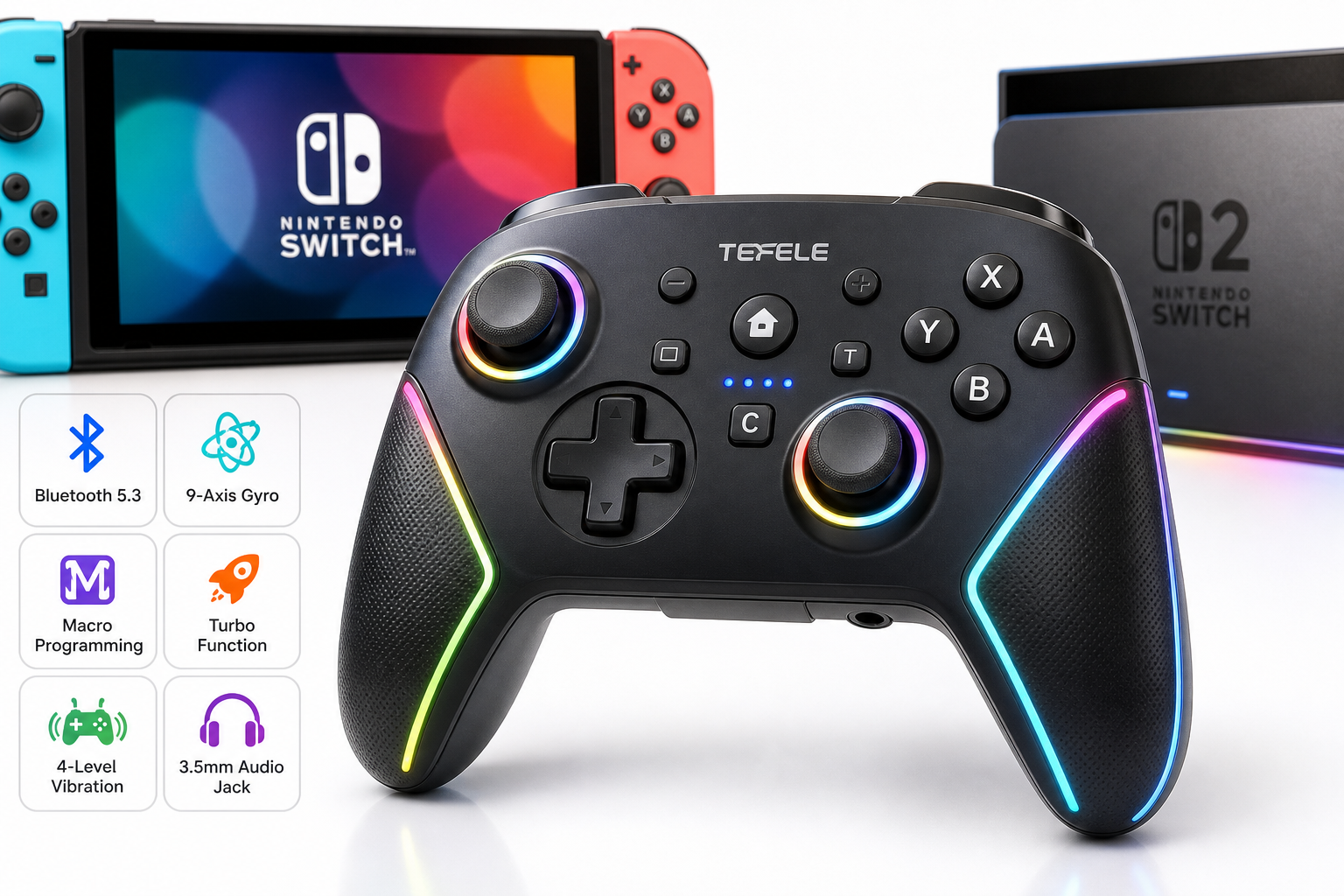
The TEFELE TFEFLE Switch 2 Controller is a third‑party wireless gamepad designed for Nintendo Switch and Switch 2 users who want a more advanced feature set than the standard Joy‑Cons or basic controllers. With Bluetooth 5.3 connectivity, a dedicated C button for in‑game chat, 9‑axis gyro, macro programming, turbo fire, adjustable vibration, LED lighting, and a 3.5 mm audio jack, it aims to deliver a premium experience at a budget‑friendly level. This review looks at its design, core features, performance in real‑world play, and the main strengths and weaknesses to help you decide if it fits your setup.
Introduction
The TEFELE TFEFLE Switch 2 Controller is positioned as a full‑featured wireless gamepad for Nintendo Switch and Switch 2 players who want pro‑style controls without paying first‑party prices. It combines modern connectivity (Bluetooth 5.3) with quality‑of‑life extras such as gyro aiming, programmable macros, turbo, and a built‑in audio jack for wired headsets.
In this review, we break down the controller’s hardware design, core functions, everyday performance, and key pros and cons to see whether it’s a smart buy compared with both Joy‑Cons and other third‑party pads in its class. At around $34.99, it targets value‑focused gamers who still care about advanced features.
Product overview and key features
Design and build
The TEFELE TFEFLE Switch 2 Controller follows the familiar asymmetric‑stick layout used by many modern console pads. It is shaped for two‑handed grip, with:
- Left analog stick in the upper‑left
- Directional pad below the left stick
- A/B/X/Y buttons on the right
- Right analog stick in the lower‑right
- Shoulder and trigger buttons along the top edge
The shell appears to be standard ABS plastic with a matte finish, designed to resist fingerprints and provide a bit of grip. Contoured handles are meant to support longer play sessions more comfortably than flat Joy‑Cons used with a grip.
LED lighting elements add visual flair, particularly appealing if you play in low‑light setups or want your controller to stand out on a desk or dock.
Connectivity and compatibility
The controller uses Bluetooth 5.3 for a more modern and efficient wireless connection compared with older Bluetooth versions. In practice, that should translate into:
- Faster, more reliable pairing
- Reduced latency
- Better power efficiency and potentially longer battery life
It is primarily designed for Nintendo Switch and Switch 2, and many such third‑party pads can also connect to PC via Bluetooth. If you plan to use it on Windows, it’s worth checking what input mode it presents (e.g., XInput vs. DirectInput) and whether games recognize all buttons correctly, but for typical Switch usage the core mapping is straightforward.
Controls and functional highlights
The TEFELE TFEFLE Switch 2 Controller differentiates itself with several premium‑style functions:
-
C Button for Game Chat
A dedicated C button is intended for quick access to in‑game chat features or contextual actions in supported titles. On Switch 2, where system‑level and in‑game communication have been expanded in newer titles, having a dedicated, easily reachable chat button can be convenient if the game allows button reassignment. -
9‑Axis Gyro Sensor
The built‑in 9‑axis gyro supports motion controls such as tilt‑to‑aim or motion‑based camera adjustment. This is important if you enjoy shooters or motion‑aim‑enhanced games:- Fine‑tune aiming by combining stick input with subtle wrist movement.
- Use motion gestures where games support them, similar to Nintendo’s own controllers.
-
Macro Programming
Macro functionality lets you record a sequence of button presses and map them to a single button. This can be useful for:- Repeating combo inputs in fighting games
- Complex menu sequences you perform often
- Rebinding multi‑step actions to one trigger in action or RPG titles
Most macro‑enabled controllers include safeguards so that macro recording and playback require clear button combinations, reducing the chance of accidental activation mid‑match.
-
Turbo Function
The turbo feature allows a selected button (for example A or B) to fire repeatedly while held, mimicking rapid button presses. This is particularly helpful in:- 2D action games that require frequent attacks
- Retro or arcade shooters with rapid‑fire weapons
- Games that involve repeated confirmation presses
-
4‑Level Vibration
Adjustable rumble with four intensity levels lets you tune feedback to your liking:- Turn vibration down for quieter play or to reduce hand fatigue
- Increase it in action titles where strong feedback adds immersion
-
LED Lighting
Integrated LED lights provide visual feedback and customization. Depending on implementation, LEDs may:- Indicate connection status or player number
- Offer static or cycling colors for cosmetic appeal
-
3.5 mm Audio Jack
A standout feature compared with many basic third‑party pads is the 3.5 mm audio jack, which allows you to plug a wired headset directly into the controller (subject to console support and game audio settings). This:- Keeps your headset cable closer to you, not to the console dock
- Can simplify voice chat setups versus running long cables across the room
Performance and user experience
Wireless stability and latency
Bluetooth 5.3 should offer a solid connection for typical living‑room distances. During normal use, you can expect:
- Stable pairing once the controller is registered with your Switch or Switch 2
- Minimal input delay that feels comparable to other modern wireless controllers
- Stable performance at several meters from the console, provided there are no major obstacles or interference sources
As with any third‑party wireless pad, performance can vary slightly depending on the specific environment (Wi‑Fi congestion, other Bluetooth devices, and line‑of‑sight to the dock or console).
Controls, comfort, and ergonomics
The TEFELE TFEFLE controller aims to mimic a standard console pad feel rather than the more compact Joy‑Cons:
- Analog sticks: Full‑size sticks typically provide more precise control and are easier to manipulate for fine aiming than Joy‑Con sticks.
- Face buttons: The A/B/X/Y cluster follows Nintendo’s layout, and the travel and actuation force are generally tuned to be responsive but not overly stiff.
- D‑pad: Depending on build tuning, the D‑pad may feel more suitable for 2D games than the separate buttons of Joy‑Cons.
- Shoulder/trigger buttons: Having distinct L/R and ZL/ZR triggers is essential for shooters and racing games; the feel of these triggers greatly influences comfort over long sessions.
The contoured grips distribute pressure across the palm, helping reduce fatigue during extended gaming sessions. Users with larger hands will likely appreciate this more than the smaller Joy‑Con controllers.
Motion controls and gyro aiming
With its 9‑axis gyro, the controller is well‑suited to Switch games that support motion aiming or tilt‑based input. Once you adjust in‑game sensitivity and your personal hand movement style, you can:
- Combine stick movement for large aim adjustments with small wrist movements for fine targeting.
- Use motion control for racing or platforming games that support tilt steering or gesture inputs.
This can be especially beneficial in competitive shooters where small aim corrections help land more accurate shots.
Macros, turbo, and customization
Macro programming and turbo features add an extra layer of flexibility:
- Macro sequences help automate complex inputs. For example, a fighting game combo or a multi‑step action that normally requires precise timing can be triggered with a single macro button.
- Turbo is useful when you need to hold down a button for rapid‑fire actions, reducing thumb fatigue while maintaining a consistent firing rate.
However, there are a few caveats:
- Competitive online games may restrict or discourage macro and turbo usage.
- It takes some time to learn the configuration combinations and avoid switching modes accidentally during heated gameplay.
Audio experience
When supported by the console and game, the 3.5 mm audio jack on the controller can greatly simplify your audio setup:
- You connect your wired headset directly to the controller.
- You stay closer to the sound source and avoid long audio cables trailing from the dock or console.
For handheld mode, you may still prefer plugging into the console itself, but in TV mode the controller jack is often more practical.
Battery life and charging
While exact battery specifications are not indicated in the basic listing, Bluetooth 5.3 and the option to adjust vibration levels generally help extend battery life. Typical expectations for this type of controller include:
- Several hours of continuous play per charge, depending on vibration strength and LED brightness
- Longer runtime when vibration is turned down and LED effects are minimized
Charging is usually handled via a USB‑C port on the top or bottom of the controller (check the product listing or manual for the exact location), letting you plug into the Switch dock, a USB charger, or a PC.
Pros and cons
Pros
- Modern wireless connectivity with Bluetooth 5.3 for stable performance and efficient power use.
- 9‑axis gyro for accurate motion controls and gyro aiming in supported titles.
- Macro programming to streamline complex inputs and repetitive actions.
- Turbo function for rapid‑fire in action and retro games.
- 4‑level adjustable vibration to fine‑tune rumble strength or reduce noise.
- C button for game chat providing quick access to communication features in compatible games.
- 3.5 mm audio jack for wired headsets directly from the controller, convenient in TV mode.
- LED lighting adds personalization and visual feedback.
- Ergonomic, full‑size grip design more comfortable than Joy‑Cons for long sessions.
- Typically more cost‑effective than first‑party pro controllers, especially around $34.99.
Cons
- As a third‑party controller, long‑term durability and quality control can vary more than first‑party options.
- Advanced features like macros and turbo might not be allowed or welcomed in some online or competitive game environments.
- Button feel, analog stick resistance, and trigger sensitivity may not perfectly match Nintendo’s official pro controllers, which could bother highly sensitive players.
- LED lighting and strong vibration settings can reduce battery life if always left at maximum.
- Some features (like chat mapping to the C button or audio through the 3.5 mm jack) may depend on individual game support and system settings.
Conclusion and recommendation
The TEFELE TFEFLE Switch 2 Controller offers a substantial feature set that goes well beyond basic gamepads. With Bluetooth 5.3, motion controls, macros, turbo, adjustable vibration, LED lighting, and a rare inclusion of a 3.5 mm audio jack, it aims to deliver a pro‑style experience at a more accessible price point like $34.99.
It is best suited for:
- Switch and Switch 2 players who want a more ergonomic alternative to Joy‑Cons for extended TV or tabletop play.
- Users who value customization, such as macros, turbo, and adjustable rumble.
- Gamers using wired headsets who appreciate having a headset jack on the controller itself.
If you prioritize absolute build quality, official support, and guaranteed compatibility, Nintendo’s own first‑party controllers still set the benchmark. But if you are comfortable with a well‑equipped third‑party option and want pro‑style features without paying premium first‑party prices, the TEFELE TFEFLE Switch 2 Controller is a compelling candidate to consider for your setup.