
Razer Raiju Mobile (RZ06-02800100-R3M1) Review: Console-Style Control for Android Gamers
The Razer Raiju Mobile (model RZ06-02800100-R3M1) is a premium Android-focused game controller designed to bring console-style ergonomics and advanced features—such as multiple connectivity modes, remappable extra buttons, and adjustable phone mount angles—to smartphone gaming. This review looks at its build quality, feature set, performance over Bluetooth and wired USB-C, overall usability for long sessions, and the main trade-offs buyers should consider, including its size, app dependency, and game compatibility.
Product Context
The Razer Raiju Mobile (RZ06-02800100-R3M1) is a full-size gamepad built specifically for Android smartphones. Rather than clipping tiny controls around your phone, Razer takes the opposite approach here: this is essentially a console controller with an integrated phone cradle.
Aimed at players who treat mobile games, game streaming, and emulation as seriously as console or PC titles, the Raiju Mobile targets:
- Android users who want console-grade sticks, triggers, and buttons for shooters, MOBAs, and racers.
- Mobile cloud gaming users (e.g., Xbox/PC remote play, cloud platforms) who benefit from a traditional layout.
- Gamers who want both Bluetooth and wired USB-C connectivity and extra programmable buttons.
From its first release, the Raiju Mobile sat toward the higher end of the Android controller market, which you should keep in mind when comparing it to more compact clip-based or telescopic controllers in the same segment (for instance, you might see it around $37.40 on its current product page).
Feature Breakdown
Design and Build
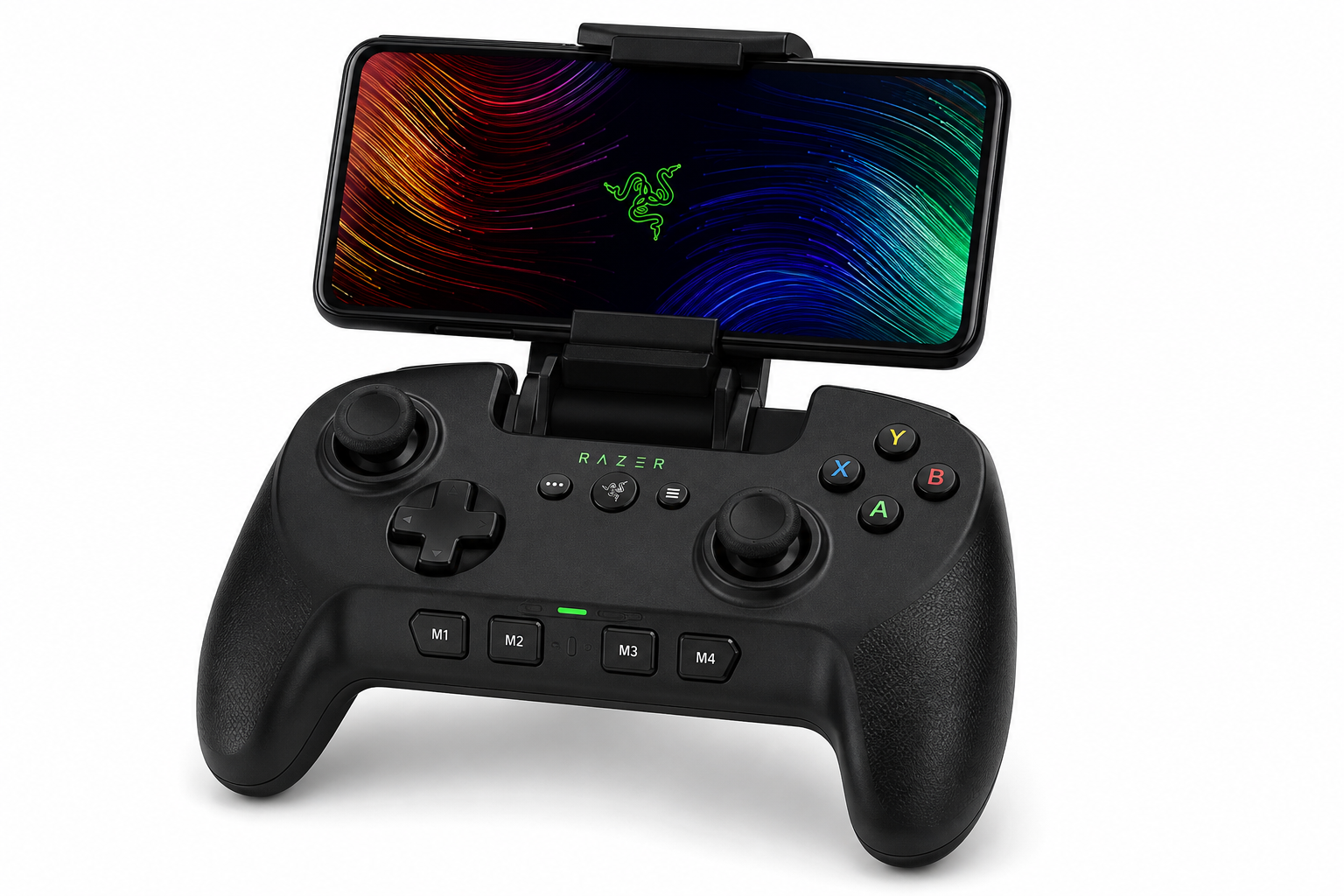
The Raiju Mobile closely resembles Razer’s console controllers:
- Full-size chassis with substantial grips for two-handed use.
- Integrated phone holder that folds out from the top and can secure a variety of Android phones.
- Adjustable viewing angles so you can tilt the phone to a comfortable position.
- A largely plastic construction, but with a solid feel and moderate weight that helps stability on a desk or in your hands.
The result is a controller that feels much closer to holding an Xbox/PlayStation pad than a typical low-profile mobile gamepad.
Controls and Layout
The control scheme mirrors modern console gamepads, with a few enhancements:
- Dual analog sticks with clickable L3/R3.
- Standard face buttons, directional pad, and shoulder buttons.
- Analog triggers suitable for racers and action titles.
- Four multi-function buttons (M1–M4) that can be remapped using Razer’s software, allowing custom layouts or quick access to repeated actions.
This configuration is well-suited to competitive titles and complex control schemes that are hard to manage with touch alone.
Connectivity Options
The Raiju Mobile is flexible in how it connects:
- Bluetooth wireless mode for cable-free gaming on compatible Android phones.
- Wired USB-C connectivity for users who prefer lower latency and a more stable connection.
Having both modes is valuable if you switch between different devices or care about minimizing lag in competitive games.
Software and Customization
Razer pairs the Raiju Mobile with companion software on Android for:
- Remapping the M1–M4 multi-function buttons.
- Adjusting certain controller behavior profiles.
This gives power users some room to fine-tune the control layout for specific titles—especially useful in games that support full controller remapping or where you want quick access to complex combos.
Performance Insights
Input Responsiveness
In use, the Raiju Mobile aims to deliver a console-like response on Android:
- Over Bluetooth, latency is generally acceptable for most genres, especially RPGs, platformers, and many action games.
- Over USB-C, latency can be reduced further, which is helpful for fast-paced shooters, fighters, and rhythm games where timing is critical.
How smooth the experience feels will ultimately depend on each game’s controller implementation and your Android version, but the hardware itself is positioned for low-latency play.
Analog Sticks and Triggers
The sticks provide a familiar level of resistance, making them appropriate for:
- Fine aiming in shooters.
- Camera control in third-person titles.
- Precision movement in platformers.
Analog triggers are useful in driving titles where partial inputs are required, and they feel more like console triggers than those on compact, travel-focused controllers.
Game and App Compatibility
Because it’s an Android controller rather than a platform-specific accessory, behavior depends on:
- The game’s native controller support.
- Your Android version and device-specific quirks.
Titles with robust controller support (including many premium mobile games and cloud or remote-play apps) benefit most. Some touch-only games may require built-in remapping tools from the game or third-party solutions, which the Raiju Mobile itself does not natively provide.
Usability
Setup and Pairing
Getting started is straightforward:
- Bluetooth mode: Put the controller into pairing mode, discover it on your Android device, and connect.
- Wired USB-C mode: Connect via compatible cable where supported; the phone can recognize it as a standard gamepad.
- Install the companion app (where available) if you want to customize button assignments.
Once set up, the controller generally behaves like a conventional Android gamepad, recognized by most controller-aware titles.
Ergonomics and Comfort
Strengths of the form factor include:
- Full-size grips that distribute weight, particularly helpful for long sessions.
- A centered phone mount that keeps the display aligned with your field of view.
- Adjustable tilt, which can help find a comfortable angle when playing at a desk, on a couch, or on a plane tray table.
However, a few usability considerations follow from this design:
- It is bulkier than telescopic controllers that wrap around the phone, making it less pocketable.
- The combined weight of controller plus phone can feel top-heavy when holding it for very long periods without resting your arms.
Portability and Day-to-Day Use
The Raiju Mobile is better suited to a backpack or dedicated case than a pocket. For players who primarily game at home, in a hotel, or at a desk, this is less of an issue. For quick gaming on public transit or in very short bursts, a smaller controller—or pure touch—may be more convenient.
Battery impact is also worth noting: in Bluetooth mode, the controller draws from its own power, while in wired mode it can rely on the USB-C connection. The overall impact on phone battery life will vary by use case, but serious mobile gamers should already be accustomed to monitoring power usage during long sessions.
Trade-offs
Pros
- Console-style ergonomics with a full-size grip and familiar layout.
- Dual connectivity (Bluetooth and USB-C) for flexibility and lower latency options.
- Adjustable phone mount with tilt control for better viewing angles.
- Four programmable multi-function buttons (M1–M4) for advanced control schemes.
- Strong fit for cloud gaming and remote play, where a traditional controller layout is ideal.
Cons
- Larger and heavier than many mobile-first controllers; not ideal for ultra-portable use.
- Game compatibility varies and depends heavily on Android and individual titles.
- Requires a companion app for full customization, adding a software layer to manage.
- The design is Android-focused, so it’s not a universal solution across multiple ecosystems.
Value Considerations
Pricing has historically placed the Raiju Mobile at the more premium end of the Android controller segment. At around $37.40, it typically costs more than compact clip-style solutions but less than some high-end modular gaming setups.
Its value is strongest for players who:
- Prefer console-controller ergonomics over ultra-portable designs.
- Use Android as a serious gaming or cloud gaming platform.
- Can take advantage of the extra programmable buttons and wired mode.
For casual users who only occasionally play mobile games, a simpler or cheaper controller may be more appropriate.
Conclusion
The Razer Raiju Mobile (RZ06-02800100-R3M1) is best viewed as a console-grade controller that happens to be built around Android smartphones. It offers responsive sticks and triggers, extra programmable buttons, and both Bluetooth and USB-C connectivity, all framed around an integrated, adjustable phone cradle.
Its main compromises are size, portability, and a dependence on game-by-game controller support. If your priority is keeping a controller in your pocket at all times, this is probably more hardware than you need.
However, if your goal is to make Android, cloud gaming, or remote play feel as close as possible to using a traditional console—especially when gaming in longer sessions—the Raiju Mobile justifies its positioning and, at roughly $37.40, can be a compelling choice among dedicated mobile gaming controllers.