
PlayStation DualSense vs. Xbox Wireless Controller: Which Gaming Controller Is Better?
A good gaming controller can significantly affect comfort, precision, and overall gaming enjoyment. Two of the most recognizable options are the PlayStation DualSense Wireless Controller and the Xbox Wireless Controller. Both offer wireless connectivity, comfortable ergonomics, responsive controls, and broad compatibility, but they have different strengths. The DualSense focuses on immersive features such as haptic feedback and adaptive triggers, while the Xbox controller emphasizes familiar ergonomics, broad compatibility, and a straightforward gaming experience. This review compares the two controllers in terms of design, comfort, features, connectivity, battery life, PC compatibility, and overall value.
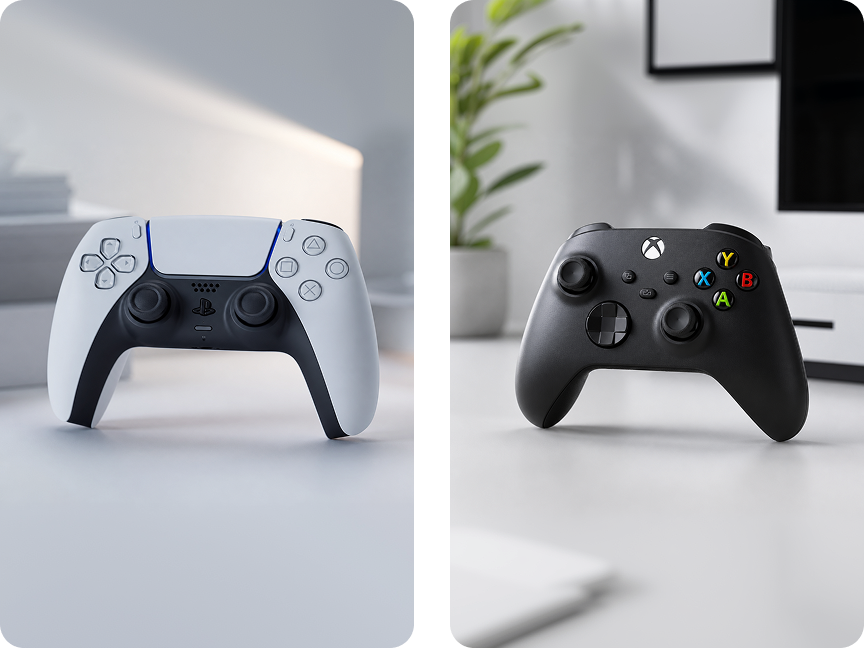
1. Design and Ergonomics
The first thing you'll notice is that the two controllers have different designs.
The DualSense has a larger, more rounded shape with symmetrical analog sticks. Its design feels modern and substantial in the hands, making it comfortable for many players during longer gaming sessions.
The Xbox Wireless Controller uses an asymmetrical stick layout, with the left analog stick positioned higher than the right one. It has a familiar Xbox-style shape and textured surfaces that provide a secure grip.
Neither design is objectively better. It largely comes down to hand size and personal preference.
Best for symmetrical controls: DualSense
Best for a familiar Xbox-style layout: Xbox Wireless Controller
2. Haptic Feedback and Adaptive Triggers
This is where the DualSense has one of its biggest advantages.
The DualSense features haptic feedback and adaptive triggers, allowing supported games to provide more detailed physical feedback.
Instead of traditional vibration simply buzzing the entire controller, haptic feedback can create different sensations depending on what is happening in the game.
The adaptive triggers can also change resistance. Pulling a trigger may feel different depending on the weapon, vehicle, or action being simulated.
The Xbox Wireless Controller provides traditional rumble feedback and impulse triggers, which can still create a satisfying gaming experience.
However, the DualSense offers a more distinctive approach to immersion.
Winner for immersive features: DualSense
3. Button Layout and Controls
The button layout can have a noticeable effect on gameplay, particularly in competitive games.
The DualSense uses PlayStation's familiar Triangle, Circle, Cross, and Square buttons, while the Xbox controller uses A, B, X, and Y.
The Xbox controller also features a hybrid D-pad with a distinct clicky feel, which many players appreciate for directional inputs.
The DualSense uses a more traditional directional pad, which can feel softer and quieter.
For fighting games and games that rely heavily on precise directional inputs, the D-pad is worth considering.
Best D-pad feel: Xbox Wireless Controller
Best for PlayStation-style controls: DualSense
4. PC Compatibility
Both controllers can be used with PCs, but the experience isn't always identical.
The Xbox Wireless Controller has a major advantage on Windows because Xbox controller input is widely supported through Microsoft's ecosystem.
The DualSense can also connect to Windows via USB or Bluetooth, and some PC games support its advanced features. However, support for features such as haptic feedback and adaptive triggers can depend on the specific game.
For PC gamers who want the simplest plug-and-play experience, the Xbox controller is generally the safer choice.
Winner for PC compatibility: Xbox Wireless Controller
5. Wireless Connectivity
Both controllers support wireless gaming, allowing you to play without being connected directly to the console.
The Xbox Wireless Controller can connect through Xbox Wireless on compatible Xbox hardware and supports Bluetooth for compatible devices.
The DualSense also supports Bluetooth and USB connectivity, making it useful beyond the PS5 itself.
For PC gaming, however, connection methods and feature support can vary between games.
If you mainly use a controller with Windows, the Xbox controller's broad native compatibility is a significant advantage.
6. Battery Life and Power
Battery design is another important difference.
The DualSense has an integrated rechargeable battery, so you can charge it with USB-C when needed.
The standard Xbox Wireless Controller uses replaceable AA batteries, while rechargeable battery packs can be purchased separately.
This creates two different approaches.
The DualSense is convenient if you prefer simply plugging the controller in to recharge.
The Xbox approach gives you more flexibility. You can replace the batteries immediately or use a rechargeable battery pack.
Best for built-in rechargeable convenience: DualSense
Best for battery flexibility: Xbox Wireless Controller
7. Microphone and Audio Features
The DualSense includes a built-in microphone, which can be useful for quick voice communication without connecting a separate headset.
It also includes a 3.5mm headset jack.
The Xbox Wireless Controller also supports wired headsets through its 3.5mm jack, making it easy to connect headphones or a gaming headset.
If you regularly use voice chat, a dedicated gaming headset will generally provide a better experience than relying on a built-in controller microphone.
8. Comfort for Long Gaming Sessions
Comfort becomes increasingly important when you're playing for several hours.
The DualSense has a substantial, ergonomic shape that feels particularly comfortable for players who prefer a larger controller.
The Xbox Wireless Controller is slightly more compact and has textured grips on the triggers, bumpers, and rear case.
Players with smaller hands may prefer the Xbox controller's shape, while players who enjoy a larger controller may find the DualSense more comfortable.
The winner depends on your hands and playing style.
If possible, trying both before buying is the best way to determine which feels better.
9. Which Controller Is Better for Different Games?
The DualSense is particularly attractive for games that take advantage of its advanced feedback features.
Action games, racing games, and other immersive titles can benefit from the sensation provided by haptic feedback and adaptive triggers.
The Xbox Wireless Controller is an excellent all-purpose choice, particularly for PC gaming, racing games, shooters, and games designed around the Xbox control layout.
For competitive PC gaming, compatibility and familiarity may matter more than advanced feedback features.
10. Price and Value
Price can vary depending on color, special editions, and promotions.
Both controllers are positioned as mainstream gaming accessories, but their prices can change depending on the version and current discounts.
The Xbox Wireless Controller can be particularly attractive for buyers who prioritize basic functionality, compatibility, and value.
The DualSense may justify its price for players who specifically want its advanced haptic feedback and adaptive-trigger features.
Best value for PC-focused gamers: Xbox Wireless Controller
Best value for immersive PS5 gaming: DualSense
11. Which One Should You Buy?
Choose the PlayStation DualSense if you:
- Want advanced haptic feedback
- Like adaptive triggers
- Prefer symmetrical analog sticks
- Mainly play on PS5
- Want a built-in rechargeable battery
- Enjoy immersive single-player games
Choose the Xbox Wireless Controller if you:
- Mainly play games on Windows PC
- Prefer asymmetrical analog sticks
- Want broad native compatibility
- Like the Xbox button layout
- Prefer replaceable batteries
- Want a straightforward all-purpose controller
Final Verdict
The PlayStation DualSense and Xbox Wireless Controller are both excellent mainstream gaming controllers, but they are designed around different priorities.
The DualSense is the more feature-rich choice. Its haptic feedback and adaptive triggers provide a more immersive experience in supported games, while its symmetrical layout and rechargeable battery make it a strong choice for PS5 players.
The Xbox Wireless Controller is the more straightforward and versatile option, particularly for Windows PC gamers. Its familiar layout, textured grip, broad compatibility, and flexible battery options make it an excellent all-purpose controller.
If you're primarily a PS5 gamer, the DualSense is the natural choice.
If you mainly play on PC or Xbox, the Xbox Wireless Controller is likely to be the more convenient option.
Ultimately, the best controller comes down to more than specifications. Comfort, platform compatibility, and the types of games you play should be the deciding factors.