
Logitech G F310 Wired Gamepad Review: A Classic, Console‑Style PC Controller
The Logitech G F310 wired gamepad is a long‑standing, budget‑friendly PC controller with a console‑style layout and a distinctive 4‑switch D‑pad. This review looks at how it performs across common scenarios such as modern PC games, retro emulation, platformers, racing titles, and living‑room use with Steam Big Picture or Android TV. We examine its build quality, compatibility, ergonomics, and input modes, outline where it excels, and highlight its age‑related limitations compared with newer controllers. The goal is to help you determine whether this simple, wired gamepad still fits your gaming needs today.
Introduction
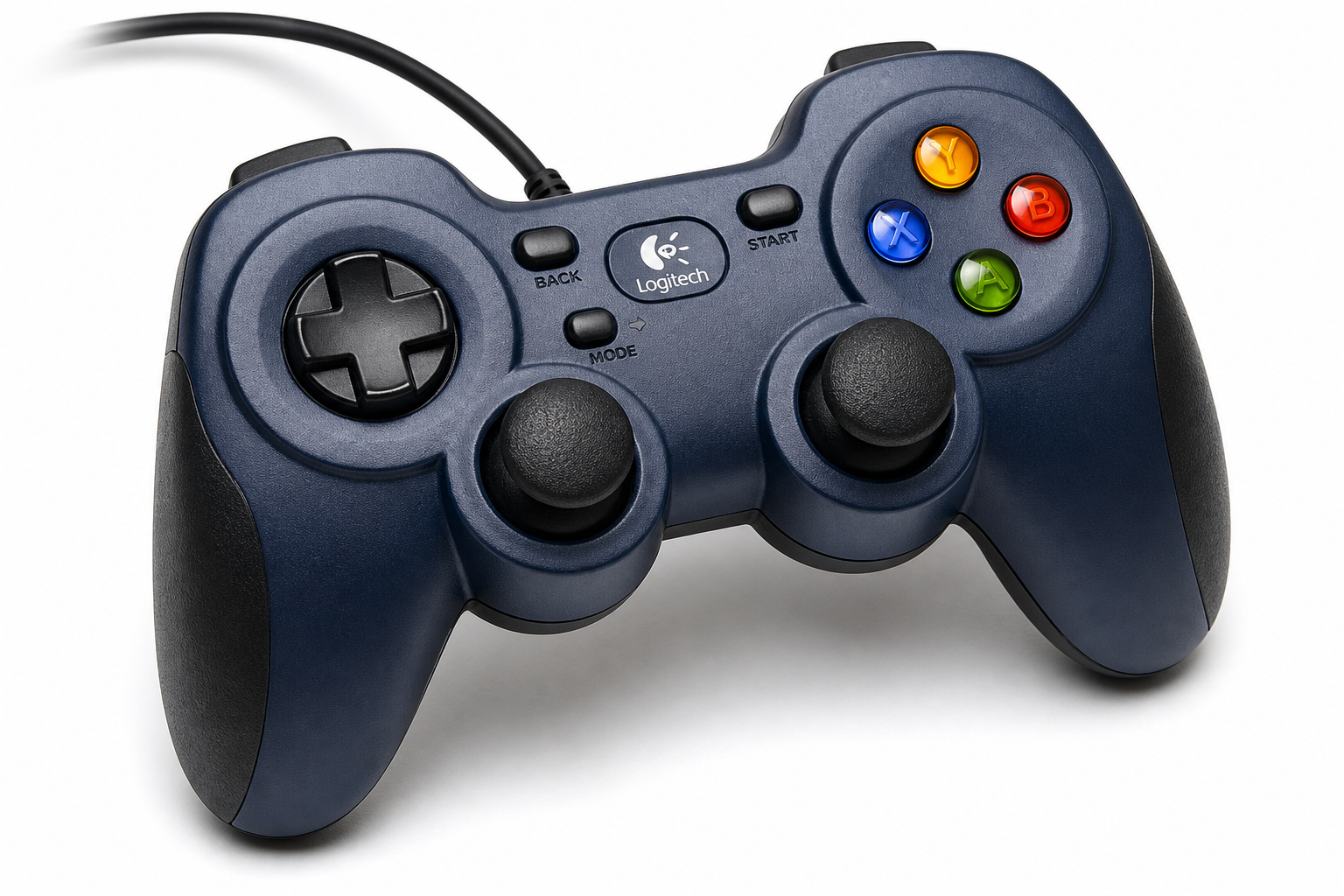
The Logitech G F310 Wired Gamepad Controller (Blue/Black) is one of the longest‑running budget controllers for PC gaming. It offers a familiar, console‑like layout with dual analog sticks, four face buttons, bumpers and triggers, and an exclusive 4‑switch D‑pad designed to feel more precise than the typical single‑pivot D‑pad.
This review focuses specifically on the Logitech G F310 sold at the following link: https://www.amazon.com/dp/B003VAHYQY. For readers who are price‑sensitive, the F310 is usually positioned as an entry‑level option, and on this product page it is typically available around $19.99, depending on retailer discounts and stock.
We will look at typical use cases, real‑world performance, strengths, and limitations so you can decide whether this wired controller still makes sense for your setup.
Typical Use Cases
Below are the most common ways buyers tend to use the Logitech G F310:
-
General PC Gaming (Steam, GOG, Epic, etc.)
The F310 targets PC gamers who prefer gamepad controls for action titles, platformers, sports games, and some shooters. Its XInput/DirectInput switch on the underside lets it behave like an Xbox‑style pad in many titles or fall back to older input standards for legacy games. -
Retro Emulation and 2D Games
Many users choose the F310 for emulators (NES, SNES, Genesis, PlayStation 1/2, arcade frontends) and 2D platformers. The 4‑switch D‑pad is a central selling point for directional input in these scenarios. -
Racing and Sports Games
With analog triggers and dual sticks, the F310 supports many racing and sports games that benefit from gradual acceleration and steering, albeit without advanced trigger technology or vibration. -
Living‑Room / Couch Gaming (Steam Big Picture)
The controller is commonly paired with Steam Big Picture mode and a living‑room PC, offering console‑style navigation and gameplay from the couch via a long USB cable. -
Android TV and Some Smart TV Setups
Logitech promotes compatibility with certain Android TV devices when the controller is in XInput (X) mode, enabling basic game navigation and control. -
Simple, Robust Controller for Labs, Classrooms, or Robotics
Thanks to its wired USB connection, moderate price, and wide support on Windows, the F310 is also used in educational labs, robotics competitions, and kiosk environments where wireless gear is less desirable.
Performance in Each Scenario
1. Modern PC Games (XInput Titles)
With the hardware switch set to XInput (X), Windows typically recognizes the F310 as an Xbox‑style controller. Most contemporary PC games with native controller support map its inputs automatically.
-
Button Mapping:
The standard ABXY layout, shoulder buttons, triggers, and sticks match the expectations of many PC titles. Little to no manual configuration is usually required. -
Responsiveness:
Being a wired USB controller, latency is low and consistent. There is no need to worry about wireless interference or battery life. -
Limitations:
The F310 lacks rumble/vibration feedback, which some players miss in action or racing games. The analog triggers are functional but not as refined or comfortable as those on more expensive, newer controllers.
2. Legacy PC Games and Emulators (DirectInput Titles)
Switching the underside toggle to DirectInput (D) allows the F310 to work with older games and some emulators that predate XInput.
-
Compatibility:
In this mode, the controller behaves similarly to older Logitech gamepads. In many cases, you will need to configure controls manually in each game or emulator. -
Software Customization:
Logitech’s configuration software (Logitech Gaming Software or its successor, depending on OS) can be used to remap buttons or even emulate keyboard/mouse input for titles that do not directly support gamepads. -
Use in Emulators:
For emulation frontends and retro platforms, the combination of a programmable layout and the 4‑switch D‑pad can be an advantage, particularly if you tailor the mapping to each system.
3. Retro and 2D Platformers
The D‑pad is a major point of interest for retro gamers.
-
4‑Switch Design:
Instead of resting on a single pivot, the D‑pad rides on four individual switches beneath the plastic rocker. This aims to provide more defined directional presses and reduce the “mushy” feel common on many older pads. -
Practical Use:
In 2D platformers and side‑scrollers, the D‑pad typically feels more precise than basic budget alternatives. However, individual perception varies: some players appreciate the firmness, while others find the travel and shape less comfortable for extended play, especially in complex fighting‑game inputs. -
For Fighting Games:
The F310’s D‑pad can be adequate for casual fighting‑game play, but opinions are mixed. Some users feel it sits in between older Xbox pads and modern premium controllers in terms of comfort and accuracy. If you are serious about competitive fighters, you may want to test it first or consider a pad specifically optimized for that genre.
4. Racing and Sports Games
-
Analog Sticks and Triggers:
The dual analog sticks provide smooth steering and camera control. The analog triggers allow variable input for acceleration and braking. They are fully functional but relatively basic in feel. -
Grip and Comfort:
The slightly contoured grips and moderate size work reasonably well for most hand sizes, though extended racing sessions may highlight the lack of rubberized grips and ergonomic sculpting found on modern premium controllers. -
No Force Feedback:
The absence of rumble means you will not get road texture vibrations, collisions, or impact feedback through the controller, which removes a layer of immersion in many racing and sports titles.
5. Living‑Room and TV Use (Steam Big Picture, Android TV)
-
Cable Length:
The roughly 1.8–2.0 m (about 6.5 ft) USB cable offers a decent reach from a PC or media box to a couch, though a USB extension may still be necessary in some living rooms. -
Steam Big Picture:
In XInput mode, Steam typically detects the F310 and maps it to standard navigation and gameplay controls. This allows you to browse your library, launch games, and play without using a mouse and keyboard. -
Android TV:
On supported Android TV devices, the F310 can be used for both system navigation and compatible games. The central Logitech button and back key are commonly mapped to TV navigation functions.
6. Educational, Lab, or Robotics Environments
-
Wired Reliability:
A wired connection makes the F310 a straightforward choice for shared systems, classroom PCs, robotics driver stations, and kiosks where wireless connection management and charging would be inconvenient. -
Standard Layout for Training:
The familiar console‑style layout shortens the learning curve for students or new operators.
Strengths Across Scenarios
-
Simple, Reliable Wired Connection
No batteries, no charging cycles, and no wireless dropouts. Plug‑and‑play behavior on Windows (especially in XInput mode) remains a core advantage. -
Dual Input Modes (XInput and DirectInput)
The physical switch on the underside adds flexibility, broadening game compatibility from modern titles to older DirectInput‑based games and certain emulators. -
Console‑Like Layout
Players familiar with Xbox‑style controllers will find the layout intuitive: offset sticks, ABXY face buttons, bumpers, triggers, and a central Logitech button. -
4‑Switch D‑Pad for Defined Directions
Compared to many budget controllers, the 4‑switch D‑pad offers more distinct directional presses and can be an upgrade if you are coming from a very soft or imprecise pad. -
Budget‑Friendly Positioning
Historically, the F310 is positioned at the entry‑level end of the market, and at around $19.99 on the referenced product page, it is often one of the cheapest recognizable‑brand controllers available. -
Broad PC and Some TV Compatibility
Official support for Windows PCs, plus compatibility with some Android TV devices and Chromebook setups, helps the F310 fit into varied environments.
Limitations Across Scenarios
-
No Rumble or Advanced Haptics
The F310 does not include vibration motors. If force feedback is important to you for immersion or gameplay cues, this is a significant omission. -
Aging Design and Materials
The core design dates back many years. While functional, it lacks many refinements of newer controllers—such as improved ergonomics, textured grips, or more premium plastics. -
Mixed Opinions on D‑Pad Comfort
The 4‑switch system improves definition, but the physical shape and feel of the D‑pad do not suit every player. Some find it excellent for retro games; others find it fatiguing or imprecise in demanding fighting‑game inputs. -
Limited Platform Compatibility
The F310 is optimised for PC. It does not natively support modern consoles like Xbox Series X|S, PlayStation 5, or Nintendo Switch without third‑party adapters, and even then support can vary. -
No Wireless Option
Being wired is an advantage for latency and simplicity, but it also means cable management and restricted movement compared with wireless pads. -
Software and Driver Caveats
While XInput mode is usually straightforward, DirectInput mode and advanced remapping rely on Logitech software that may require extra configuration. Users on non‑Windows platforms may need to rely on OS‑level tools or community workarounds. -
Competition from Newer Budget Controllers
Competing budget pads now offer features such as rumble, improved ergonomics, or even Hall‑effect sticks at similar price points. The F310’s main strengths are its established track record, brand recognition, and broad PC compatibility rather than cutting‑edge features.
Verdict
The Logitech G F310 Wired Gamepad Controller is a straightforward, no‑frills PC controller that has earned its place as a long‑time budget default. Its strengths are clear: a familiar console‑like layout, low‑latency wired connection, an input‑mode switch for broad compatibility, and a 4‑switch D‑pad that can outperform many generic alternatives.
At roughly $19.99 on the referenced Amazon product page, it remains attractive if you want a simple, reliable, brand‑name wired controller for PC gaming, retro emulation, or lab/educational use and do not care about rumble or cutting‑edge ergonomics.
However, its age shows. Players who value vibration feedback, more modern ergonomics, or specialized performance for fighting games or competitive play may find better options among newer controllers, sometimes at similar price levels.
Recommended if:
- You need an inexpensive, wired PC controller that “just works” in most modern games.
- You want a recognizable brand with long‑standing support and a standard layout.
- You prioritize low latency and compatibility over advanced features.
Think carefully if:
- Rumble, premium ergonomics, or competitive fighting‑game performance are high priorities.
- You primarily play on consoles rather than PC.
- You are willing to pay a bit more for modern features like better triggers, grip textures, or wireless connectivity.
For many everyday PC gaming and retro scenarios, the Logitech G F310 remains a practical and dependable choice, especially when you can find it near $19.99.