
GuliKit TT Pro Wireless Controller Review: PlayStation-Style Precision for Switch, PC, and Mobile
The GuliKit TT Pro Wireless Controller targets players who want a PlayStation-style layout with premium sticks, low-latency wireless, and competitive features on Nintendo Switch (including Switch 2), PC, Android, and iOS. With 720° adjustable tension magnetic TMR joysticks, four detachable metal back buttons, smart triggers, and cross‑platform support, it aims to be a single, versatile gamepad for both casual and competitive play. This review looks at its design, performance, strengths, and limitations, and which types of gamers will benefit most from it.
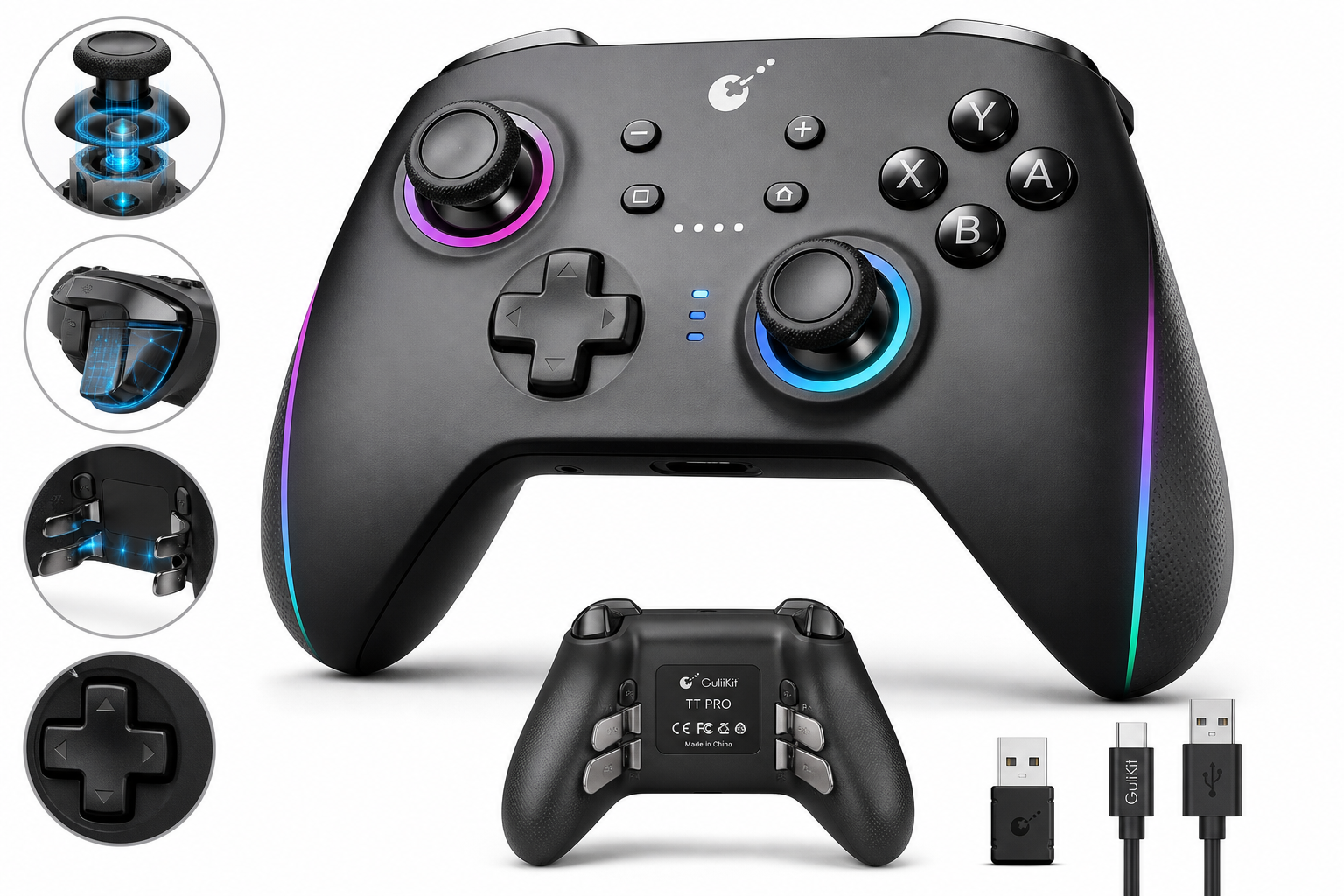
What This Product Is
The GuliKit TT Pro Wireless Controller (GB) is a multi-platform gamepad designed for:
- Nintendo Switch & Switch 2 (with auto wake‑up support)
- Windows PC
- Android and iOS devices
It uses GuliKit’s latest magnetic TMR (Tunnel Magnetoresistance) joystick sensors and a 720° adjustable-tension mechanism, allowing you to tune stick resistance for different genres. Compared with the company’s earlier KK3 or Zen series, the TT line adopts a symmetrical, PlayStation-style stick layout and integrates GuliKit’s Hyperlink 2 ultra‑low‑latency wireless system to reduce input lag.
This specific TT Pro variant typically ships with:
- Dual magnetic TMR joysticks with adjustable tension
- Classic floating D‑pad
- Hall‑effect style smart triggers
- Four detachable metal back buttons (rear paddles)
- Built‑in 950 mAh battery
- USB‑C port for wired play and charging
On Amazon, the TT Pro Wireless Controller (GB) is generally positioned as a mid‑to‑upper‑tier controller in its category, often listed around $59.99, making it a competitor to higher‑end third‑party Switch and PC controllers.
Why It Matters
Controller drift and inconsistent inputs are two of the biggest frustrations on modern consoles. GuliKit became popular by focusing on drift‑resistant magnetic joystick technology, and the TT Pro is their attempt to bring that reputation into a more esports‑style package:
- Magnetic TMR joysticks are designed to be more durable than traditional potentiometer sticks, significantly reducing the risk of drift over time.
- Low‑latency wireless (Hyperlink 2) aims to keep response times competitive with wired play, which matters for shooters, fighting games, and rhythm titles.
- The PlayStation‑like layout plus rear paddles makes it appealing to players who want a familiar feel across PC, Switch, and mobile without constantly relearning muscle memory.
If you’re tired of replacing drift‑prone controllers, or you want one pad that can move between Switch, Steam, and your phone, the TT Pro is GuliKit’s answer.
Key Advantages
1. Magnetic TMR Joysticks with Adjustable Tension
The headline feature is the anti‑drift TMR joystick system combined with a 720° adjustable tension mechanism:
- TMR sensors read stick position magnetically rather than via physical contact, greatly reducing wear.
- Adjustable tension lets you dial in a looser feel for platformers or a stiffer response for precise aiming in shooters.
- A built‑in smooth joystick stand and guided mechanism make the motion feel consistent rather than scratchy or notchy.
For players who notice every micro‑adjustment in an FPS or MOBA, this level of customization is a meaningful upgrade over fixed‑tension sticks.
2. Low‑Latency Wireless Across Platforms
The TT series integrates Hyperlink 2, GuliKit’s proprietary low‑latency wireless tech, alongside standard Bluetooth modes:
- Wireless latency can drop to a few milliseconds in ideal conditions, making it suitable for competitive play.
- It supports Switch / Switch 2 wake‑up, so you can power on the console directly from the controller.
- The same controller can be quickly paired with PC, Android, and iOS, reducing the need to own multiple pads.
If you bounce between docked Switch, Steam on PC, and mobile cloud gaming, having a single, consistent controller is a productivity and comfort win.
3. Competitive Features: Rear Paddles and Smart Triggers
The TT Pro is clearly built with modern competitive expectations in mind:
- Four detachable metal back buttons (paddles) can be mapped to face or shoulder buttons, allowing you to jump, crouch, or reload without lifting your thumbs off the sticks.
- Gen 2 "Smart" triggers provide responsive analog input and can feel snappier than older designs, improving control in racing and shooters.
- The classic floating D‑pad is tuned for fighting games and 2D platformers, with clear directional separation that helps avoid accidental diagonals.
For players who considered an “elite” controller but want GuliKit’s joystick tech instead, this is a compelling combination.
4. Strong Platform and Firmware Support
GuliKit has been actively updating firmware for the TT PRO line, addressing bugs and refining behavior across platforms. The controller:
- Has dedicated modes for Switch, XInput (PC), Android, and iOS.
- Can receive firmware updates via USB or GuliKit’s app, allowing fixes and feature tweaks after purchase.
While firmware updates occasionally introduce new issues before being patched, the upside is that the controller is not static; its performance and compatibility can improve over time.
5. Solid Battery and Build
With a 950 mAh internal battery, the TT Pro is designed to last through long sessions without frequent recharging. The overall build:
- Feels denser and more premium than many budget controllers.
- Uses detachable metal paddles rather than fragile plastic.
- Retains a conventional, ergonomic grip shape that should feel natural to most players familiar with PlayStation‑style controllers.
Key Limitations
1. Firmware Quirks and Learning Curve
The same active firmware development that keeps the TT Pro up to date can also create friction:
- Some users report temporary bugs after certain firmware updates (for example, button mapping glitches or pairing irregularities that then require a rollback or a later hotfix).
- Advanced features—such as mode switching, macro programming, or tension/behavior tweaks—are controlled through button combinations and sometimes the companion app, which can be unintuitive at first.
If you want a controller that “just works” out of the box with zero tinkering, this complexity may feel like a downside.
2. Not the Best Choice for Xbox‑Native Consoles
While the TT Pro works well as an XInput controller on PC, it is not an officially licensed Xbox pad and does not connect natively to Xbox consoles:
- Xbox Series and Xbox One users will generally need a separate solution; this is not a direct replacement for an Xbox controller on those systems.
- Some PC users may see slightly different behavior depending on how Steam or other launchers identify the pad.
If your primary platform is an Xbox console, a native Microsoft controller (or officially licensed equivalent) is still the simpler route.
3. Feature Differences vs. TT Max
Within GuliKit’s own lineup, there are some distinctions between TT Pro and TT Max:
- TT Max often includes extra stick caps and some additional firmware‑level features (such as more advanced ABXY layout switching or gyro‑to‑joystick behavior), depending on region and firmware.
- If you want the absolute top‑spec TT experience, you may find the Pro slightly more constrained than the Max in certain niche use cases.
For most users this won’t be a deal‑breaker, but enthusiasts comparing every spec will want to understand those differences before choosing.
4. Limited On‑Device Customization UI
Although rear paddles and other features are configurable, most adjustments are done via button shortcuts and LED indicators, not an on‑device display or robust PC software suite. Compared with high‑end controllers that offer deep desktop configurators:
- Fine‑tuning can feel opaque.
- Re‑creating a complex configuration after a reset may require revisiting the manual.
If you like visually managing profiles from a full PC application, the TT Pro’s approach can seem basic.
Who It’s For
You’ll get the most value from the GuliKit TT Pro Wireless Controller if you are:
- A multi‑platform gamer who plays across Switch / Switch 2, PC, and mobile and wants a single controller that travels smoothly between them.
- A player worried about stick drift, especially if you’ve already replaced one or more Joy‑Cons or third‑party pads due to failing analog sticks.
- A competitive or enthusiast gamer who wants:
- PlayStation‑style stick layout
- Rear paddles for advanced control schemes
- Precise, tension‑tunable joysticks
- Low‑latency wireless for shooters and fighters
- Someone willing to tweak settings, update firmware, and learn basic button combos to unlock all the controller’s capabilities.
If that sounds like your use case, the TT Pro presents a strong balance of advanced features and long‑term durability.
Who Should Skip It
You may want to look elsewhere if you are:
- Primarily an Xbox console gamer looking for a native replacement pad.
- Uninterested in tinkering, firmware updates, or manual‑driven button combos; you just want something extremely simple and plug‑and‑play.
- On a tight budget and only need a basic PC or Android controller—many simpler pads are cheaper than the TT Pro’s typical $59.99 price point.
- Expecting deep desktop software customization: if you rely on graphical remapping tools, detailed trigger curves, or per‑game profiles with a full UI, the TT Pro’s approach may feel limited.
In those scenarios, either a more basic budget pad or a premium controller with a mature desktop software suite may better fit your needs.
Final Recommendation
The GuliKit TT Pro Wireless Controller (GB) is a thoughtfully engineered pad that combines drift‑resistant magnetic TMR sticks, adjustable tension, rear paddles, and low‑latency wireless in a PlayStation‑style form factor that works across Switch, Switch 2, PC, Android, and iOS.
Its strengths lie in precision, durability, and cross‑platform versatility, making it especially compelling for players who game on multiple systems and are tired of analog stick failures. The main trade‑offs are a more involved setup and learning curve, occasional firmware quirks, and the fact that it isn’t designed as a first‑class Xbox console controller.
If you’re an enthusiast or competitive player who values input quality and platform flexibility—and you’re comfortable updating firmware and learning a few shortcuts—the TT Pro is a strong recommendation in its segment. For plug‑and‑play users on a single platform, especially Xbox, simpler or platform‑native alternatives may be a better fit.