
GameSir G7 Pro Controller Review: A Versatile Pro-Style Gamepad for Xbox, PC, and Android
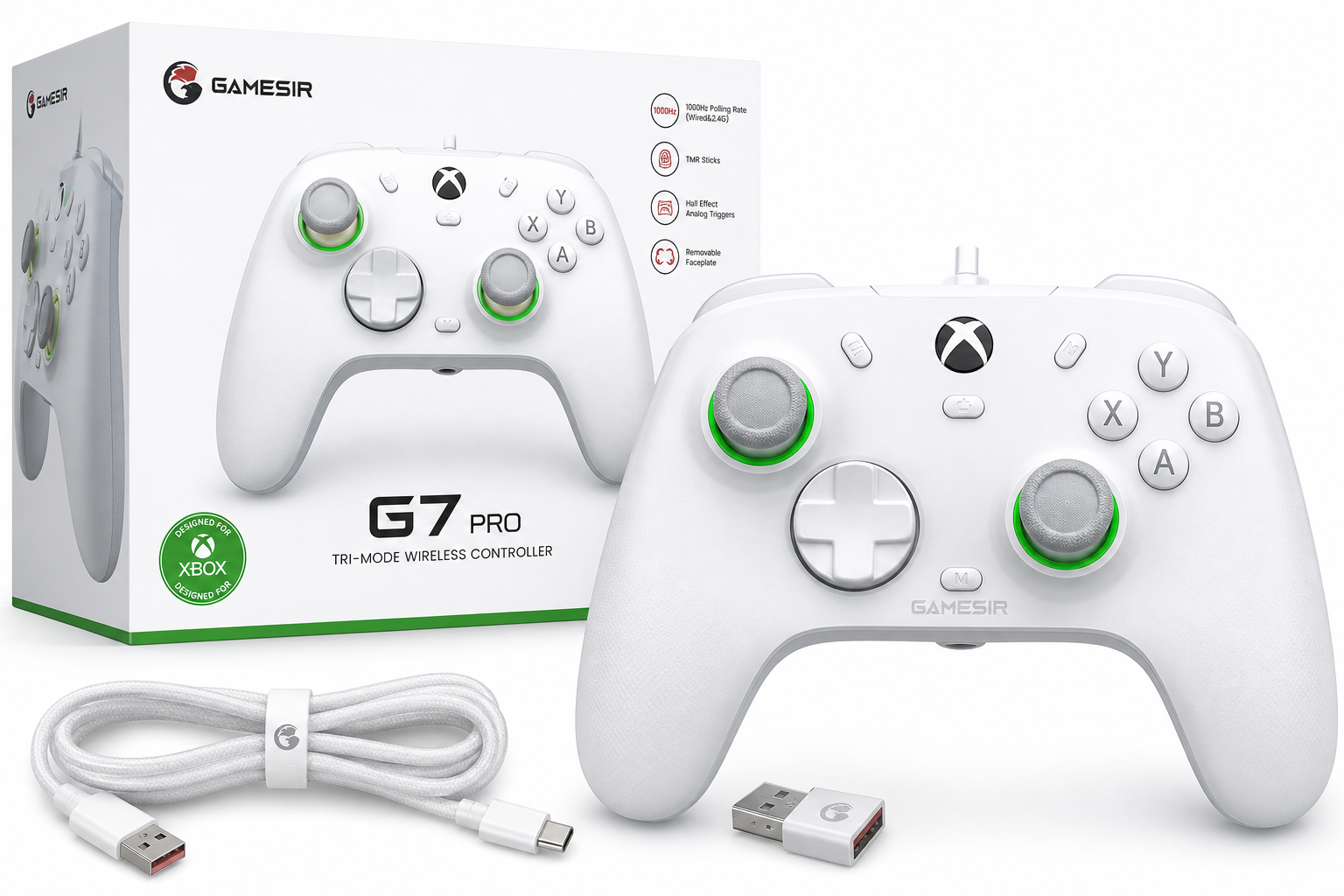
The GameSir G7 Pro is a feature-rich controller designed for Xbox Series X|S, Xbox One, Windows PC, and Android. With TMR magnetic-resistance sticks, Hall effect analog triggers, a 1000Hz polling rate on PC, and tri-mode connectivity (wired for Xbox, 2.4GHz wireless and wired for PC, Bluetooth for Android), it targets players who want more precision and customization than a standard first-party pad. This review looks at its build quality, ergonomics, performance, software, and everyday user experience to help you decide if it’s the right upgrade for your gaming setup.
Introduction
The GameSir G7 Pro Wired Controller for Xbox Series X|S, Xbox One, PC & Android is positioned as a step up from the standard Xbox Wireless Controller, offering enthusiast features like TMR sticks, Hall effect analog triggers, and a 1000Hz polling rate on PC, along with tri-mode connectivity for cross‑platform play. Sold around $79.99 on Amazon, it aims to deliver pro‑grade precision without the premium price tag of many tournament‑focused gamepads.
This review focuses on the white G7 Pro model referenced in the product listing, which is officially licensed for Xbox and supports wired play on Xbox consoles plus wireless options on PC and Android.
Product overview and key features
At a glance, the GameSir G7 Pro looks familiar to Xbox players but layers in extra controls and modern sensor tech.
Design and build quality
- Xbox-style layout: Asymmetrical thumbsticks, menu/view/share buttons, and the central Xbox guide button will be instantly recognizable to anyone used to Microsoft’s pads.
- Textured grips and shell: The controller uses a slightly textured plastic shell to improve grip during long sessions without feeling overly rough.
- Weight and balance: It feels comparable to a stock Xbox controller, with a slightly denser feel due to the internal battery and additional features, but still suitable for long play.
- Removable faceplate (on some variants): Many G7 Pro units feature a removable or paint‑friendly faceplate, letting users customize the look without disassembling the controller. Even when you ignore that, the overall fit and finish is solid for the price bracket.
Connectivity and platform support
The G7 Pro is marketed as a tri‑mode controller:
-
Xbox Series X|S and Xbox One
- Primary connection: wired via USB‑C to USB‑A cable.
- This wired-only approach on Xbox ensures low latency and compatibility with the console’s ecosystem (including the Xbox guide button and system-level audio controls through the headset jack).
-
Windows PC
- 2.4GHz wireless via the included USB dongle.
- Wired USB‑C connection as an alternative for maximum responsiveness.
- Compatible with GameSir’s configuration software for remapping and tuning.
-
Android
- Bluetooth connectivity for mobile gaming and cloud streaming.
A physical mode switch on the back allows you to toggle between Xbox (wired), 2.4GHz, and Bluetooth modes, making it quick to move between PC, console, and phone.
TMR sticks and Hall effect triggers
One of the core selling points is its sensor technology:
-
TMR (Tunnel Magneto‑Resistance) sticks
- These are magnetic‑sensing sticks designed to reduce wear and minimize stick drift compared to traditional potentiometer sticks.
- They typically provide smoother, more consistent input over time and better long‑term durability.
-
Hall effect analog triggers
- The triggers use magnetic Hall sensors instead of mechanical potentiometers.
- This helps avoid trigger dead‑zones as the controller ages and offers smoother analog input, which benefits racing games, shooters, and any title that relies on nuanced trigger control.
1000Hz polling rate on PC
- Over both wired and 2.4GHz wireless connections to PC, the G7 Pro supports up to a 1000Hz polling rate, significantly higher than the standard 125–250Hz of many mainstream controllers.
- This higher polling rate reduces input latency and is particularly attractive to competitive or FPS players who want snappier response.
Extra buttons and customization
The G7 Pro offers several additional controls beyond a stock Xbox controller:
- Rear paddles (R4/L4) that can be mapped to frequently used inputs like jump, crouch, or reload, letting you keep your thumbs on the sticks.
- Mini shoulder buttons (R5/L5) on some variants, adding even more remappable inputs.
- Lock switches for rear paddles to disable them quickly and avoid accidental presses.
- 3.5mm audio jack that works over wired and 2.4GHz (on supported platforms), allowing direct headset connection.
- Dedicated mic mute button near the audio jack for quick access.
Software support (PC)
Using GameSir’s configuration software (often GameSir Nexus on PC), you can typically:
- Remap buttons and rear paddles.
- Adjust thumbstick response curves and dead zones.
- Configure trigger sensitivity or enable hair‑trigger mode.
- Tweak vibration intensity and, on supported models, gyroscope settings for motion aiming in PC games.
This level of software control allows the G7 Pro to behave more like a high‑end esports controller than a budget third‑party pad.
Performance and user experience
Latency and responsiveness
In practice, the G7 Pro feels very responsive in fast‑paced shooters and action games, especially on PC where the 1000Hz polling rate shines.
- Wired on Xbox
- Latency is effectively a non‑issue. Inputs feel immediate and stable, suitable for competitive FPS play.
- 2.4GHz wireless on PC
- Performance remains excellent, with responsiveness close to wired and no noticeable input delay in typical home setups.
- Bluetooth on Android
- As with any Bluetooth controller, performance depends on the phone and wireless environment, but for cloud streaming and casual mobile play it’s more than adequate.
Comfort and ergonomics
The G7 Pro’s shape closely follows the standard Xbox controller, which is generally well‑regarded for ergonomics:
- The handles fill the palm comfortably for medium and large hands, and smaller hands should still find it manageable.
- Textured grips reduce slipping during long sessions.
- The buttons and sticks are laid out identically to an Xbox pad, requiring no adjustment period for most players.
Some users may find the D‑pad design (often a circular or hybrid pad with mechanical switches) slightly more sensitive than Microsoft’s cross‑style D‑pad, making it easier to accidentally trigger diagonal inputs in certain genres. For fighters and platformers, it’s worth testing and, if necessary, adjusting your input style or remapping.
Sticks, triggers, and face buttons
-
Sticks
- The TMR sticks feel smooth and precise, with even resistance throughout the range of motion.
- Fine adjustments in shooters and camera control in third‑person games are easy to dial in, especially once you tune dead zones and curves via software.
-
Triggers
- Hall effect triggers offer a consistent, smooth pull with accurate analog response.
- Hair‑trigger modes (enabled via button combinations) can shorten travel for competitive shooters, allowing faster firing.
-
Face buttons (ABXY)
- Use micro‑switch mechanisms on many models, giving a crisp, mouse‑like click.
- Actuation is light and fast, which benefits combo‑heavy games and quick taps.
Extra controls and audio
- Rear paddles are responsive and easy to reach, though there is a short adjustment period to avoid accidental presses. The physical lock switches are helpful when you hand the controller to someone unfamiliar.
- 3.5mm audio jack works well for connecting a wired headset directly to the controller, which is convenient on Xbox and PC.
- The mic mute button is a small but welcome quality‑of‑life feature for voice chat.
Software tuning (PC focus)
On PC, the G7 Pro comes into its own thanks to the configuration software:
- You can create and save multiple profiles for different games (for example, one with aggressive stick curves and low dead zones for shooters, and another with smoother curves for driving games).
- Trigger settings and hair‑trigger options allow you to customize how quickly weapons fire or cars accelerate.
- Users who enjoy fine‑tuning will appreciate how much control they get compared to a typical plug‑and‑play controller.
Reliability and drift resistance
Because the G7 Pro uses TMR sticks and Hall effect triggers, it is better equipped to resist common issues like stick drift and trigger dead zones than controllers relying on traditional potentiometers. While no consumer controller is completely immune to wear or physical damage, these technologies are a clear advantage for long‑term reliability, especially if you game heavily.
Pros and cons
Pros
- Tri‑mode connectivity: Wired for Xbox, 2.4GHz wireless and wired for PC, Bluetooth for Android.
- TMR magnetic sticks that help reduce drift and maintain long‑term precision.
- Hall effect analog triggers for smooth, accurate pull and better durability.
- Up to 1000Hz polling rate on PC, offering lower input latency for competitive play.
- Extra controls including rear paddles and additional shoulder buttons (R4/L4, R5/L5) on supported variants.
- 3.5mm audio jack with mic mute button, convenient for chat and headsets.
- Extensive software customization on PC (button mapping, stick and trigger tuning, profiles).
- Comfortable, Xbox‑style ergonomics that feel familiar to most players.
- Generally good value for its feature set at around $79.99.
Cons
- Wired‑only on Xbox: No native wireless console connection on this standard white model; you must use a cable for Series X|S and Xbox One.
- Learning curve for extra buttons: Rear paddles can be accidentally pressed until you adapt or lock them.
- D‑pad sensitivity may not suit everyone, particularly for precise 2D platformers or some fighting games.
- Software is PC‑centric: Advanced tuning options don’t apply directly to console use.
- As a third‑party controller, firmware and long‑term support are not as guaranteed as first‑party Microsoft hardware.
Conclusion and recommendation
The GameSir G7 Pro is a well‑rounded controller that successfully blends pro‑grade features with everyday usability. Its combination of TMR sticks, Hall effect triggers, tri‑mode connectivity, and 1000Hz polling on PC makes it especially appealing to players who split their time between Xbox, PC, and Android and want more than a basic gamepad without spending flagship‑tier money.
For competitive PC players, the fast polling rate, magnetic sensors, and extensive software tuning are the main reasons to choose the G7 Pro over a standard Xbox controller. For Xbox‑focused players, the requirement to use a wired connection is the main trade‑off; if you are comfortable with a cable and want a more customizable pad, it’s a strong option. For Android gamers and cloud streaming users, the Bluetooth mode and familiar Xbox layout make it easy to integrate into a mobile setup.
If you’re looking for a single controller that can handle Xbox Series X|S, Xbox One, PC, and Android with advanced hardware features, extra buttons, and solid build quality, the GameSir G7 Pro at around $79.99 is an excellent value‑oriented choice. It isn’t perfect—particularly on the console wireless front—but for many players it strikes an impressive balance between performance, versatility, and price.