
abxylute C6 Wireless PC Controller Review: Lightweight, Low-Latency Versatility for Multi-Platform Gaming
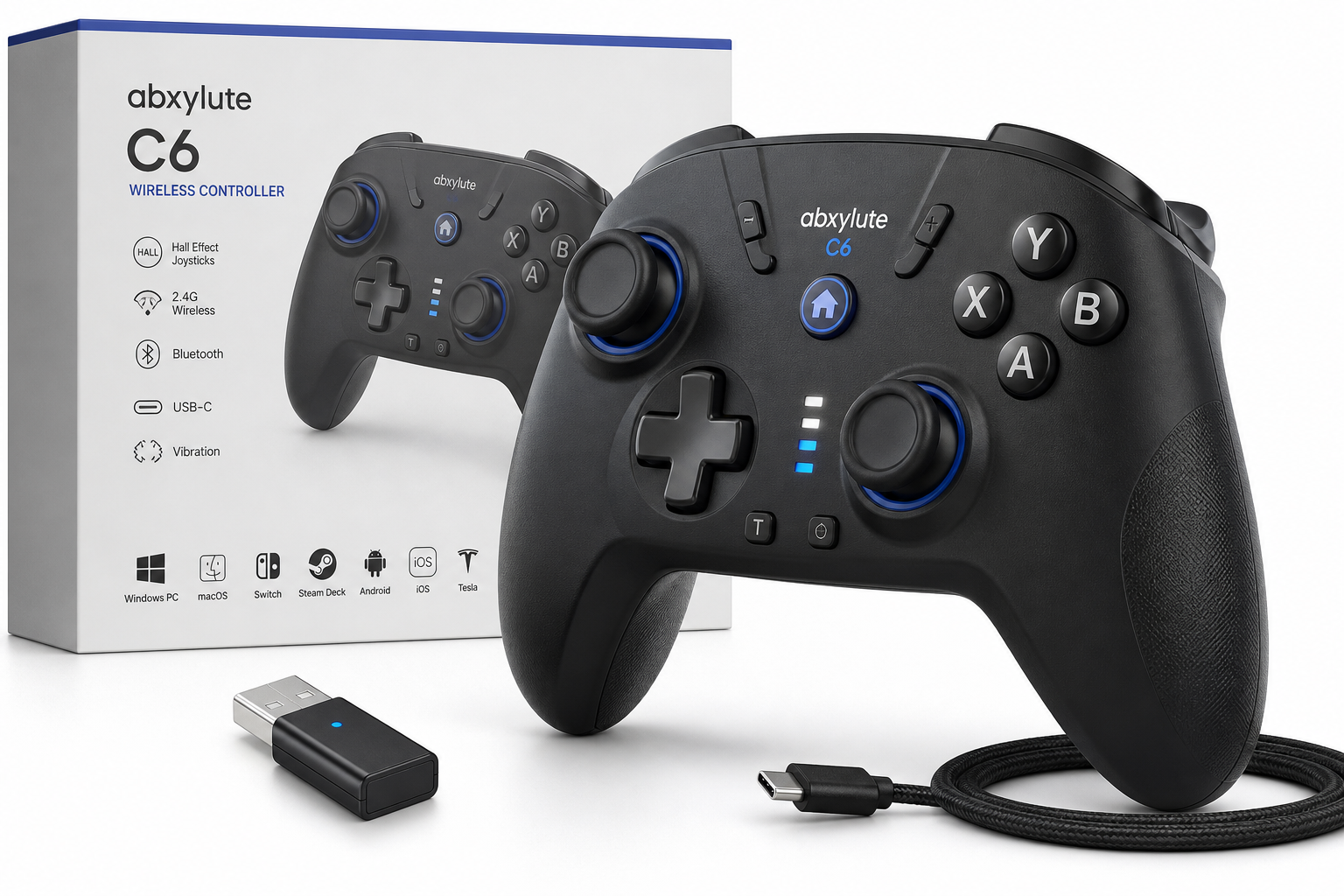
The abxylute C6 Wireless PC Controller is a multi-platform gamepad aimed at players who want a lightweight, low-latency controller with Hall effect joysticks and broad device compatibility. Supporting Windows PCs, macOS, Nintendo Switch, Steam Deck, Android, iOS, and even Tesla cars, it combines a 2.4 GHz dongle, Bluetooth, and wired modes with a claimed 1000 Hz polling rate on supported platforms. This review looks at its design, performance, cross‑platform behavior, strengths, and trade-offs to help you decide if it fits your gaming setup.
Introduction
The abxylute C6 Wireless PC Controller targets a specific kind of player: someone who regularly hops between a Windows PC, Nintendo Switch, Steam Deck, mobile devices, and possibly even a Tesla, but doesn’t want to manage a different controller for every system. On paper, the C6 promises a lot for around $27.99: a 1000 Hz polling rate, Hall effect joysticks to avoid stick drift, multiple wireless modes, and vibration and turbo support in a relatively lightweight body.
In this review, we’ll break down how the C6 performs across platforms, what it’s like to use for extended sessions, and where it stands out—or falls short—against more established brands.
Key Points
- Multi-platform support: Windows PC, macOS, Nintendo Switch, Steam Deck, Android TV/phones, iOS, and Tesla (via Bluetooth or dongle modes).
- Multiple connection modes:
- 2.4 GHz dongle (PC, Steam Deck, some Android TV boxes).
- Bluetooth (Switch, mobile, Tesla, others).
- Wired USB-C for compatible hosts.
- Hall effect joysticks to minimize stick drift and maintain smooth analog input over time.
- Up to 1000 Hz polling rate in PC XInput/dongle mode, targeting very low input latency.
- Standard console-style layout with dual analog sticks, D-pad, face buttons, triggers, bumpers, and function keys.
- Vibration and turbo for supported systems.
- Lightweight design, easing fatigue in long sessions but with a slightly less premium feel than heavier, metal-heavy controllers.
Experience
Setup and Connectivity
Out of the box, the abxylute C6 behaves like a typical multi-mode modern controller. The included manual explains that you choose different controller modes depending on your target device:
- Windows PC / macOS: Dongle mode or XInput mode.
- Nintendo Switch: NS mode.
- Android devices: HID mode.
- iOS devices: XInput mode over Bluetooth.
- Steam Deck: Dongle mode.
Switching modes is done via button combinations and/or long-pressing the Home and other function keys until the indicator LEDs show the correct profile. It’s not difficult once memorized, but you will likely reference the manual during the first few days. When connected via the 2.4 GHz dongle in XInput mode, Windows recognizes the C6 as a standard Xbox-style gamepad, which gives you instant compatibility with Steam, Game Pass, and most PC titles.
On Nintendo Switch, the controller presents itself as a Switch Pro‑style pad in NS mode, supporting standard button mapping, motion-free operation, and vibration within game support. For Android TV and Android phones, the C6 can connect either through the USB dongle (if you have a free USB-A port) or via Bluetooth HID mode. The experience on modern Android devices is generally plug‑and‑play in titles with built-in controller support.
iOS requires Bluetooth as well, using XInput-style mapping; cloud gaming apps and many controller‑aware games recognize it with little trouble. For Tesla, the C6 works as a standard Bluetooth controller: you pair it via the car’s Bluetooth settings and use it in supported in‑car titles.
Build Quality and Ergonomics
The C6 feels lightweight in the hand, which has two effects. On the positive side, long sessions are easier on the wrists, and players who prefer lighter controllers will appreciate that it doesn’t feel top‑heavy. On the other hand, the absence of heft can translate into a less "premium" impression compared to some flagship controllers with more dense materials.
The shell uses matte plastic with a fairly standard Xbox‑inspired contour. Grips are comfortable for medium and large hands, and the balance of the controller doesn’t fight you during quick camera movements or long driving sessions. The buttons and triggers generally have a crisp tactile response, avoiding the mushiness common to many low‑cost third‑party pads.
Hall Effect Joysticks and Triggers
One of the main selling points of the abxylute C6 is its Hall effect joystick design. Instead of using physical potentiometers that can wear out and develop dead zones or stick drift, Hall sensors detect the position of the magnetized joystick shafts electronically. In practice, that means:
- More consistent analog readings over time.
- Far lower risk of drift developing with heavy use.
- Smooth, linear input feel in shooters and racing games.
The sticks on the C6 are smooth to rotate with consistent resistance, suitable for both precise aim adjustments in FPS titles and broad sweeps in racing or action games. For players upgrading from older controllers suffering from drift, this alone can be a strong reason to consider the C6.
Polling Rate and Latency
In its PC XInput/dongle configuration, the abxylute C6 advertises a 1000 Hz polling rate (1 ms theoretical report interval). In fast-paced games—competitive shooters or fighting games—the controller feels responsive and snappy, with little perceptible input delay when used over the 2.4 GHz dongle.
Bluetooth modes naturally introduce a bit more latency compared to the dongle, but performance is still acceptable for most genres, especially on mobile devices and Switch titles that are not tuned for esports-level responsiveness. For players sensitive to delay, the dongle remains the recommended connection method for PC and Steam Deck.
Platform-Specific Behavior
- Windows PC / Steam: Recognized as an Xbox‑style gamepad in XInput mode; button prompts and vibration support work in most modern titles. The 1000 Hz polling and Hall effect sticks make it feel significantly better than many budget controllers.
- Steam Deck: Using the dongle, the C6 integrates nicely with SteamOS, and you can customize layouts through Steam’s controller configuration. It behaves similarly to a standard XInput controller.
- Nintendo Switch: Operates in NS mode with typical Switch mappings. Motion controls are not a focus; if you depend on gyro aiming, that may be a limitation.
- Android / iOS: Gamepad-aware titles (emulators, streaming clients, cloud gaming apps, and many premium games) recognize the controller without major issues, though some games that only expect on‑screen touch controls will require remapping tools.
- Tesla: Works as a Bluetooth controller for Tesla’s built-in game library. It’s convenient if you want a dedicated pad that lives in the car and can also follow you inside to work with a laptop or tablet.
Vibration, Turbo, and Extra Features
The C6 includes vibration motors that provide basic rumble feedback. It doesn’t attempt to match the nuanced HD Rumble of first‑party controllers, but the feedback is strong enough to make racing, platforming, and action titles more immersive.
A turbo function allows you to assign rapid‑fire behavior to specific buttons using on‑controller shortcuts. This is useful for shoot ’em ups and games that rely on frequent button taps. The feature is implemented at the controller level, so it works across platforms that simply see the C6 as a standard pad.
Battery life is competitive for a lightweight wireless controller, though your actual run time will depend on whether you use the dongle or Bluetooth and whether vibration is enabled. Charging is done via USB‑C.
Pros
- Excellent compatibility across Windows, macOS, Switch, Steam Deck, Android, iOS, and Tesla.
- Hall effect joysticks reduce the risk of stick drift and maintain smooth, accurate input.
- Low-latency 2.4 GHz dongle with up to 1000 Hz polling rate, especially beneficial on PC.
- Lightweight and comfortable for long sessions.
- Clear XInput/Switch/HID mode support, with distinct modes for each major platform.
- Vibration and turbo functions for more immersive and flexible gameplay.
- USB‑C charging and modern connectivity options.
- Generally strong value for the feature set at around $27.99.
Cons
- Lightweight shell may feel less premium and less solid than heavier, brand-name controllers.
- No strong focus on gyro/motion controls, which some Switch and PC players might miss.
- Mode switching relies on LED patterns and button combos that require some memorization, especially if you frequently move between platforms.
- As a third‑party controller, firmware and long-term software support depend on abxylute’s ecosystem rather than platform holders.
Verdict
The abxylute C6 Wireless PC Controller is an impressive multi-platform gamepad that punches above its weight in both features and flexibility. With Hall effect joysticks, a 1000 Hz polling rate in PC dongle mode, and support for virtually every major gaming platform—including Windows PCs, Steam Deck, Switch, Android, iOS, and Tesla—it offers a compelling combination of performance and convenience.
If you want a single controller that can follow you from your desk to your couch, your TV, your phone, and even your car, the C6 is a strong contender. Its build is more about practicality and low weight than premium materials, and it doesn’t chase advanced gyro features, but for the price bracket represented by $27.99, it delivers a robust, low‑latency experience that will satisfy most casual and mid‑core gamers, and even some competitive players when used in its fastest PC mode.
For players who prioritize cross‑platform support, anti-drift sticks, and low latency without paying flagship prices, the abxylute C6 is easy to recommend.